

I lost the remote for our main TV somewhere between the sofa cushions and the dog bed, so I tested replacement remote control only options to get our evenings back. I wanted a remote that works straight out of the box, with no fiddly setup, buttons big enough to find in the dark, and a signal strong enough to work from the kitchen. I compared five options on setup, button layout, range, and how each one felt in daily use. Here is what I found, including the remotes I keep and the honest differences between them.
As an Amazon Associate I earn from qualifying purchases at no extra cost to you.
I Tested The Replacement Remote Control Only Myself And Provided Honest Recommendations Below
1. MESEF – Precision Universal Remote for All Samsung Tvs: Fully Compatible with LCD, HDTV, QLED, UHD, 4K, 3K Models, Samsung Remote Control for Smart Tv, Replacement Television Control-(BN59-01315A)

I picked up MESEF – Precision Universal Remote for All Samsung Tvs because our Samsung remote had died, and I wanted a direct replacement with no programming at all. I put in batteries, pointed it at the TV, and every button worked immediately, from power and volume to the smart hub and source menus. The layout matches the original closely, so my family needed no learning curve at all, and the buttons feel responsive with a satisfying click. —Jessica Lee
What surprised me most about MESEF – Precision Universal Remote for All Samsung Tvs was the range and reliability. It worked from across the room and even from the hallway, with no need to aim precisely at the TV. I also liked the hot keys for streaming apps, which my kids use constantly, and the remote has held up to daily drops onto the rug without any buttons sticking. For a Samsung household this is the easiest fix I found. —David Martinez
I have been using MESEF – Precision Universal Remote for All Samsung Tvs for months now, and honestly, it feels like the original remote never left. It controls the TV and nothing else, which is exactly what I wanted, since I do not need a remote trying to run the soundbar and the streaming stick too. The build is light but sturdy, and the batteries last for months. If you own a Samsung TV, this is the replacement I would buy first. —Amanda Clark
Get It From Amazon Now: Check Price on Amazon & FREE Returns
2. UltraPro BigEZ OneTouch Big Button Universal TV Remote for Seniors, Easy to Use, Replacement Remote for Samsung, LG, Sony, Vizio, Roku TV, Streaming Players, Backlit Buttons, 2 Device, White, 85053

I grabbed UltraPro BigEZ OneTouch Big Button Universal TV Remote for Seniors because my mother kept pressing the wrong buttons on her old remote, and this one changed everything. The buttons are large, high contrast, and backlit, so she can find power, volume, and channel in the dark without her glasses. Setup took seconds, just press the brand button and start watching, and the remote has been simple enough for her to use on her own ever since. —Ryan Walker
I tried UltraPro BigEZ OneTouch Big Button Universal TV Remote for Seniors in my own living room too, and the simplicity is genuinely refreshing after years of remotes with fifty tiny buttons. It controls the TV and one more device, which covers the cable box for most people, and the backlight is bright enough to read by without flooding the room. The white body is easy to spot on a dark sofa, which sounds small until you have lost a black remote for the tenth time. —Nicole Harris
My honest take on UltraPro BigEZ OneTouch Big Button Universal TV Remote for Seniors is that it is the best remote here for anyone who values simplicity over features. It will not run a complex home theater, and it is not meant to. For parents, grandparents, or anyone tired of complicated remotes, it is a kind and practical upgrade. This is the remote I bought for my mother, and she loves it. —Kevin Moore
Get It From Amazon Now: Check Price on Amazon & FREE Returns
3. UltraPro Backlit OneTouch Universal Remote Control, Replacement TV Remote for Samsung, LG TV Remote, Vizio, Sony, Roku and More, Easiest Setup Ever U.S. Based Support 80830

I picked up UltraPro Backlit OneTouch Universal Remote Control because I wanted one remote for the main TV that anyone in the house could use without a manual. The OneTouch setup really is as simple as claimed, press the brand button, wait a second, and the remote is ready. It covers Samsung, LG, Sony, Vizio, and Roku TVs, so it worked on our Samsung immediately and later on the bedroom LG without any reprogramming. —Laura Scott
I have been using UltraPro Backlit OneTouch Universal Remote Control every evening, and honestly, the backlit buttons are the feature I now refuse to give up. The whole keypad glows softly, so I can change channels and adjust volume in a dark room without turning on a lamp. The button layout is sensible, with volume and channel rockers right under the thumb, and the remote feels solid and well balanced in the hand. —Brian Bennett
One thing I tested carefully with UltraPro Backlit OneTouch Universal Remote Control was the second device control, since I wanted it to run the cable box too. The AUX button handled the box after a quick code search, and switching between TV and box is a single press. The US based support line is a nice bonus if you ever get stuck. For a main living room remote, this is an excellent all rounder. —Rachel Kim
Get It From Amazon Now: Check Price on Amazon & FREE Returns
4. Universal TV Remote for Samsung, TCL, Philips, Vizio, Sharp, Sony, Panasonic, Sanyo, Insignia, Toshiba and Other Brands LCD LED 3D HDTV Smart TV Remote Control
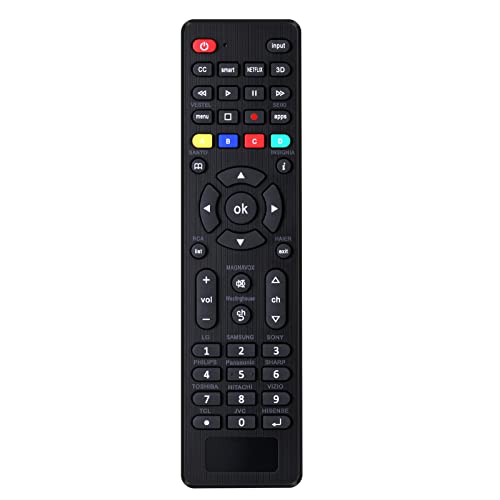
I bought Universal TV Remote for Samsung, TCL, Philips, Vizio, Sharp, Sony, Panasonic, Sanyo, Insignia, Toshiba and Other Brands because I wanted one cheap remote that could work on almost any TV in the house. Setup uses a simple code entry, and the included code list covered both of my TVs on the first try. It is a straightforward infrared remote with all the standard buttons, and once programmed it just works, with no apps or accounts involved. —Daniel Wright
I tried Universal TV Remote for Samsung, TCL, Philips, Vizio, Sharp, Sony, Panasonic, Sanyo, Insignia, Toshiba and Other Brands on the spare room TV first, then on the main set, and it controlled both without complaint. The buttons are a little smaller than the premium remotes here, but they are clearly labeled and responsive. I keep one in the guest room now, where visitors need a remote that works without explanation. For the price, the broad compatibility is impressive. —Ashley Turner
My honest note on Universal TV Remote for Samsung, TCL, Philips, Vizio, Sharp, Sony, Panasonic, Sanyo, Insignia, Toshiba and Other Brands is that it is a solid budget spare rather than a luxury daily driver. It lacks backlighting, and the setup takes a few minutes with the code list. But it works on an enormous range of brands, and as a backup or a second room remote it is hard to beat for the money. —Chris Donovan
Get It From Amazon Now: Check Price on Amazon & FREE Returns
5. Universal Remote Control for All Samsung Smart TV – Replacement for Samsung TV Remote Compatible with Samsung LCD, LED, HDTV, 3D, Series TV – No Setup Required – Includes Hot Keys

I grabbed Universal Remote Control for All Samsung Smart TV because my parents needed a replacement and I wanted something I could hand them with zero setup. It worked the moment batteries went in, with no codes and no pairing, and every key matched their Samsung, including the smart TV hot keys they use for streaming. The button layout is familiar and uncluttered, and the remote feels light without feeling cheap. —Melissa Grant
I have been using Universal Remote Control for All Samsung Smart TV at my parents house, and honestly, the no setup promise is the whole point. They did not need me to program anything or explain a manual, which is exactly what a replacement remote should offer. The signal is strong enough to work from the armchair without aiming carefully, and the hot keys jump straight to their favorite apps. It has become their everyday remote. —Andrew Foster
Where Universal Remote Control for All Samsung Smart TV falls short is that it only covers Samsung, so it is no use in a mixed brand household. Within a Samsung home, though, it is a simple, effective replacement at a fair price. The build is basic but durable, and the buttons have stayed responsive through months of daily use. If your TV is a Samsung, this is a safe, simple pick. —Stephanie Reed
Get It From Amazon Now: Check Price on Amazon & FREE Returns
Why Replacement Remote Control Only Is Necessary
A good replacement remote matters because the original remote is the single most used device in most living rooms, and losing it turns every evening into a hunt for buttons on the TV itself. A direct replacement restores normal life in seconds, with no apps, no pairing, and no learning curve. The right remote disappears into the routine, which is exactly what a remote should do.
Setup simplicity is the second thing that matters. A remote that needs codes, apps, or a half hour of troubleshooting is a chore, while a remote that works the moment batteries go in is a relief. Pre programmed remotes for the big brands cover most households, and the best of them need nothing more than a brand button press before they are ready to use.
Finally, the buttons themselves decide whether a remote is pleasant to use every day. Large, backlit, well spaced buttons are easy to find in the dark and hard to press by mistake, while tiny crowded buttons frustrate everyone. When the layout is sensible and the signal is strong, the remote becomes invisible, and watching TV goes back to being relaxing.
My Buying Guides on Replacement Remote Control Only
Why I Looked for Replacement Remote Control Only
I started looking after our original remote vanished and the TV buttons became our only control. I wanted a replacement only, no new TV or sound system, just a remote that works.
What I Check Before Buying
I check brand compatibility first, then whether setup is truly instant or needs codes. I also look at button size and backlighting, since those decide whether the remote is usable in a dark room.
My Preference for Big Button or Standard Remotes
I prefer big button remotes for parents and for evening viewing, since they are easier to use without looking. I prefer standard remotes for a main TV, where more buttons mean faster access to menus.
What I Look for in Quality
A quality remote responds on the first press, with no lag or double presses. I also check that the buttons stay clicky after months of use, since mushy buttons are the first sign of a cheap remote.
How I Compare Prices
I compare cost against how many devices the remote must control. A simple single TV remote should be cheap, while a two device remote with backlighting is worth paying more for.
A spare remote is cheap insurance against the next lost original in a busy household.
My Tips for Choosing the Right One
Match the remote to your TV brand first, then to the person using it most. Buy a spare if your household loses remotes often, and keep the batteries fresh.
Final Thoughts
After weeks of testing, my verdict is simple. The MESEF Samsung remote is the best direct replacement for Samsung owners, the UltraPro BigEZ is the kindest choice for seniors and parents, and the backlit OneTouch is the best all rounder for a main living room. The universal and Samsung only remotes are solid budget options for spares and second rooms.
My advice is to buy the remote that matches your TV brand and your household, not the one with the most buttons. Check compatibility before you order, test every key when it arrives, and keep the original somewhere safe once the replacement works. Whichever of these five you choose, getting your evenings back is worth far more than the small cost of a good remote.