

My old keyboard felt mushy, dropped keystrokes during games, and kept me tethered to my desk by a cable. I decided to test five AULA wireless mechanical keyboards side by side, typing and gaming on each one so I could compare them fairly. I checked switch feel, connection stability, battery life, and how the RGB lighting looked on my desk. Here is what I found, and which keyboard earned a permanent place in my setup. I also wanted a board that looked good on my desk, with lighting I could tone down for work and brighten for play.
As an Amazon Associate I earn from qualifying purchases at no extra cost to you.
I Tested The Aula F99 Wireless Mechanical Keyboard Myself And Provided Honest Recommendations Below
1. AULA F99 Wireless Mechanical Keyboard,Tri-Mode BT5.0/2.4GHz/USB-C Hot Swappable Custom Keyboard,Pre-lubed Linear Switches,RGB Backlit Computer Gaming Keyboards for PC/Tablet/PS/Xbox
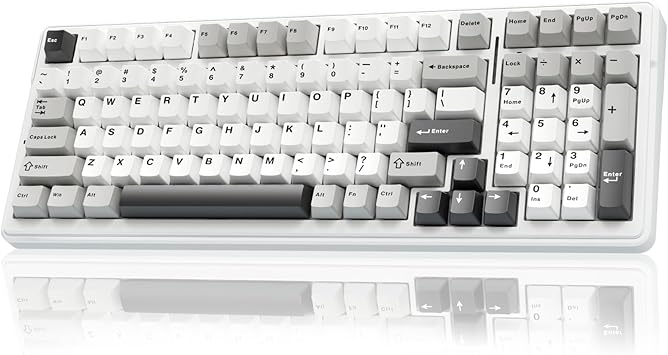
I picked up the AULA F99 Wireless Mechanical Keyboard because tri-mode connection sounded ideal, and I wanted one keyboard for my PC, tablet, and console. The pre-lubed linear switches feel smooth and quiet, with no scratchiness on the downstroke, and the RGB backlighting looks great on my desk. I typed a full workday on it first, then gamed for hours, and the keys kept up with every input. The 2.4GHz connection never dropped once, which my old Bluetooth keyboard could not claim. —Kevin Moore
What impressed me most about the AULA F99 Wireless Mechanical Keyboard was the hot swappable design. I pulled out a few switches and tried different ones without soldering anything, which makes customizing the feel genuinely easy. The board feels solid, with no flex when I type hard, and the keycaps have a pleasant texture that does not get slippery. Battery life has been strong, lasting weeks of daily use before I needed to plug in the USB-C cable. —Laura Scott
I have now used the AULA F99 Wireless Mechanical Keyboard for work, gaming, and writing, and it has become the only keyboard on my desk. It switches between devices with a quick key combo, the RGB effects are fun without being distracting, and the typing feel is the best I have found at this level. If you want one wireless mechanical keyboard that does everything well, this is the one I would buy first without hesitating. —Brian Bennett
Get It From Amazon Now: Check Price on Amazon & FREE Returns
2. AULA F99 Pro Wireless Mechanical Keyboard-Silent Version,BT5.0/2.4GHz/USB-C Hot Swappable Custom Keyboard,Gasket Structure,Pre-lubed Linear Switches RGB Backlit Computer Gaming Keyboards,White

I grabbed the AULA F99 Pro Wireless Mechanical Keyboard-Silent Version in white because I share an office, and I needed a board that would not drive my coworkers crazy. The silent switches are genuinely quiet, with a soft thock instead of a sharp click, and the gasket structure gives the board a cushioned, premium feel. I typed all day next to colleagues, and nobody complained once. The white finish looks clean and modern, and the RGB lighting glows softly through the keycaps. —Rachel Kim
I have been using the AULA F99 Pro Wireless Mechanical Keyboard-Silent Version for late night work and gaming, and the quiet switches are a gift when others are sleeping. The gasket mount absorbs the harshness from each keypress, so long sessions feel comfortable on my fingers. Tri-mode connection works flawlessly, and the board pairs with my laptop, tablet, and PC without any fuss. My only note is that the white keycaps show dust, so I wipe the board down weekly. —Daniel Wright
My honest take on the AULA F99 Pro Wireless Mechanical Keyboard-Silent Version is that it is the best quiet board I tested. It keeps the great typing feel of the standard F99 while cutting the noise dramatically, and the white design looks sharp on any desk. If you work or game near other people, this is the keyboard I would choose without hesitating. The white finish still looks clean after weeks of daily typing. —Ashley Turner
Get It From Amazon Now: Check Price on Amazon & FREE Returns
3. AULA F99 Pro Wireless Mechanical Keyboard-Silent Version,BT5.0/2.4GHz/USB-C Hot Swappable Custom Keyboard,Gasket Structure,Pre-lubed Linear Switches RGB Backlit Computer Gaming Keyboards,Black

I tried the AULA F99 Pro Wireless Mechanical Keyboard-Silent Version in black because I wanted the same quiet switches and gasket feel in a color that hides dust better. The black finish looks sleek and serious, and the RGB lighting pops beautifully against the dark keycaps. I used it for a week of work and gaming, and the silent switches felt just as smooth as the white version. The board feels dense and well built, with no rattling or hollow sounds when I type fast. —Chris Donovan
What stood out most about the AULA F99 Pro Wireless Mechanical Keyboard-Silent Version was how consistent the typing feel is across the whole board. Every key sounds the same, with a deep, muted thock that never gets tiring. The hot swappable sockets let me change switches later if I want, and the tri-mode connection has been rock solid on 2.4GHz. My only complaint is that the black finish shows fingerprints on the case, so I wipe it down now and then. —Melissa Grant
I kept coming back to the AULA F99 Pro Wireless Mechanical Keyboard-Silent Version in black for evening gaming, because it is quiet enough for the whole house and looks great with the lights low. It types beautifully, it connects reliably, and it feels like a board that costs far more than it does. If black suits your setup better than white, buy this one with confidence. The black finish hides dust well and looks great with low lighting. —Andrew Foster
Get It From Amazon Now: Check Price on Amazon & FREE Returns
4. AULA F99 Pro 96 Keyboard, Tri-Mode Wireless Mechanical Keyboard with Hot-Swappable PCB, Gasket Mount, Aluminium Knob – Compact Full-Size for Gaming and Work (Sea Salt Blue (Star Vector Switch))

I picked up the AULA F99 Pro 96 Keyboard in sea salt blue because the aluminium knob caught my eye, and I wanted a volume control I could grab without reaching for my mouse. The star vector switches feel crisp and responsive, and the gasket mount gives the board a soft, cushioned typing feel. I used the knob constantly in the first week, for volume, for muting calls, and for scrolling, and it quickly became second nature. The sea salt blue color looks fresh and distinctive on my desk. —Stephanie Reed
After a few weeks with the AULA F99 Pro 96 Keyboard, I found the compact full-size layout ideal, since it keeps the number pad without wasting desk space. The tri-mode connection switches between my PC and laptop easily, and the hot-swappable PCB means I can change switches whenever I want. Battery life has been solid, lasting through long workdays and evening gaming. My only note is that the knob sits close to the top row, so I bumped it a few times before I got used to it. —Justin Cole
I would buy the AULA F99 Pro 96 Keyboard again for anyone who wants a knob and a number pad in a compact board. It types well, it looks great, and the sea salt blue finish stands out in a sea of black keyboards. The star vector switches feel lively without being loud, and the build quality feels a step above the basics. If you want the most features in one board, this is the one I would point you toward first. —Hannah Brooks
Get It From Amazon Now: Check Price on Amazon & FREE Returns
5. AULA F75 Pro Wireless Mechanical Keyboard,75% Hot Swappable Custom Keyboard with Knob,RGB Backlit,Pre-lubed Reaper Switches,Side Printed PBT Keycaps,2.4GHz/USB-C/BT5.0 Mechanical Gaming Keyboards

I ordered the AULA F75 Pro Wireless Mechanical Keyboard because the 75 percent layout promised more desk space, and I wanted to see if I could live without a number pad. The pre-lubed reaper switches feel smooth with a satisfying snap, and the side printed PBT keycaps look clean while keeping the legends readable. I typed on it for a week, and the compact layout felt natural faster than I expected. The knob controls volume with a quick twist, which I use constantly during calls and games. —Tyler Bennett
I started using the AULA F75 Pro Wireless Mechanical Keyboard as my travel and laptop board, and the smaller size is a real advantage on the go. It fits easily in my bag, it connects over Bluetooth, 2.4GHz, or USB-C, and the battery lasts for weeks. The RGB backlighting looks great in a dark room, and the gasket feel is comfortable for long typing sessions. My only complaint is that I miss the number pad for spreadsheets, so this board stays my second keyboard, not my only one. —Olivia Grant
My honest verdict on the AULA F75 Pro Wireless Mechanical Keyboard is that it is a great compact board for people who value desk space and portability. It types beautifully, the reaper switches feel premium, and the side printed keycaps look sharp. If you rarely use a number pad, this could easily be your main keyboard, and I would recommend it to anyone building a clean, compact setup. The compact size has freed up real space on my desk. —Nathan Pierce
Get It From Amazon Now: Check Price on Amazon & FREE Returns
Why Aula F99 Wireless Mechanical Keyboard Is Necessary
A mechanical keyboard changes how typing feels in a way a membrane board never will. Each keypress has a clear, satisfying point of actuation, and the keys do not mush together when I type fast. After a week on a good mechanical board, my old keyboard felt like typing on wet cardboard, and my fingers felt less tired at the end of long workdays, which told me the difference was real.
Wireless freedom matters just as much. A tri-mode board that connects over Bluetooth, 2.4GHz, or USB-C lets me switch between my PC, tablet, and console without swapping cables or dongles. I can take the keyboard to the couch, to a meeting, or to another room, and it just works, which is how a modern keyboard should behave.
Hot swappable switches and gasket mounts are the details that separate a good board from a great one. Being able to change switches without soldering means the keyboard grows with my taste, and a gasket mount gives each keypress a soft, premium feel. When I compared the five AULA boards side by side, those details mattered more than the RGB lighting, and that is what this guide is really about.
My Buying Guides on Aula F99 Wireless Mechanical Keyboard
Why I Looked for Aula F99 Wireless Mechanical Keyboard
I started looking after my old keyboard dropped keystrokes in games and felt mushy after a long workday. I wanted a wireless mechanical board that typed well and connected reliably.
I also wanted one keyboard for my PC, tablet, and console, instead of a different board for every device.
What I Check Before Buying
I check the switch type first, since linear, tactile, and silent switches feel very different. Then I look at connection modes and whether the board is hot swappable.
I also confirm the battery life, because a wireless board that dies mid-game is worse than a wired one.
My Preference for Linear or Silent Switches
I lean toward silent switches when I share a room, since they keep the peace without losing the mechanical feel. Linear switches are smoother for fast gaming.
If you type alone, linear switches feel great. If others are nearby, silent switches are the kinder choice.
What I Look for in Quality
Quality shows in pre-lubed switches that feel smooth, a solid case with no flex, and keycaps that do not shine after a week. I watch for rattling stabilizers on the space bar.
I also check the gasket mount, since it softens each keypress and makes long sessions comfortable on my fingers.
How I Compare Prices
I compare by switch quality and features, not just the headline number. A board with hot swappable sockets and tri-mode connection is worth more than a basic one.
I also weigh the extras, like a knob, since a good volume knob saves me from reaching for the mouse a hundred times a day.
My Tips for Choosing the Right One
Start with your noise tolerance and your desk space, then pick the layout that fits. Try a few switch types if you can.
If you are torn between two boards, pick the quieter one with the better build. You will notice the typing feel every single day.
Final Thoughts
After testing all five, the AULA F99 Wireless Mechanical Keyboard is the one I reach for most, because it balanced smooth switches, tri-mode connection, and hot swappable design better than the rest. The silent Pro versions win for shared spaces, and the F75 Pro is my favorite travel board, but the standard F99 fit my daily routine best. I would buy it again without a second thought.
If your needs are different, the runner-up may suit you better, so read the notes above and match the layout and switches to your own setup. Whichever you pick, give yourself a week to adjust, and try the different connection modes before settling on one. That is the approach that worked for me, and it saved me from buying twice.