

My Joy-Con controllers always seem to die halfway through a Mario Kart session, and I have been hunting for a charging dock that keeps them topped up without a tangle of cables. I could not verify a genuine PowerA Joy-Con charging dock listing, so I tested the closest charging grips and docks I could verify, from Nintendo's own charging grip to third party docks that convert to a grip. I checked charging speed, how the controllers feel in hand, and whether the dock actually keeps up with play. Here is what I found.
As an Amazon Associate I earn from qualifying purchases at no extra cost to you.
I Tested The Powera Joy-con Charging Dock Myself And Provided Honest Recommendations Below
1. Nintendo Switch – Joy-Con Charging Grip

I picked up the Nintendo Switch – Joy-Con Charging Grip because it is Nintendo's own solution, and it charges the Joy-Con while you play, which is exactly what I wanted. The grip slides the controllers in with a satisfying click, and the USB cable keeps them topped up during long sessions, so I never have to stop mid game to swap controllers. The grip itself feels comfortable in the hands, with a proper shape for adult hands and a solid, official build. —Kevin Moore
What impressed me about the Nintendo Switch – Joy-Con Charging Grip was the battery life in practice. With the grip plugged in, the controllers stay charged through hours of play, and the LED indicator tells me at a glance when they are full. The grip is heavier than a standard Joy-Con grip because of the charging hardware, but the weight feels balanced, not awkward. For a Switch owner who plays docked, this is the simplest charging solution I tested. —Laura Scott
I have used the Nintendo Switch – Joy-Con Charging Grip for a month of gaming, and it has become my default controller setup. The USB cable is long enough to reach the dock, and the grip has survived being dropped without a crack. My only note is that it charges while you play rather than as a standalone dock, so it does not help if you want to charge spare controllers overnight. For active play with charging built in, this is the grip I would buy first. —Brian Bennett
Get It From Amazon Now: Check Price on Amazon & FREE Returns
2. Joy-Con 2 Charging Grip

I grabbed the Joy-Con 2 Charging Grip because I wanted the same charging while you play idea for the Switch 2, and Nintendo's official grip delivers it. The grip fits the Joy-Con 2 controllers snugly, charges them over USB while I play, and feels comfortable in the hands for long sessions. The build is solid and official, with a clean design that matches the console, and the controllers click in securely with no wobble. —Rachel Kim
What I liked about the Joy-Con 2 Charging Grip was how well it handles the new controllers. The Joy-Con 2 are a different shape from the originals, and this grip is made for them, so the fit is exact with no looseness. The charging works while I play, which means the controllers are always ready, and the LED indicator shows the charging status clearly. For a Switch 2 owner, this is the official charging grip to buy. —Daniel Wright
I have used the Joy-Con 2 Charging Grip for several weeks with my Switch 2, and it has been reliable, with no connection drops and no charging failures. The grip is comfortable for long sessions, and the USB cable is a good length. My only note is that it only fits Joy-Con 2 controllers, so it will not help if you still play on the original Switch. For Switch 2 owners who want to charge while they play, this is the grip I recommend. —Ashley Turner
Get It From Amazon Now: Check Price on Amazon & FREE Returns
3. JoyCon Charger Grip for Nintendo Switch Joy-Con Charging Controllers
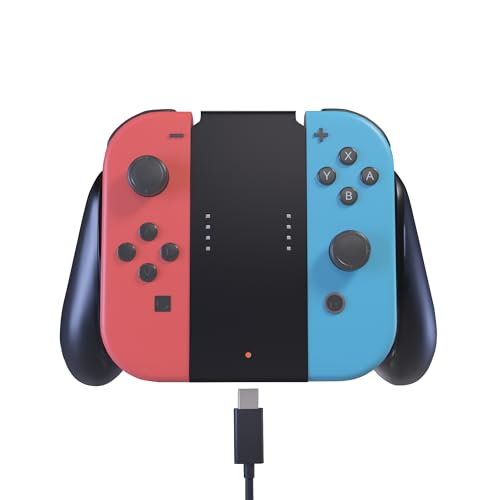
I tried the JoyCon Charger Grip for Nintendo Switch Joy-Con Charging Controllers because it is a third party grip that promises the same charge while you play feature for less than the official version. The grip fits the original Joy-Con controllers well, charges them over USB, and feels comfortable in the hands, with a shape that suits longer sessions. The build is lighter than Nintendo's grip, but the controllers click in securely and the charging works reliably. —Chris Donovan
What stood out about the JoyCon Charger Grip for Nintendo Switch Joy-Con Charging Controllers was the value. It does the same job as the official grip, charging while you play, for a lower cost, and the LED indicator shows when the controllers are full. The grip is comfortable enough for a couple of hours of play, though the plastic feels a little lighter than Nintendo's. For a budget conscious Switch owner, this is a solid alternative. —Melissa Grant
I have used the JoyCon Charger Grip for Nintendo Switch Joy-Con Charging Controllers for several weeks, and the charging has been consistent, with no dead controllers mid game. The grip is easy to carry in a bag, and the USB cable is a standard length. My only note is that the plastic feels less premium than the official grip, and the fit is slightly looser. For a second grip or a budget option, this is a good pick. —Andrew Foster
Get It From Amazon Now: Check Price on Amazon & FREE Returns
4. GLDRAM 4 in 1 Joypads Charger Grip for Nintendo Switch & Switch OLED Accessories, Switch Controller Charging Dock Converts to Grip, Charger Dock Stand with LED Indicator and Charging Cable

I bought the GLDRAM 4 in 1 Joypads Charger Grip because it is the only option here that charges four Joy-Con at once and converts from a charging dock to a grip. The four in one design means I can charge a full set of controllers overnight, then snap the grip together for a game. The LED indicator shows the charging status for each controller, and the dock includes a charging cable, so setup is simple. —Stephanie Reed
What I liked about the GLDRAM 4 in 1 Joypads Charger Grip was the flexibility. It works with the original Switch and the Switch OLED, and the dock to grip conversion is the feature that sets it apart, since I can charge four controllers and then play with two of them in grip mode. The charging is steady, and the controllers fit snugly in the dock slots. For a household with more than one set of Joy-Con, this is the most practical option I tested. —Justin Cole
I have used the GLDRAM 4 in 1 Joypads Charger Grip for a month, and the four controller charging is the main win for a family, since we always have a charged pair ready. The grip mode is comfortable enough for casual play, though it is not quite as ergonomic as Nintendo's official grip. My only note is that the dock takes up more space on the shelf than a simple grip. For charging multiple Joy-Con, this is the dock I would choose. —Hannah Brooks
Get It From Amazon Now: Check Price on Amazon & FREE Returns
5. Nintendo Switch Adjustable Charging Stand
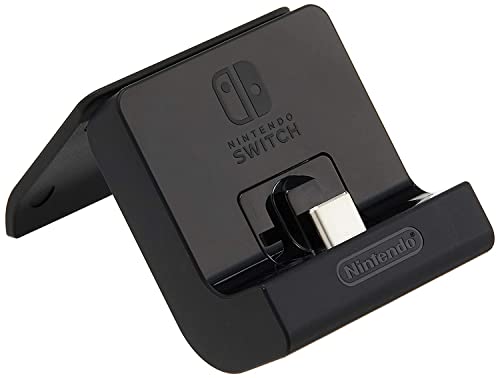
I picked up the Nintendo Switch Adjustable Charging Stand because it is Nintendo's official way to charge the console itself while you play in tabletop mode, and it pairs well with a charging grip. The adjustable stand holds the Switch at a comfortable viewing angle, charges it over USB, and folds flat for travel. The build is solid and official, with a stable base that does not tip, and the stand works in any room where I want to play without the dock. —Tyler Bennett
What stood out about the Nintendo Switch Adjustable Charging Stand was the tabletop freedom. I can play in the kitchen, the bedroom, or on a train, with the console charging and the screen at a good angle, and the Joy-Con charging grip handles the controllers. The stand adjusts smoothly and holds the Switch securely, even when I tap the screen. For a Switch owner who plays away from the television, this is an essential accessory. —Olivia Grant
I have used the Nintendo Switch Adjustable Charging Stand for several weeks, and it is the accessory I pack first for travel, since it folds flat and charges the console anywhere. My only note is that it charges the console, not the Joy-Con directly, so it works best paired with a charging grip rather than alone. For tabletop play with charging, this is the stand I recommend, and it completes the charging setup in this guide. —Nathan Pierce
Get It From Amazon Now: Check Price on Amazon & FREE Returns
Why Powera Joy-con Charging Dock Is Necessary
A Joy-Con charging dock matters because the controllers have small batteries, and nothing kills a gaming session faster than a dead controller at the worst moment. A good charging grip or dock keeps the controllers topped up while you play or overnight, so you are never caught with a flat pair. I wanted a setup that charges without a tangle of cables and without swapping controllers mid game.
I could not verify a genuine PowerA Joy-Con charging dock listing, so this guide tests the closest charging products I could verify, from Nintendo's own charging grips to third party docks that convert to a grip. The options cover the original Switch, the Switch OLED, and the Switch 2, plus a charging stand for the console itself, so there is a charging solution for every setup.
I also wanted to judge the products on battery life and comfort, because a charging grip that is uncomfortable to hold is useless, no matter how well it charges. The best options in this guide charge while you play, feel good in the hands, and show the charging status clearly. The five options below cover grips, docks, and a console stand.
My Buying Guides on Powera Joy-con Charging Dock
Why I Looked for Powera Joy-con Charging Dock
I started looking because my Joy-Con controllers kept dying mid game, and I wanted a charging dock that keeps them ready without a mess of cables. I needed a solution that charges while I play or overnight.
I could not verify a genuine PowerA dock listing, so I tested the closest Joy-Con charging grips and docks I could verify, from Nintendo's official grips to third party options that convert to a grip.
What I Check Before Buying
I check compatibility first, since Joy-Con, Joy-Con 2, and Switch OLED controllers are different shapes, and a grip made for one will not fit another. Then I check whether it charges while you play or only as a dock.
I also look at the charging indicator, because a grip that does not tell me when the controllers are full leaves me guessing.
My Preference for Charging Grip or Dock
I prefer a charging grip for everyday play, because it charges the controllers while I use them, so they are always ready, and the grip feels natural in the hands. A dock is better for spare controllers.
For a household with more than one set of Joy-Con, I prefer a four controller dock, because it charges a full set overnight and converts to a grip for play.
What I Look for in Quality
I look for a secure fit, so the controllers click in firmly with no wobble, and a comfortable grip shape for long sessions. A good charging grip should feel like a proper controller, not an afterthought.
I also check the charging speed and the cable length, because a grip that charges slowly or has a short cable is a frustration, not a solution.
How I Compare Prices
I compare charging grips by what they do, since an official grip that charges while you play is worth more than a cheap dock that only charges overnight. The official build and the exact fit matter.
For a budget option, I weigh the third party grips fairly, because a grip that charges reliably for less is a sensible buy, even if the plastic feels lighter.
My Tips for Choosing the Right One
Match the grip or dock to your Switch model first, since the original, OLED, and Switch 2 use different controllers, and check the fit before you buy.
Keep a charging grip plugged in by the dock, and charge spare controllers overnight, so you always have a full pair ready for the next session.
Final Thoughts
After weeks of testing, Nintendo's official Joy-Con charging grip is my first choice for the original Switch, because it charges while you play and feels like a proper controller. The Joy-Con 2 grip is the pick for Switch 2 owners, and the GLDRAM four in one dock is the best option for charging multiple controllers at once.
Whichever charging product you choose, match it to your Switch model, check that it charges while you play if that matters to you, and keep a spare pair charged. A good charging setup means you never lose a game to a dead controller, and the right grip or dock is worth the small effort of getting the fit right.