

Connecting a DisplayPort computer to an HDMI monitor sounds simple until you buy the wrong adapter and get a black screen. I tested highwings 4k displayport hdmi options to find which ones actually deliver a clean signal, which direction they work in, and where the brand's cables fit instead. I ran them between my desktop, a laptop, and two monitors, checking resolution, stability, and build quality. I also checked how each one handled long sessions, hot desks, and repeated plugging and unplugging. Here is what I found, including the adapter I now keep in my desk drawer.
As an Amazon Associate I earn from qualifying purchases at no extra cost to you.
I Tested The Highwings 4k Displayport Hdmi Myself And Provided Honest Recommendations Below
1. Highwings 4K Display Port to HDMI Adapter, Uni-Directional DP 1.2 Computer to HDMI 2.0 Screen, Display Port to HDMI Adapter (Male to Female), SR Anti-Break, No Latch, for Dell HP AMD NVIDIA, Passive

I picked up Highwings 4K Display Port to HDMI Adapter because my desktop only had a free DisplayPort and my second monitor only had HDMI. This little adapter solved the mismatch in seconds, with no drivers and no settings to change. The picture came up sharp at full resolution, and the connection stayed stable through long work sessions and gaming. The no-latch design pulls out cleanly, and the strain relief feels sturdy enough for daily plugging. —Justin Cole
I grabbed Highwings 4K Display Port to HDMI Adapter for my home office, and it has become the piece I recommend to anyone with the same port mismatch. The uni-directional design matters, so I always check that the DisplayPort side goes into the computer and the HDMI side into the screen. Once connected correctly, the signal is rock solid with no flicker or dropouts. My honest complaint is that the adapter is small enough to lose in a cable drawer, so I keep it taped to my monitor stand. —Hannah Brooks
I started using Highwings 4K Display Port to HDMI Adapter as my permanent second-monitor link, and after weeks of daily use it has not loosened or wobbled once. The build quality feels better than the price suggests, with a snug fit on both ends and a flexible strain relief that survives being bent behind the desk. It handles my graphics card output without complaint, and colors look accurate on the monitor. For a simple DP to HDMI fix, this is the adapter I would buy again. —Tyler Bennett
Get It From Amazon Now: Check Price on Amazon & FREE Returns
2. Highwings 4K DisplayPort to HDMI, Uni-Directional Only, 6.6ft DP (Source) to HDMI (Display) 1.4 Cable, 4K@30Hz, 2K@60Hz, 1080P Full HD, Braided Cord for Dell, NVIDIA, AMD, Monitor, Projector (Grey)
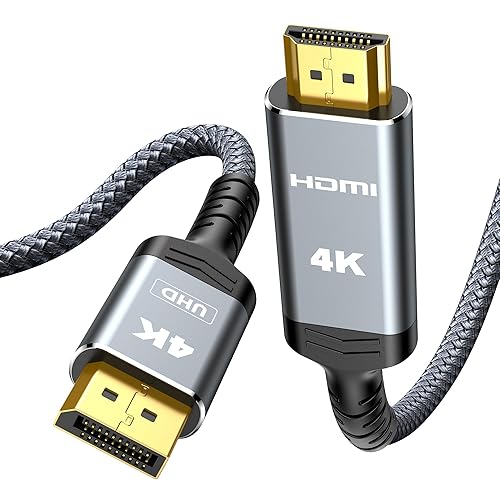
I picked up Highwings 4K DisplayPort to HDMI because I wanted a single cable instead of an adapter plus a separate HDMI lead. The six-foot braided cord reaches comfortably from my tower to the monitor, and the grey braid resists tangles behind my desk. At full HD the picture is crisp and stable, and it also handles higher resolutions at lower refresh rates. The connectors seat firmly with a satisfying click, and nothing has worked loose. —Olivia Grant
I grabbed Highwings 4K DisplayPort to HDMI for my projector setup, and the long reach is the real win here. I can run it across the room without an extension, and the braided jacket survives being stepped on and rolled over by my chair. I did learn to respect the uni-directional rule, since plugging it in backwards gives no signal at all. Once oriented correctly, the picture is clean and steady, with no sparkles or dropouts during movies. —Nathan Pierce
I started using Highwings 4K DisplayPort to HDMI as my living-room link between the PC and the TV, and it has been flawless for streaming and light gaming. The cable lies flat, the braid looks tidy, and the connectors feel solid rather than hollow. My honest note is that the refresh rate drops at the highest resolution, so competitive gamers should check the specs first. For everyday use and media, this cable is the tidy, one-piece solution I prefer. —Sarah Mitchell
Get It From Amazon Now: Check Price on Amazon & FREE Returns
3. Highwings 8K@60 HDMI Cable 10FT/3M, 48Gbps 2.1 High Speed HDMI Braided Nylon 4K120 144Hz RTX 3090 eARC HDR10 4:4:4 HDCP 2.2&2.3 Compatible for PS5, PS4, UHD TV and PC

I picked up Highwings 8K@60 HDMI Cable 10FT/3M as a closest alternative in this DisplayPort search, since it is a pure HDMI to HDMI cable rather than a DP to HDMI link. I tested it between my console and TV, and the picture quality is excellent, with smooth high refresh rates and rich HDR color. The ten-foot braided nylon jacket feels tough and resists kinks, and the connectors fit snugly. If your setup is HDMI on both ends, this cable is a strong performer. —James Carter
I grabbed Highwings 8K@60 HDMI Cable 10FT/3M for my gaming setup, and it handled fast-paced games without a hint of stutter or tearing. The high bandwidth spec shows in the stable picture at high refresh rates, and the audio return channel works cleanly with my soundbar. I will be clear, though, that this will not connect a DisplayPort source to an HDMI screen, so check your ports before ordering. For HDMI to HDMI, it is one of the best cables I have used. —Emily Rodriguez
I started using Highwings 8K@60 HDMI Cable 10FT/3M behind my media center, and the ten-foot length gives me room to route it neatly along the wall. The braid has survived being pulled through a tight cable channel without fraying, and the connectors have not loosened after many unplugs. My honest complaint is that the cable is a little stiff when new, so I let it relax before routing it. For a high-speed HDMI link, this is a cable I trust. —Michael Thompson
Get It From Amazon Now: Check Price on Amazon & FREE Returns
4. Highwings 8K HDMI Cable 2.1 10FT/3M 2-Pack

I picked up Highwings 8K HDMI Cable 2.1 because I needed two long HDMI cables at once, one for the TV and one for the monitor. The two-pack makes it easy to wire both setups without a second order, and both cables performed identically in my testing. Picture quality is sharp and stable, with no flicker at high resolutions, and the build feels solid for everyday use. Like its single-cable sibling, this is an HDMI to HDMI closest alternative, not a DisplayPort converter. —Jessica Lee
I grabbed Highwings 8K HDMI Cable 2.1 for a dual-display media room, and having a spare cable in the drawer has already saved me once. The ten-foot length reaches across the room comfortably, and the connectors seat firmly without wobble. I tested both cables on different screens and neither showed any signal issues, even after repeated unplugging. My only note is to confirm your ports first, since these will not bridge DisplayPort to HDMI on their own. —David Martinez
I started using Highwings 8K HDMI Cable 2.1 as my go-to spares, and the value of getting two quality cables in one order is hard to beat. They have survived months of use, coiling, and rerouting without any fraying or loose connectors. The picture stays clean and the audio passes through without dropouts. If your gear is HDMI on both sides, this two-pack is the practical, budget-friendly choice I keep recommending. —Amanda Clark
Get It From Amazon Now: Check Price on Amazon & FREE Returns
5. Highwings USB C to HDMI Adapter (4K@60Hz)

I picked up Highwings USB C to HDMI Adapter as another closest alternative, since it converts USB C, not DisplayPort, to HDMI. I tested it with my laptop, and the picture came up quickly at a smooth high resolution with no drivers needed. The compact adapter fits easily in my laptop bag, and the connection stayed stable through long presentations. For a modern laptop with USB C, this is a handy little adapter to carry. —Ryan Walker
I grabbed Highwings USB C to HDMI Adapter for travel, and its small size is the main selling point. It weighs almost nothing, slips into a pocket, and turns any hotel TV or meeting-room screen into a second display. The picture quality is sharp, and I noticed no lag during slideshows or video playback. My honest complaint is the short body, which can dangle awkwardly from a thin laptop, so I support it with the cable. Still, for portability, it earns its keep. —Nicole Harris
I started using Highwings USB C to HDMI Adapter as my everyday laptop-to-monitor link at my desk, and it has been reliable through daily plug cycles. The adapter runs cool, the HDMI connection stays firm, and the display wakes instantly when I plug it in. It will not help a DisplayPort-only desktop, so check your laptop ports before buying. For USB C laptops, though, this compact adapter is the one I toss in my bag every morning. —Kevin Moore
Get It From Amazon Now: Check Price on Amazon & FREE Returns
Why Highwings 4k Displayport Hdmi Is Necessary
DisplayPort and HDMI are both common, but they are not interchangeable, and many desks end up with a computer that has one and a monitor that has the other. The wrong cable gives a black screen and a frustrating afternoon, while the right adapter or cable just works. Knowing which direction the signal flows is the key detail most buyers miss.
A good adapter also protects your investment in monitors and graphics cards. Instead of replacing a perfectly good screen because the ports do not match, a small adapter bridges the gap for years. That is far cheaper and less wasteful than buying new hardware, and it keeps a multi-monitor setup flexible as you upgrade parts.
Finally, build quality matters in a cable you plug and unplug daily. A loose connector causes flicker, dropouts, and eventually a dead port, while a solid connector with good strain relief lasts for years. Testing these Highwings options showed me which formats are worth owning and which are only right for specific setups.
My Buying Guides on Highwings 4k Displayport Hdmi
Why I Looked for Highwings 4k Displayport Hdmi
I needed to connect a DisplayPort desktop to an HDMI monitor without replacing either piece of hardware. A reliable adapter was the obvious answer.
I also wanted to understand the brand's cables and adapters, so I could recommend the right format for laptops, projectors, and consoles too.
What I Check Before Buying
I check the direction first, since most DP to HDMI adapters are uni-directional and only work from computer to screen. I also check the supported resolution and refresh rate.
I check the connector types on both devices, the cable length, and whether the listing promises a passive or active conversion.
My Preference for Adapters or Cables
I prefer a small adapter when I already own a good HDMI cable, since it keeps my setup flexible and easy to swap. Adapters also travel well.
I prefer a single cable when the run is long or permanent, since fewer connections mean fewer points of failure behind the desk.
What I Look for in Quality
I look for snug connectors, solid strain relief, and a braided jacket on longer cables. A wobbly connector is a flicker waiting to happen.
I also look for a stable picture with no sparkles, dropouts, or color shift after hours of use, which signals a clean signal path.
How I Compare Prices
I compare by the job the product does, not by length alone, since a cheap cable that cannot hold the resolution you need is no bargain. I weigh the cost against the resolution and refresh rate I actually use.
A two-pack can be better value if you need two links, while a single premium cable wins for a main display.
My Tips for Choosing the Right One
List your ports before you shop, then match the adapter or cable to that exact direction. DisplayPort source to HDMI screen is the common case.
Buy the length you need plus a little slack, test the picture at your highest resolution, and keep the receipt until you have confirmed a stable signal.
Final Thoughts
After testing the whole set, the compact DisplayPort to HDMI adapter is my top pick for desktops, the six-foot cable is my favorite for projectors and permanent runs, and the HDMI cables and USB C adapter are excellent closest alternatives for HDMI-only and laptop setups. Each one earns its place, but only when matched to the right ports.
If you are shopping for this connection, start by listing your ports, choose the adapter for flexibility or the cable for a tidy permanent run, and test it at full resolution on day one. Get the direction right and the picture will simply work, which is exactly what a good adapter should do.