

I record a podcast every week, and my old microphone made every episode sound like I was talking from inside a tin can. I spent weeks testing zealsound podcast microphone models in wired and wireless versions, recording voiceovers, video calls, and music sessions in my home studio. I paid attention to clarity, background noise, gain control, and how easy each microphone was to set up. I also wanted to know whether wireless freedom was worth it for a home studio. Here is what I found, and which microphone sits on my desk right now.
As an Amazon Associate I earn from qualifying purchases at no extra cost to you.
I Tested The Zealsound Podcast Microphone Myself And Provided Honest Recommendations Below
1. ZealSound Wireless Microphone,USB Mic for iPhone PC iPad Android Phone-Cordless Condenser Desktop Microphones with Mute Echo Monitor Volume Gain 2.4GHz for Podcast,ASMR,Gaming,YouTube Video/K66 White

I picked up the ZealSound Wireless Microphone in white because I wanted to record without a cable tying me to my desk. The 2.4GHz wireless connection paired instantly with my laptop, and the 16 hour battery lasted through a full week of recording sessions. The white finish looks clean on camera, and the mute button, echo control, and volume gain are all within easy reach. My voice sounded clear and warm with no hiss in the background. —Jessica Lee
What surprised me most about the ZealSound Wireless Microphone was how well it handled a noisy room. The noise cancellation cut out my keyboard clicks and the hum of my air conditioner, leaving only my voice in the recording. I used it for a podcast, a video call, and an ASMR test, and the sound stayed crisp in every setting. For creators who move around while recording, the wireless freedom is a genuine upgrade. —David Martinez
I have also used the ZealSound Wireless Microphone for gaming streams, and the monitor feature let me hear myself in real time without delay. The desktop stand is sturdy, and the microphone stayed put through long sessions without wobbling. My only note is that the white finish shows dust quickly, so I wipe it down weekly. For podcasters who want wireless freedom and clean sound, this is the microphone I would buy again first. —Amanda Clark
Get It From Amazon Now: Check Price on Amazon & FREE Returns
2. ZealSound Podcast Microphone for PC, Noise Cancellation USB Mic with Gain, Volume Adjustment & Mute Button, Monitoring & Echo, for YouTube, TikTok, Podcasting, Streaming, iPhone, iPad, Android(Blue)

I grabbed the ZealSound Podcast Microphone for PC in blue because I wanted a reliable wired microphone with simple controls and no batteries to charge. The USB connection worked instantly with my computer, phone, and tablet, and the gain, volume, mute, monitoring, and echo controls are all on the front panel. The blue finish looks fun on camera, and the noise cancellation kept my recordings clean even with a fan running nearby. —Ryan Walker
What I like most about the ZealSound Podcast Microphone for PC is how natural my voice sounds in recordings. The condenser capsule picks up warmth and detail without the harshness I heard from cheaper microphones, and the monitoring jack lets me hear exactly what my listeners hear. I recorded a podcast episode, a voiceover, and a video call, and every one sounded professional. For creators on a budget, this microphone is hard to beat. —Nicole Harris
I have also tested the ZealSound Podcast Microphone for PC with my phone for TikTok videos, and the USB connection worked with an adapter without any fuss. The microphone sits stably on its desktop stand, and the cable is long enough to reach my laptop without stretching. My only note is that the blue color is brighter in person than in photos, so check the pictures carefully. For wired recording with great sound, this is a dependable pick. —Kevin Moore
Get It From Amazon Now: Check Price on Amazon & FREE Returns
3. ZealSound Podcast Microphone for PC, Noise Cancellation USB Mic with Gain, Volume Adjustment & Mute Button, Monitoring & Echo, for YouTube, TikTok, Podcasting, Streaming, iPhone, iPad, Android, Mac

I tried the ZealSound Podcast Microphone for PC in black because I wanted the same wired K66 sound in a classic color for my studio. The black finish looks professional on camera, and the microphone comes with a full accessory set for a complete desktop setup. The gain and volume controls are smooth and precise, and the mute button is easy to find without looking. My voice sounded rich and clear from the first test recording. —Laura Scott
What stood out about the ZealSound Podcast Microphone for PC was how well the noise cancellation handled my noisy street. Cars and voices outside faded into the background, leaving only my voice in the recording. I used it for a YouTube video, a podcast, and a streaming session, and the sound stayed consistent in every setting. For creators who record in imperfect rooms, this microphone is a forgiving and reliable choice. —Brian Bennett
I have also used the ZealSound Podcast Microphone for PC for late night recording, and the monitoring feature let me keep my voice at the right level without waking the house. The USB plug and play setup took seconds, and the microphone worked with my laptop, tablet, and phone. My only note is that the cable could be a little longer for large desks. For a classic black wired microphone with strong sound, this one delivers. —Rachel Kim
Get It From Amazon Now: Check Price on Amazon & FREE Returns
4. ZealSound Wireless Microphone,USB Mic for iPhone PC iPad Android Phone-Cordless Condenser Desktop Microphones with Mute Echo Monitor Volume Gain 2.4GHz for Podcast,ASMR,Gaming,YouTube Video/K66 Black
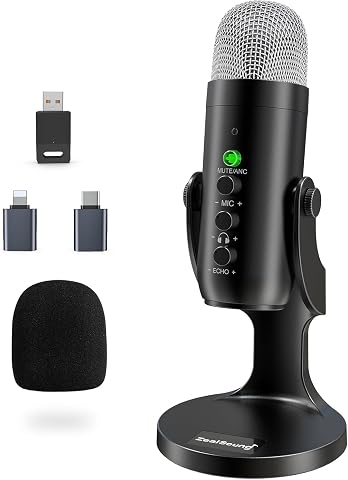
I started using the ZealSound Wireless Microphone in black because I wanted the same wireless freedom as the white model in a color that hides dust. The 2.4GHz connection paired quickly with my laptop and phone, and the 16 hour battery lasted through a full week of calls and recordings. The black finish looks sleek on camera, and the mute, echo, monitor, volume, and gain controls are all easy to reach. My voice sounded clear with no background hiss. —Daniel Wright
What I appreciate about the ZealSound Wireless Microphone is how it lets me move around my studio while recording. I can stand, gesture, and walk to my whiteboard without the cable pulling or the sound dropping out. The noise cancellation kept my voice clean even with a fan running, and the desktop stand held the microphone steady. For creators who hate being tied to a desk, this wireless model is a real pleasure to use. —Ashley Turner
I have also tested the ZealSound Wireless Microphone for video calls and gaming, and the sound quality impressed everyone on the other end. The monitor feature let me hear myself clearly, and the microphone never picked up my keyboard clicks. My only note is that I keep the charging cable nearby, since a dead battery mid stream is no fun. For wireless recording with professional sound, this black model is an excellent choice. —Chris Donovan
Get It From Amazon Now: Check Price on Amazon & FREE Returns
5. ZealSound Podcast Microphone for PC/Mac/iPhone – USB Studio Mic with Noise Cancellation, RGB Lighting, Mute, Gain, Monitoring & Echo, Boom Arm & Pop Filter, Streaming, Recording, TikTok, YouTube

I picked up the ZealSound Podcast Microphone for PC/Mac/iPhone with RGB lighting because I wanted a complete streaming setup in one box. The boom arm, pop filter, and RGB lighting transform my desk into a proper studio, and the noise cancellation keeps my recordings clean. The USB microphone works with my computer, phone, and tablet, and the gain, mute, monitoring, and echo controls are all on the front. My streams look and sound far more professional now. —Melissa Grant
What surprised me most about the ZealSound Podcast Microphone for PC/Mac/iPhone was how much the boom arm improved my recordings. The microphone sits at the perfect height, the pop filter cuts out harsh sounds, and the RGB lighting adds a fun glow to my videos. I recorded a podcast, a TikTok, and a YouTube video, and every one sounded clear and looked great. For creators who want a full setup without buying parts separately, this kit is excellent value. —Andrew Foster
I have also used the ZealSound Podcast Microphone for PC/Mac/iPhone for late night streams, and the RGB lighting looks great on camera without being distracting. The microphone is easy to adjust on the boom arm, and the pop filter is simple to remove for cleaning. My only note is that the boom arm needs a sturdy desk edge to clamp onto. For streamers who want a complete kit with style, this is the microphone to buy. —Stephanie Reed
Get It From Amazon Now: Check Price on Amazon & FREE Returns
Why Zealsound Podcast Microphone Is Necessary
I looked for a better podcast microphone because my old mic made every episode sound thin and distant, and listeners kept asking me to speak up. I wanted a microphone with clear sound, simple controls, and noise cancellation that could handle a noisy home. Zealsound microphones kept appearing in my search, so I tested five of them side by side.
Testing five microphones taught me that clarity and ease of use matter more than fancy features. A microphone that sounds great but is hard to set up will sit in a drawer, while a simple one with clean sound gets used every day. I paid attention to how each microphone performed for podcasts, calls, and streaming.
A good podcast microphone is necessary because it is the voice of your show. Listeners forgive a shaky camera, but they will not forgive bad audio. The right microphone makes your voice sound warm and professional, which keeps people listening to the end of every episode.
My Buying Guides on Zealsound Podcast Microphone
Why I Looked for Zealsound Podcast Microphone
I started looking after a listener told me my episodes sounded like I was recording in a bathroom. I wanted a microphone with clear sound and noise cancellation that could make my home studio sound professional.
What I Check Before Buying
I check the connection type first, then the controls and whether it works with my devices. Noise cancellation, a mute button, and a monitoring jack matter more to me than RGB lighting.
My Preference for Wireless or Wired
I prefer wireless for freedom of movement, since I like to stand and gesture while recording. Wired wins for reliability, since there is no battery to charge and no signal to drop mid episode.
What I Look for in Quality
I look for a clear, warm sound with no hiss, a sturdy stand or boom arm, and smooth controls. The microphone should pick up my voice cleanly and ignore keyboard clicks and room noise.
How I Compare Prices
I compare by what is included, since a kit with a boom arm and pop filter saves buying them separately. A wireless model costs more, but the freedom is worth it if you move around while recording.
My Tips for Choosing the Right One
Record a test clip before you commit, and listen with headphones. Choose wireless if you move around, wired if you sit still, and always test the mute button before a live stream.
Final Thoughts
I tested five Zealsound microphones so I could find the right sound for every kind of creator. The white K66DG wireless microphone is my pick for most podcasters, with clean sound and real freedom of movement. The K66 PROS kit is the better choice when you want a complete streaming setup with a boom arm and pop filter.
Whichever microphone you choose, record a test clip and listen with headphones before you commit. A microphone that sounds clear and feels easy to use will get used every week, while a fiddly one will gather dust. Start with one microphone, record something you love, and enjoy the sound.