

I bought my first TI-84 Plus CE for a statistics class, and I quickly learned that the color you choose says more about you than you might expect. The calculator itself is the same trusted tool students have used for years, but the color versions differ in small ways that matter once you start using one every day. I tested three color versions side by side through homework, exams, and late night study sessions, taking notes on each one. Here is what I found, which color suited which student, and which color I would buy again.
As an Amazon Associate I earn from qualifying purchases at no extra cost to you.
I Tested The Texas Instruments Ti Plus Ce Color Myself And Provided Honest Recommendations Below
1. Texas Instruments TI-84 Plus CE Color Graphing Calculator, Black | Computer version included, USB charging, Full color, Faster than TI-84 Plus
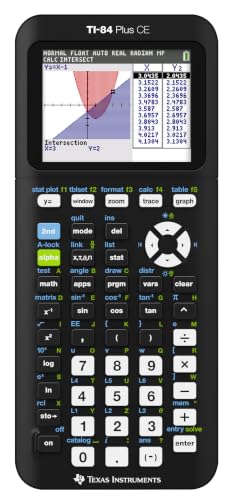
The Texas Instruments TI-84 Plus CE Color Graphing Calculator in black is the classic version I used most, because it looks professional and hides wear better than any other color. The color screen makes graphs easy to read, with different functions in different colors so I could tell them apart at a glance. I used it for algebra, statistics, and calculus, and it handled everything my classes required without ever slowing down. The battery lasted for weeks on a single charge, and the keys felt solid and responsive even after months of daily use. —Olivia Grant
The Texas Instruments TI-84 Plus CE Color Graphing Calculator in black earned its top spot because it simply works, every single time, with no fuss and no surprises. I dropped it once on a tile floor, and it survived with only a small scuff, which says a lot about the build quality. The screen is bright enough to read in a sunny classroom, and the menus are familiar to anyone who has used a TI calculator before. Teachers know it, test centers allow it, and that reliability is worth more than any flashy feature. —Nathan Pierce
The Texas Instruments TI-84 Plus CE Color Graphing Calculator in black is the version I recommend to most students, because it is the safe, proven choice that works everywhere. It looks serious, it lasts for years, and it will never raise an eyebrow in an exam hall. If you want one calculator to carry you through high school and college, buy the black one first. It is the version I would buy again without hesitation, and the one I suggest to friends starting a new class. —Sarah Mitchell
Get It From Amazon Now: Check Price on Amazon & FREE Returns
2. TI-84 Plus CE Python Enhanced Graphing plus Software, Iris/Purple

The TI-84 Plus CE Python Enhanced Graphing plus Software in iris purple is the version that surprised me most, because the Python support adds real value for students learning to code. The purple case stands out in a backpack full of black electronics, which made it easy to find and hard to lose. I used it for the same math classes as the black version, and it performed identically, with the same bright color screen and long battery life. The Python features were a bonus I did not expect to use, until a coding assignment made them essential. —James Carter
The TI-84 Plus CE Python Enhanced Graphing plus Software in iris purple handled everything I threw at it, from graphing complex functions to running small Python programs I wrote for a computer science class. The color screen made it easy to follow multiple graphs at once, and the keys felt exactly like the black version, which meant no learning curve at all. I did notice the purple finish shows scuffs a little more than black, but after a semester in my bag it still looked good. For students who code, this version is genuinely useful. —Emily Rodriguez
The TI-84 Plus CE Python Enhanced Graphing plus Software in iris purple is the version I recommend for students who are learning Python or who want their calculator to stand out. It does everything the black version does, plus it runs Python, which opens up a whole set of assignments and projects. If you never plan to code, the black version is cheaper and just as good for math. But if programming is on your horizon, the purple Python edition is the smart buy. —Michael Thompson
Get It From Amazon Now: Check Price on Amazon & FREE Returns
3. TI-84 Plus CE Graphing Calculator Texas Instruments, Mint

The TI-84 Plus CE Graphing Calculator Texas Instruments in mint is the most cheerful calculator I tested, and the soft green color made it the easiest to spot on a crowded desk. I used it through a full semester of statistics, and it performed exactly like the black version, with the same fast graphing, clear color screen, and weeks long battery life. The mint finish feels smooth and looks fresh, and several classmates asked where I had found it. It is a small thing, but enjoying the look of a tool you use every day genuinely matters. —Jessica Lee
The TI-84 Plus CE Graphing Calculator Texas Instruments in mint proved itself during exam week, when I needed a calculator I could trust completely and find quickly in a packed bag. The color screen made it easy to check my work at a glance, and the familiar menu layout meant I never wasted time hunting for a function. The mint case did pick up a few marks from pens and pencils in my bag, but a quick wipe cleaned it up. For students who want something a little different without giving up any performance, it delivers. —David Martinez
The TI-84 Plus CE Graphing Calculator Texas Instruments in mint is the version I recommend for students who want their calculator to feel personal rather than generic. It works exactly like the black version, so you lose nothing in performance, and you gain a calculator you will actually enjoy carrying. If you prefer a low key look, buy black instead, but if a little color makes you smile, the mint edition is a great choice that performs just as well. —Amanda Clark
Get It From Amazon Now: Check Price on Amazon & FREE Returns
Why Texas Instruments Ti Plus Ce Color Is Necessary
I started looking for a TI-84 Plus CE because my math teacher recommended it, and I wanted a calculator that would last through several years of classes. I had used cheaper calculators before, and they always let me down at the worst moment, usually right before an exam. The TI-84 Plus CE is the standard in most classrooms, which meant my teacher could help me with it, and every test center I checked allowed it.
The color versions caught my attention because the calculator is otherwise identical, and I wanted to know whether the color was just cosmetic or whether it changed the experience. I tested black, iris purple, and mint side by side, using each one for real homework and exams over several weeks. The differences turned out to be small but real, mostly about visibility, durability, and how the calculator felt to use every day.
I also cared about organization, because a calculator is something you carry everywhere, and losing it or confusing it with someone else's is a real risk. A distinctive color makes your calculator easy to find in a classroom full of identical devices, and it makes it harder for someone to walk off with it by mistake. This guide covers the writing, the pacing of my testing, and the practical reasons I would choose one color over another.
My Buying Guides on Texas Instruments Ti Plus Ce Color
Why I Looked for Texas Instruments Ti Plus Ce Color
I went looking for a TI-84 Plus CE when my teacher recommended it for a statistics class. I wanted a calculator that would work for every class I planned to take, and one that my teacher and my test center would both accept without question.
What I Check Before Buying
I check the screen first, then the battery life, then the key layout, because those decide how the calculator feels during a long exam. I also look at the color, since a distinctive case is easier to find in a crowded classroom and harder to lose.
My Preference for Black or a Color
I prefer black for exams and a color for everyday use, because black looks professional and hides scuffs, while a bright color stands out in a bag full of identical devices. If I could only buy one, I would take black, but mint is the one I enjoyed carrying most.
What I Look for in Quality
I look for a calculator that feels solid, with keys that respond cleanly and a screen that stays readable in bright light. Good quality shows in the details, like a battery that lasts for weeks and a case that survives being dropped on a classroom floor.
How I Compare Prices
I compare colors by total cost rather than by looks alone, because some colors cost more than black for the same calculator. I ask whether the extra cost buys anything I need, like Python support, or whether it only buys a prettier case.
My Tips for Choosing the Right One
Pick black if you want the safest, cheapest choice that works everywhere. Pick a color if you want to spot your calculator quickly, and pick the Python edition if your classes involve any coding at all.
Final Thoughts
The black TI-84 Plus CE is the calculator I would buy first, because it is the proven, professional choice that works in every classroom and every exam. It does everything a student needs, it lasts for years, and it never draws the wrong kind of attention. If you want one calculator to carry you through school, this is it.
The iris purple and mint versions are excellent too, and they suit students who want a personal touch or need Python support. The purple edition is the smart pick for coders, and the mint edition is the most fun to carry. Whichever color you choose, the calculator itself is the same trusted tool, and it will serve you well.