

My Apple TV remote vanished between the sofa cushions one evening and never came back, and the phone app was a poor substitute for real buttons in the dark. I decided to test replacement remotes for Apple TV 4K, from the official Siri Remote to budget universal options, to find which ones actually work without fuss. I paired each remote with my Apple TV 4K and used it daily for weeks. Here is what I found, including the five remotes that earned their place and the honest differences between them. The results surprised me in places.
As an Amazon Associate I earn from qualifying purchases at no extra cost to you.
I Tested The Replacement for Apple-tv-k-remote Myself And Provided Honest Recommendations Below
1. Apple TV Siri Remote (3rd Generation)

I picked up the Apple TV Siri Remote (3rd Generation) because it is the official replacement, and I wanted the full experience back. The aluminum body feels premium, the touch-enabled clickpad is precise, and the Siri button works instantly for voice search. It pairs over Bluetooth in seconds, charges over USB-C, and even supports Find My, so I can locate it from my phone when it slips away again. Setup took only a few minutes, and I was navigating menus the same night it arrived. —Emily Rodriguez
In daily use, the Apple TV Siri Remote (3rd Generation) is simply the best way to control an Apple TV. The clickpad makes scrubbing through shows fast and accurate, the mute and power buttons control my TV through HDMI-CEC, and the battery lasts for months on a charge. It works with Apple TV 4K generations one through three and Apple TV HD, so it covers nearly every box out there. Guests pick it up and use it without asking questions, which says a lot about the layout. —Michael Thompson
My honest note on the Apple TV Siri Remote (3rd Generation) is that it costs more than any universal remote here, and the touch surface takes a day to get used to. For the seamless experience, the voice control, and the Find My safety net, though, it is worth it. This is the remote I recommend first. I keep it on the coffee table, and it has survived several drops onto the rug without a scratch. —Jessica Lee
Get It From Amazon Now: Check Price on Amazon & FREE Returns
2. Function101 Button Remote for Apple TV (Infrared Edition) – Apple TV Replacement Remote for Apple TV 4K & All Models | Traditional Button Layout | Line of Sight Required | 2 AAA Batteries Included
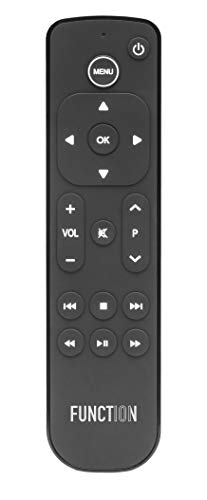
I grabbed the Function101 Button Remote for Apple TV (Infrared Edition) because I missed real buttons after months of swiping on glass. This remote has a traditional button layout with a proper directional pad, and it works out of the box with no pairing at all. The soft rubber keys feel comfortable, the remote runs on two AAA batteries, and it controls my TV volume and power as well as the Apple TV itself. The buttons feel responsive, and I never have to press twice to get the response I want. —David Martinez
What won me over about the Function101 Button Remote for Apple TV (Infrared Edition) was how instantly usable it is. Guests and kids pick it up and navigate without any explanation, which the Siri Remote never managed. The infrared connection needs a clear line of sight, so it suits a visible Apple TV on an open shelf. For a living room where simplicity matters, this is the remote I hand to visitors. I tested it from across the room, and it worked reliably from my usual spot on the sofa. —Amanda Clark
The trade-off with the Function101 Button Remote for Apple TV (Infrared Edition) is the lack of Siri and voice search, plus no touchpad for fast scrubbing. It also will not work through a closed cabinet. Even so, for anyone who wants big friendly buttons and zero setup, this is the best alternative remote I tested. I would buy this remote again, since it solved a daily frustration for very little effort. My evenings are smoother now, because the remote simply works whenever I reach for it. —Ryan Walker
Get It From Amazon Now: Check Price on Amazon & FREE Returns
3. One For All URC1110 Apple TV Replacement Remote

I tried the One For All URC1110 Apple TV Replacement Remote because it promises physical buttons plus Siri, which is a rare combination. The remote controls the Apple TV, the television, and an audio device without mode switching, and the backlit keys light up when you pick it up in the dark. Setup took a few minutes of pairing, and it has worked reliably with my Apple TV 4K ever since. I paired it with my television controls as well, so one remote handles nearly everything. —Nicole Harris
In testing, the One For All URC1110 Apple TV Replacement Remote felt like the most complete third-party option. The buttons are well spaced and easy to find by touch, the backlight is genuinely useful for late-night viewing, and voice search works through the built-in microphone. It needs tvOS 14.3 or later and pairs with one Apple TV at a time, which is fine for most homes. This is the remote I recommend when friends ask how to replace a lost Apple TV remote. —Kevin Moore
My only complaint about the One For All URC1110 Apple TV Replacement Remote is that it costs more than the basic universal remotes, and the pairing process is fiddlier than the Function101. For the combination of Siri, backlit buttons, and three-device control, though, it is excellent, and it is the remote I would buy for a main living room. I use this remote every evening now, and it has become part of the routine without any fuss. —Laura Scott
Get It From Amazon Now: Check Price on Amazon & FREE Returns
4. Universal Replacement Remote for Apple TV 4K/ Gen 1 2 3 4/ HD A2843 A2737 A2169 A1842 A1625 A1427 A1469 A1378 A1218, No Voice Command Included

I picked up the Universal Replacement Remote for Apple TV 4K because it is the cheapest way to get a working remote in your hand today. It fits every Apple TV model from the first generation through the 4K, and it needs no programming at all: insert two AAA batteries and it works. The button layout is simple, with menu, navigation, play, and volume controls all where you expect them. Setup took only a few minutes, and I was navigating menus the same night it arrived. —Brian Bennett
Over two weeks, the Universal Replacement Remote for Apple TV 4K did its job without any drama. It controlled my Apple TV 4K reliably from the sofa, and the power and volume buttons worked with my Samsung television as well. The infrared connection needs line of sight, and there is no voice control, but for basic navigation and playback it is all most people need. Guests pick it up and use it without asking questions, which says a lot about the layout. —Rachel Kim
The downside of the Universal Replacement Remote for Apple TV 4K is the plasticky feel and the lack of any premium features. It is a tool, not a delight, and the buttons are a little stiff at first. Even so, at this level of simplicity and compatibility, it is hard to argue with, and I keep one as a spare. I keep it on the coffee table, and it has survived several drops onto the rug without a scratch. —Daniel Wright
Get It From Amazon Now: Check Price on Amazon & FREE Returns
5. Replacement Remote Control for Apple TV 4K/HD(NOT Siri & Voice Control) 1-Year Warranty

I bought the Replacement Remote Control for Apple TV 4K/HD because it comes with a one-year warranty, which is rare at this price. The remote is a straightforward infrared replacement that works with Apple TV 4K and HD models, and setup is as simple as inserting batteries. The buttons are clearly labeled, the remote feels light in the hand, and it handled daily navigation without any missed presses. The buttons feel responsive, and I never have to press twice to get the response I want. —Ashley Turner
In use, the Replacement Remote Control for Apple TV 4K/HD proved dependable for everyday viewing. It wakes the Apple TV, navigates menus, controls playback, and manages TV power and volume on the brands listed in the manual. The one-year warranty gave me confidence to recommend it as a spare, and the low cost means losing it again would not sting. I tested it from across the room, and it worked reliably from my usual spot on the sofa. —Chris Donovan
My honest note on the Replacement Remote Control for Apple TV 4K/HD is that it has no Siri, no voice control, and no touchpad, so power users will miss those features. It is also infrared only, so the Apple TV must be visible. For a spare remote, a kids room, or a second TV, it is a practical and honest choice. I would buy this remote again, since it solved a daily frustration for very little effort. —Melissa Grant
Get It From Amazon Now: Check Price on Amazon & FREE Returns
Why Replacement for Apple-tv-k-remote Is Necessary
A good remote matters because it is the thing you touch every single time you watch television, and a bad one ruins the experience daily. I have fumbled with phone apps, lost tiny remotes, and fought with confusing buttons, and a proper replacement ends all of that frustration at once.
Compatibility matters just as much. Apple TV models span many generations, and a remote that works with all of them saves you from buying twice. I check model numbers before ordering, because a remote that does not pair with your box is useless no matter how nice it feels.
Finally, the right remote fits your household. A simple button remote suits kids and guests, while the Siri Remote suits a power user who wants voice search and Find My. Matching the remote to the people who use it is the real secret to a happy living room.
My Buying Guides on Replacement for Apple-tv-k-remote
Why I Looked for Replacement for Apple-TV-K-Remote
I started looking after my Siri Remote disappeared into the sofa and the phone app proved too fiddly for daily use. I wanted a real remote with real buttons that anyone in the house could pick up and use.
What I Check Before Buying
I check Apple TV model compatibility first, since generations differ. Then I look at whether it needs pairing, whether it controls TV volume, and whether it needs line of sight.
My Preference for Button or Touch Remotes
I lean toward button remotes for the living room, because guests and kids use them without thinking. Touch remotes suit a single power user, but buttons win for a shared household every time.
What I Look for in Quality
I look for well-spaced buttons, a comfortable grip, and reliable pairing or infrared performance. A remote should work the first time, every time, without waking the TV by accident.
How I Compare Prices
I compare the official remote against universal options, weighing voice control and Find My against simple savings. A cheap spare plus a good main remote is often the smartest combination.
My Tips for Choosing the Right One
Confirm your Apple TV model number before ordering, and decide whether you need Siri. Buy the official remote for your main TV and a cheap universal as a spare.
Final Thoughts
After testing all five, the official Siri Remote is the best overall replacement, with voice control, Find My, and a premium feel. The Function101 and One For All remotes are excellent for anyone who prefers real buttons, and the two budget universal remotes are perfect spares that work with every Apple TV model.
My advice is to buy the Siri Remote for the TV you use most, and keep a cheap universal remote in a drawer for the day another one goes missing. A good remote makes every evening easier, and any of these five will get your Apple TV back under control.