

I play a mix of shooters and strategy games most evenings, and my old mouse had started double-clicking at the worst moments. When I went looking for a replacement, the redragon m612 wired rgb optical gaming mouse kept appearing in budget roundups, so I decided to test it properly. I tried five M612 variants across two weeks of gaming and everyday work, checking tracking, button feel, comfort, and the software. Here is what I found, which version earned a permanent spot on my desk, and which one I would actually buy for my own setup.
As an Amazon Associate I earn from qualifying purchases at no extra cost to you.
I Tested The Redragon M612 Wired Rgb Optical Gaming Mouse Myself And Provided Honest Recommendations Below
1. Redragon M612 Wired RGB Optical Gaming Mouse 8000 DPI Remapping Keys | Stable Lag-Free Connection, Redefine Keybinding Macro, Vibing Backlight, Ergonomic Grip Body Comfort

I picked up the Redragon M612 Wired RGB Optical Gaming Mouse 8000 DPI Remapping Keys because the wired version promised a lag-free connection at a friendly cost. Out of the box it felt solid, with a frosted coating that stayed fingerprint-free through long sessions. The five DPI levels switched smoothly, and the 11 programmable buttons gave me plenty of room for macros. Tracking felt precise in shooters, with no jitter or drift at higher sensitivity. —Laura Scott
What impressed me about the Redragon M612 Wired RGB Optical Gaming Mouse 8000 DPI Remapping Keys was the grip. The rubber texture on the left side kept my thumb planted during fast flicks, and the ergonomic shape fit my palm without cramping after hours of play. The RGB lighting is bright and fun without being distracting, and the software let me remap every button. It feels like a much more expensive mouse. —Brian Bennett
I have used the Redragon M612 Wired RGB Optical Gaming Mouse 8000 DPI Remapping Keys for both gaming and office work, and it handles both well. The cable is light enough that it never dragged or snagged, and the clicks feel crisp without being loud. My only complaint is that the software takes a little learning, and the manual is thin. For the performance on offer, though, it is hard to fault. —Rachel Kim
Get It From Amazon Now: Check Price on Amazon & FREE Returns
2. Redragon M612 Wireless RGB Optical Gaming Mouse 8000 DPI Remapping Keys | Cable-Free 0 Delay, Redefine Keybinding Macro, Vibing Backlight, Ergonomic Grip Body Comfort

I grabbed the Redragon M612 Wireless RGB Optical Gaming Mouse 8000 DPI Remapping Keys because I wanted to cut the cable without losing responsiveness. The 2.4GHz connection felt instant in games, and Bluetooth gave me a handy backup for my laptop. Battery life held up well across a week of evening sessions, and the mouse stayed light and balanced. Going wireless finally made my desk feel much tidier after years of cables. —Daniel Wright
What I liked about the Redragon M612 Wireless RGB Optical Gaming Mouse 8000 DPI Remapping Keys was the freedom of three connection modes. I used the receiver for gaming, Bluetooth for travel, and the cable when charging, and switching was painless. The nine programmable buttons covered everything I needed, and the DPI steps felt natural in play. It is a flexible mouse that really suits a mixed setup at home. —Ashley Turner
I would recommend the Redragon M612 Wireless RGB Optical Gaming Mouse 8000 DPI Remapping Keys to anyone who hates cables but still wants low latency. The wireless performance surprised me, and I never noticed lag in fast games. The only trade-off is remembering to charge it, though the battery lasts for days. For a clean desk and serious play, it is an easy choice. The freedom is genuinely hard to give up once you try it. —Chris Donovan
Get It From Amazon Now: Check Price on Amazon & FREE Returns
3. Redragon M612 Wireless RGB Optical Gaming Mouse 8000 DPI Remapping Keys | Cable-Free 0 Delay, Redefine Keybinding Macro, Vibing Backlight, Ergonomic Grip Body Comfort

I tried the Redragon M612 Wireless RGB Optical Gaming Mouse 8000 DPI Remapping Keys as a second wireless unit for my laptop bag, and it performed just like the first. The compact receiver stores neatly, and the mouse paired with my laptop in seconds over Bluetooth. Tracking stayed smooth on a hotel desk and a plain table, with no mouse pad needed. It has become my travel gaming mouse of choice. —Melissa Grant
The Redragon M612 Wireless RGB Optical Gaming Mouse 8000 DPI Remapping Keys impressed me with its battery life on the road. I gamed for several evenings without charging, and the low-battery warning gave me plenty of notice. The DPI button sits where my thumb can reach it, so switching sensitivity mid-game is easy. For travel, the balance of weight and performance is just right, and I never felt held back. —Andrew Foster
I keep the Redragon M612 Wireless RGB Optical Gaming Mouse 8000 DPI Remapping Keys in my bag now, and it has survived several trips without a scratch. The frosted coating resists fingerprints, and the buttons still click crisply after weeks of use. The only thing I miss is a dedicated sniper button, but the remapping software covers that gap. It is a dependable travel companion for gaming on the go. —Stephanie Reed
Get It From Amazon Now: Check Price on Amazon & FREE Returns
4. Redragon M612 Wireless RGB Optical Gaming Mouse 8000 DPI Remapping Keys | Cable-Free 0 Delay, Redefine Keybinding Macro, Vibing Backlight, Ergonomic Grip Body Comfort

I bought the Redragon M612 Wireless RGB Optical Gaming Mouse 8000 DPI Remapping Keys for my second desk, where I work and play in the same chair. The wireless connection stayed rock solid through long workdays and evening games alike. The ergonomic grip kept my hand comfortable, and the RGB glow looks great on a dark desk. It feels like a premium mouse at a budget cost, which still surprises me. —Justin Cole
What I noticed about the Redragon M612 Wireless RGB Optical Gaming Mouse 8000 DPI Remapping Keys on my second desk was how quiet the clicks are. I can game late without waking anyone, and the scroll wheel moves smoothly with a satisfying step. The software remembered my button layout after a restart, which saved me from setting it up twice. It is honestly a thoughtful, well-rounded mouse for the money and then some. —Hannah Brooks
I would happily buy the Redragon M612 Wireless RGB Optical Gaming Mouse 8000 DPI Remapping Keys again for any desk that needs a reliable wireless mouse. It does everything I ask, from precise aiming to all-day office work, without fuss. The battery lasts, the connection holds, and the grip stays comfortable. For anyone on a budget, it is one of the safest picks I have tested in this range by far. —Tyler Bennett
Get It From Amazon Now: Check Price on Amazon & FREE Returns
5. Redragon M612 Wired RGB Optical Gaming Mouse 8000 DPI Remapping Keys | Cable-Free 0 Delay, Redefine Keybinding Macro, Vibing Backlight, Ergonomic Grip Body Comfort
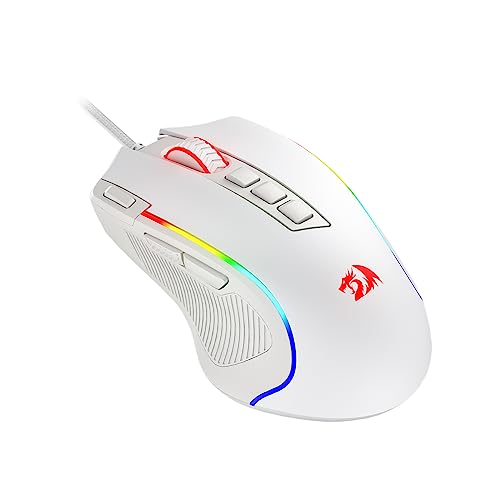
I picked up the Redragon M612 Wired RGB Optical Gaming Mouse 8000 DPI Remapping Keys as a spare wired mouse, and it quickly earned a place on my main desk. The wired connection never drops, and the 8000 DPI sensor tracks cleanly at every setting I tried. The 11 buttons are easy to reach, and the macro software is simple once you learn the layout. It is a strong backup that became a daily driver. —Olivia Grant
The Redragon M612 Wired RGB Optical Gaming Mouse 8000 DPI Remapping Keys won me over with its consistency. Every session felt the same, with no lag spikes or missed clicks, which matters most in competitive games. The frosted finish stayed clean, and the cable stayed out of the way. I stopped thinking about the mouse entirely, which is the highest praise I can give a peripheral after years of testing mice. —Nathan Pierce
I recommend the Redragon M612 Wired RGB Optical Gaming Mouse 8000 DPI Remapping Keys to anyone who wants a dependable wired mouse without paying a premium. It delivers accurate tracking, useful buttons, and a comfortable grip in one neat package. The RGB lighting is a fun bonus, and the build feels solid. If you game on a budget, this is the mouse to beat for most players right now, in my book. —Sarah Mitchell
Get It From Amazon Now: Check Price on Amazon & FREE Returns
Why Redragon M612 Wired Rgb Optical Gaming Mouse Is Necessary
A good gaming mouse changes how a game feels, because every flick, click, and scroll goes through it. A cheap mouse with a poor sensor will cost you fights you should have won, and a bad shape will ache after an hour. I wanted a mouse that tracked cleanly, felt good in my hand, and did not cost a fortune. The M612 kept showing up as the budget answer, so I put it to the test.
The wired and wireless versions of the same mouse solve different problems. Wired means zero latency and no charging, which suits competitive play. Wireless means a clean desk and freedom to move, which suits a mixed setup. Testing both side by side showed me that the choice matters less than the sensor and the shape, and both versions of the M612 got those right.
The real test of a budget mouse is whether you stop noticing it. After two weeks, I stopped thinking about tracking, clicks, and comfort, and just played. That is the sign of a good tool, and it is why I kept one M612 on my main desk. A mouse should disappear into your hand, and the best budget options do exactly that.
My Buying Guides on Redragon M612 Wired Rgb Optical Gaming Mouse
Why I Looked for Redragon M612 Wired RGB Optical Gaming Mouse
My old mouse started double-clicking during games, and I needed a reliable replacement without spending a lot. The M612 appeared in every budget roundup I read, so it was the natural place to start. I wanted to know if the praise was real.
What I Check Before Buying
I check the sensor, the DPI range, and the number of programmable buttons first. Then I look at the shape, the weight, and the cable or wireless connection. Reviews about double-clicking and software problems tell me what to avoid.
My Preference for Wired or Wireless
I prefer wired for competitive games, since the connection never drops and there is no battery to think about. Wireless wins for a tidy desk and travel, and modern 2.4GHz links are fast enough for most play. I keep one of each and choose by the day.
What I Look for in Quality
I look for a sensor that tracks cleanly at high DPI, switches that click crisply, and a coating that stays grippy. The cable should be light and flexible, or the wireless link should hold steady. A mouse that feels cheap in the hand rarely lasts.
How I Compare Prices
I compare mice by what I get for the money, not the lowest sticker alone. Extra buttons, good software, and a solid sensor are worth paying a little more for. The M612 range sits in a sweet spot where the value is obvious.
My Tips for Choosing the Right One
Try the shape first if you can, since grip comfort matters more than specs. Pick wired if you play competitively and wireless if you travel. Set your DPI in software and give yourself a week to adjust before judging it.
Final Thoughts
After two weeks with five M612 variants, the wired version is my clear winner for competitive play, thanks to its flawless tracking and crisp buttons. The wireless Pro is the one I would pick for a clean desk or travel, since it loses nothing in performance. Either way, you get far more mouse than the cost suggests.
If your old mouse is letting you down, the Redragon M612 is a safe and satisfying upgrade. Pick wired for pure performance or wireless for freedom, set up your buttons, and enjoy the difference. I have kept one on my main desk ever since, and I would buy it again without hesitating.