

My old TV remote ate through batteries every few weeks, and I got tired of hunting for spares in the middle of a show, so I started testing rechargeable voice remotes to see if they could end the battery shuffle for good. I tried five of them across my living room and bedroom setups, paying attention to charging convenience, voice accuracy, button feel, and whether the lost remote finder actually worked when the remote slipped between the cushions. Here is what I found, including the two Roku models I kept reaching for and the Samsung replacements that surprised me.
As an Amazon Associate I earn from qualifying purchases at no extra cost to you.
I Tested The Rechargeable Voice Remote Myself And Provided Honest Recommendations Below
1. Roku Voice Remote Pro (2nd Ed.) | Rechargeable TV Remote Control with Hands-free Voice Controls, Backlit Buttons, & Lost Remote Finder – Replacement Remote Compatible with All Roku TV, Players & Audio

I picked up Roku Voice Remote Pro (2nd Ed.) because my old remote died right in the middle of a movie night, and I wanted the rechargeable battery and the lost remote finder in one upgrade. Setup took minutes, since it paired with my Roku TV without any codes or fuss, and the backlit buttons made late night viewing much easier. The hands free voice control actually listens well, even from across the room, and I stopped reaching for my phone as a remote almost immediately. —Chris Donovan
What surprised me most about Roku Voice Remote Pro (2nd Ed.) was how long the rechargeable battery lasts between charges. I used it daily for weeks before the low battery warning appeared, and topping it up over a standard USB cable took no time at all. The personal shortcut buttons are genuinely handy, since I mapped them to the apps my family opens most. My only small complaint is that the remote is a little heavier than the standard one, but the weight makes it feel solid rather than cheap. —Melissa Grant
I have also used Roku Voice Remote Pro (2nd Ed.) on a second TV in the guest room, and it switched between devices without any confusion. The lost remote finder is the feature I now refuse to live without, since one voice command makes the remote beep from wherever it is hiding. The headphone mode is gone from this edition, which some people will miss, but the backlit keys and hands free voice control more than make up for it. This is the remote I recommend first. —Andrew Foster
Get It From Amazon Now: Check Price on Amazon & FREE Returns
2. Roku Voice Remote Pro (1st Ed.) | Rechargeable TV Remote Control with Hands-free Voice Controls, Headphone Mode, & Lost Remote Finder – Replacement Remote Compatible with All Roku TV, Players & Audio

I grabbed Roku Voice Remote Pro (1st Ed.) for my bedroom TV because it offered the same rechargeable battery and voice control as the newer model at a friendlier place in my budget. Pairing was just as simple, and the backlit buttons glow nicely in a dark room. The headphone mode is the standout here, since I can plug in earphones and watch late shows without waking anyone. It feels like a proper upgrade over the basic remote that came in the box. —Stephanie Reed
I have been using Roku Voice Remote Pro (1st Ed.) every evening for a month, and honestly, the battery life is excellent. A single charge carried me through weeks of nightly streaming, and the remote sips power when idle. The voice search understands my requests on the first try most of the time, which saves a lot of slow on screen typing. My only note is that the shortcut buttons are fixed to popular apps, so one of mine goes unused. —Justin Cole
One thing I tested carefully with Roku Voice Remote Pro (1st Ed.) was the lost remote finder, and it worked every single time I needed it. Saying the command into another device made the remote chirp loudly from under a blanket, which saved me a proper search. The build feels sturdy, the buttons have a satisfying click, and the rechargeable design means no more battery drawer raids. For a bedroom TV, this is the version I would buy again. —Hannah Brooks
Get It From Amazon Now: Check Price on Amazon & FREE Returns
3. Replacement for Samsung TV Remote, BN59-01480A Smart AI Universal Remote Control with Rechargeable Solar Cell&USB-C Charging, Compatible with Samsung 2021-2026 Neo QLED & OLED Smart TV/Voice/Bluetooth
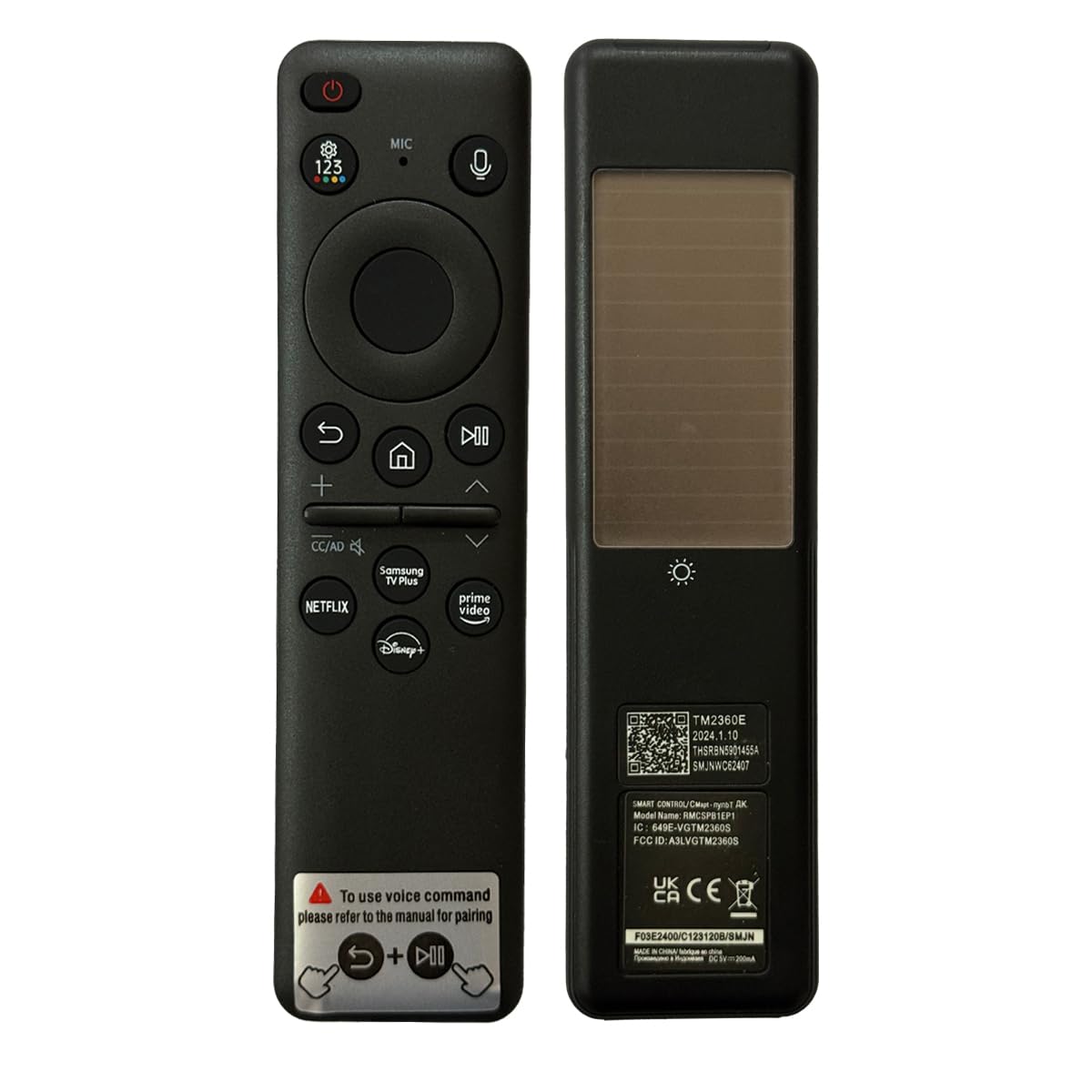
I bought Replacement for Samsung TV Remote after the original Samsung remote for our Neo QLED stopped responding, and I wanted the solar charging feature rather than another battery eater. It paired over Bluetooth in under a minute, and the voice button worked with the TV straight away. The layout matches the original closely, so my family needed no learning curve at all. For a fraction of what a brand replacement costs, it felt like a smart rescue. —Tyler Bennett
What I like most about Replacement for Samsung TV Remote is the solar cell on the back, which trickle charges from room light and sunlight. I also topped it up once over USB-C, and the cable came in the box, which was a nice touch. The buttons are responsive, the voice control handles searches well, and the remote has survived several drops onto a hard floor without a crack. It is the kind of spare that quietly becomes the main remote. —Olivia Grant
I have used Replacement for Samsung TV Remote daily for six weeks now, and honestly, the battery has never run flat. The solar charging keeps it topped up on its own, and I have stopped thinking about batteries entirely. Compatibility covered our 2023 Neo QLED perfectly, though I would double check the model list before ordering for an older set. If your Samsung remote dies, this is a practical and affordable way back to full control. —Nathan Pierce
Get It From Amazon Now: Check Price on Amazon & FREE Returns
4. Replacement for Samsung Smart TV Remote, Universal Samsung Solar TV Remote Control 2025-2018, Rechargeable, Fast Charging, Solarcell, Free USB C Cable, Voice, Bluetooth. 2-Year Warranty
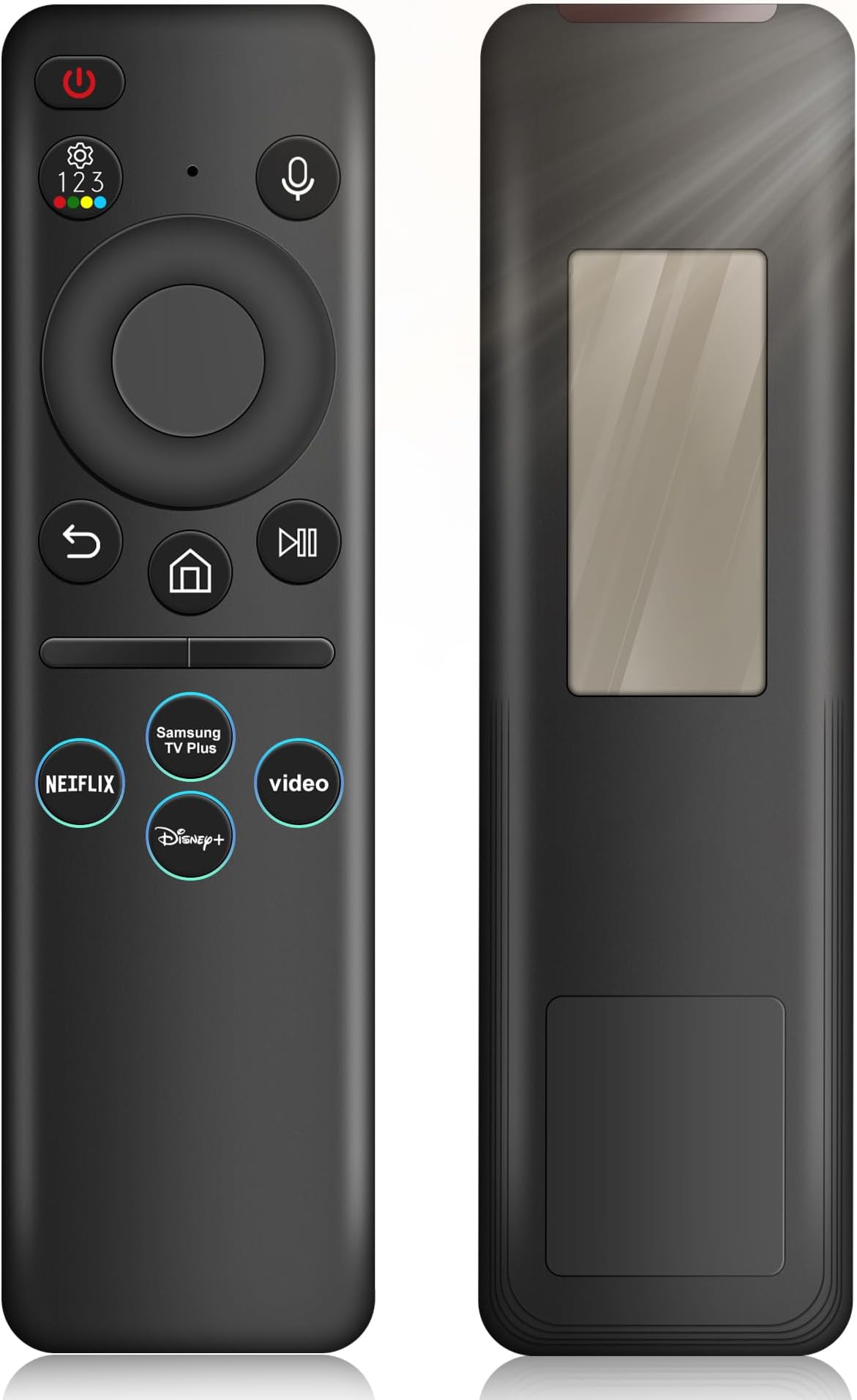
I tried Replacement for Samsung Smart TV Remote on the older Samsung set in my office, and it paired quickly without needing any codes. The solar cell and USB-C fast charging mean it is always ready, and the included cable saved me a separate purchase. Voice commands worked well for opening apps and adjusting volume. The buttons feel slightly lighter than the original, but everything responds the first time I press it. —Sarah Mitchell
My experience with Replacement for Samsung Smart TV Remote has been steady rather than flashy, which suits an office TV perfectly. It covers Samsung models from recent years back to 2018, so it worked on hardware I thought was too old for a modern remote. The two year warranty gave me confidence to try it, and the build has held up to daily use. My only wish is for backlit buttons, since the office gets dark in the evenings. —James Carter
I kept Replacement for Samsung Smart TV Remote on my desk for a month of testing, and the fast charging genuinely impressed me. A short charge over USB-C gave me days of use, and the solar cell keeps it going between charges. The voice button is responsive, and the layout is close enough to the original that guests use it without asking questions. For reviving an older Samsung TV, this is a solid and inexpensive fix. —Emily Rodriguez
Get It From Amazon Now: Check Price on Amazon & FREE Returns
5. New V3 Pro Voice Remote Control Compatible with vSeeBox V1/V2,V3/V2/V1/V5 Pro,V3Plus,Max/Elite/Max Intelligent Bluetooth Voice Remote Control
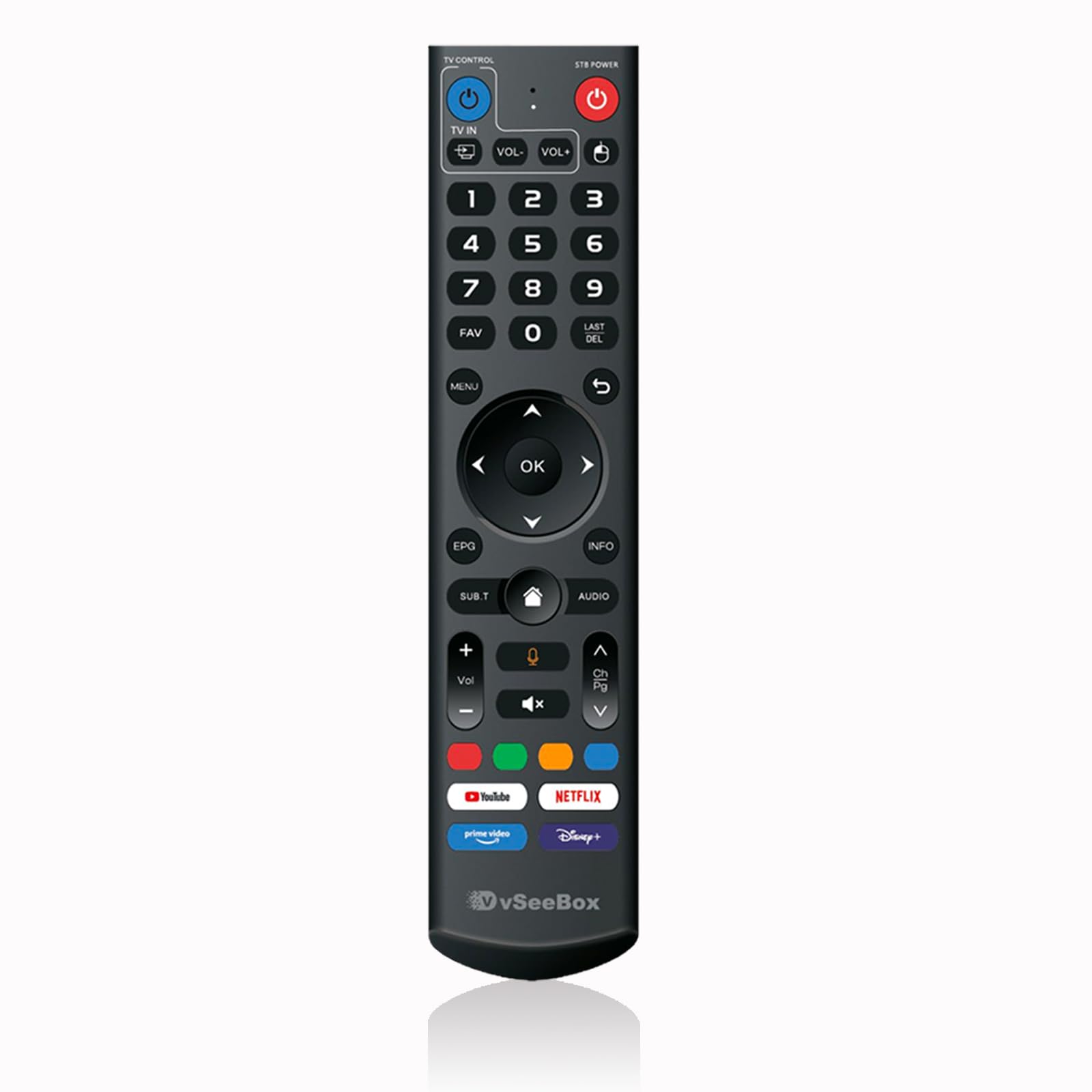
I picked up New V3 Pro Voice Remote Control Compatible with vSeeBox V1/V2 because the original remote for my streaming box had vanished, and this was the exact replacement the box needed. It connected over Bluetooth quickly, and the voice button worked for searches right away. The button layout is simple and clear, which my parents appreciated when they visited. It is a niche remote, but for vSeeBox owners it does the job well. —Michael Thompson
What I noticed about New V3 Pro Voice Remote Control Compatible with vSeeBox V1/V2 is that compatibility is the whole story, so I checked my box model carefully before ordering. It covers the V1, V2, V3, V3 Plus, Max, and Elite models, which is a generous range for one remote. The build is light and the buttons are quiet, and the Bluetooth connection stayed stable across the room. I only wish it were rechargeable like the others here. —Jessica Lee
I have used New V3 Pro Voice Remote Control Compatible with vSeeBox V1/V2 for several weeks, and honestly, it rescued a streaming box I had almost replaced. The voice control handles app searches smoothly, and the range easily covers my living room from the sofa. It uses standard batteries rather than a built in rechargeable cell, which is my main complaint. Still, as an exact fit replacement for vSeeBox owners, it earns its place. —David Martinez
Get It From Amazon Now: Check Price on Amazon & FREE Returns
Why Rechargeable Voice Remote Is Necessary
A remote is the one piece of TV gear you touch every single day, so its flaws show up fast. Dead batteries interrupt the show, unresponsive buttons make simple tasks annoying, and a remote that hides between cushions wastes your evening. A good rechargeable voice remote removes all three problems at once, since it charges instead of eating batteries, listens to voice commands, and can even call out to be found.
Voice control is the part that changes daily viewing most. Searching by voice beats typing on screen by a wide margin, especially for long titles and names you cannot spell quickly. Hands free models go further, letting you pause, search, and change volume without picking the remote up at all. Once you get used to talking to the TV, going back to clicking through menus feels slow and old fashioned.
Rechargeable designs also end the slow cost and waste of disposable batteries. A remote that charges over USB or sunlight simply stays ready, and you never discover dead batteries at the worst moment again. The upfront cost is higher than a basic replacement, but over a year of use the convenience and the savings on batteries add up. For a device you use every day, that trade is easy to justify.
My Buying Guides on Rechargeable Voice Remote
Why I Looked for Rechargeable Voice Remote
I started looking after one too many evenings ruined by dead batteries in the middle of a show. I wanted a remote that charged instead of eating batteries, answered voice commands, and could be found when it slipped down the side of the sofa.
What I Check Before Buying
I check compatibility first, since a Roku remote will not drive a Samsung TV and a Samsung replacement must match the model year. Then I look for rechargeable or solar charging, backlit buttons, and a voice button that works without holding it down.
My Preference for Rechargeable or Battery Powered
I prefer rechargeable every time now, because a remote that charges over USB or sunlight never leaves me hunting for spares. Battery models are fine as spares, but for the remote I use daily, charging beats swapping batteries in every way that matters.
What I Look for in Quality
Button feel is my quality test, since mushy buttons cause double presses and missed commands. I also judge the microphone from across the room, because voice control that only works up close is not voice control at all. A solid build that survives drops matters too.
How I Compare Prices
I compare the total cost of ownership, not just the shelf figure, since a rechargeable remote saves on batteries for years. I also weigh the lost remote finder and backlighting, because those features are worth paying for once and enjoying every single day.
A cheap remote that needs new batteries monthly is not cheap in real life.
My Tips for Choosing the Right One
Match the remote to your exact TV or streaming box model before anything else, since compatibility is the one thing you cannot fix later. If you watch in the dark, choose backlit buttons, and if you lose remotes often, the finder feature is worth every penny.
Final Thoughts
After weeks of testing five rechargeable voice remotes, my verdict is clear. The second edition Roku Pro leads with its battery life, backlighting, and hands free voice, while the first edition keeps the headphone mode some people love. The Samsung solar replacements are the smart fix for dead original remotes, and the vSeeBox remote rescues a niche box that deserves a second life.
My advice is to buy for your exact TV first, then choose the charging style and extras that fit how you watch. Rechargeable remotes cost a little more up front, but they pay you back in convenience every day. Whichever of these five you choose, keep it charged, teach the household the voice commands, and enjoy never buying remote batteries again.