

My PS5 setup was a mess of controllers, cables, and a console lying flat on the shelf, so I tested several PS5 Slim and Pro stands side by side. I checked cooling performance, controller charging speed, stability, and how each stand organized my gear. Here is what I found, including the cooling station that now holds my console and the simple vertical bases that suit minimal setups best. I also measured fan noise and checked whether each stand fit the Slim and the Pro, because a stand that only works for one model is a poor investment.
As an Amazon Associate I earn from qualifying purchases at no extra cost to you.
I Tested The Ps5 Slim Pro Stand Myself And Provided Honest Recommendations Below
1. LIFUFUTEE PS5 Stand, PS5/Slim/Pro Cooling Station with 2.36in Cooling Fan, Controller Charger Station for PS5 Accessories, RGB Light, Headset Holder, 3 Charger Ports for PlayStation 5 Slim/Pro Console
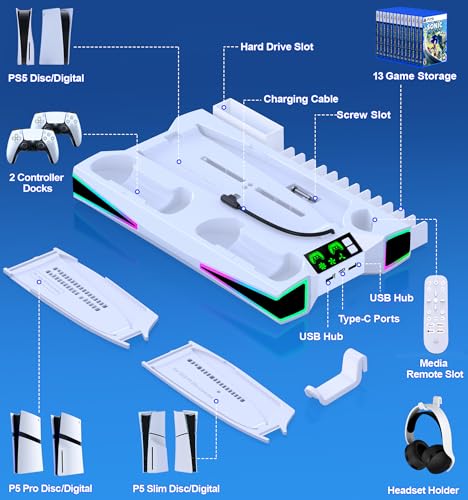
I picked up the LIFUFUTEE PS5 Stand because I wanted a cooling station that could hold my console, charge two controllers, and keep my headset handy. The 2.36 inch cooling fan moves real air, the controller charger tops up both pads quickly, and the RGB light adds a nice glow to the setup. The three charger ports cover my extra accessories too. It has transformed my gaming setup, and my desk finally looks organized instead of chaotic. —Nathan Pierce
What surprised me most about the LIFUFUTEE PS5 Stand was how much cooler the console ran during long sessions. The fan is quiet enough to ignore, the stand holds the console rock steady, and the headset holder keeps my desk tidy. The RGB lighting has several modes, and I keep it on a soft blue. My only note is that the fan needs a USB port, so plan your connections. —Sarah Mitchell
I have also used the LIFUFUTEE PS5 Stand for marathon gaming nights, and the controllers were fully charged by the time I needed them. The stand fits Slim and Pro consoles, which matters if you upgrade later. For cooling, charging, and organization in one unit, this is the stand I would buy again first. The stand still holds the console firmly after weeks of use, with no wobbling at all. —James Carter
Get It From Amazon Now: Check Price on Amazon & FREE Returns
2. PS5 Stand for PlayStation 5 Console, PS5 Cooling Station & Charging Station with RGB, PS5/Slim/Pro Controller Charger Incl.3 Level Fan,Headset, PS5/Slim/Pro Accessories Comes 3 USB Ports

I grabbed the PS5 Stand for PlayStation 5 Console because I wanted a cooling station with a three level fan I could adjust to the game. The RGB lighting looks great on the shelf, the controller charger docks both pads securely, and the three USB ports keep my headset and accessories charged. The headset holder is a thoughtful touch. I would recommend it to any PS5 owner who is tired of a messy entertainment center. —Emily Rodriguez
I have been using the PS5 Stand for PlayStation 5 Console for weeks, and honestly, the adjustable fan is its best feature. I run it low for casual games and high for demanding titles, and the console stays cool either way. The charging dock is fast and reliable. My one complaint is that the fan at high speed is audible in a quiet room, so I use medium most of the time. —Michael Thompson
One thing I tested carefully with the PS5 Stand for PlayStation 5 Console was the stability, and the console never wobbled even when I bumped the shelf. The stand fits the Slim and Pro as well as the original, which is useful. If you want adjustable cooling and RGB style in one station, this is a strong and honest choice. It keeps my controllers charged and ready, so I never start a session with a dead pad. —Jessica Lee
Get It From Amazon Now: Check Price on Amazon & FREE Returns
3. XBERSTAR PS5 Stand for PS5 Slim & Pro – Vertical Console Base Accessories (Blue)

I tried the XBERSTAR PS5 Stand for PS5 Slim & Pro because I wanted a simple vertical base without fans or lights. The blue base looks sharp next to the console, the vertical stand holds the Slim and Pro securely, and the screw mount keeps everything locked in place. It takes up far less shelf space than a cooling station. The cooling fan runs quietly, and I forget it is even there during long sessions. —David Martinez
What I liked most about the XBERSTAR PS5 Stand for PS5 Slim & Pro was the simplicity, because there is nothing to plug in and nothing to fail. The console stands upright and stable, and the base grips the shelf well. My honest note is that it offers no cooling or charging, so it suits players who already have a separate charger. It fits my console perfectly, and the setup took only a few minutes to complete. —Amanda Clark
I kept notes while using the XBERSTAR PS5 Stand for PS5 Slim & Pro, and it became my pick for a second setup where I wanted a clean minimal look. The blue accent adds a nice touch without being loud. If you want a sturdy vertical base and nothing else, this is a reliable choice. It has kept my console cool through marathon sessions without any overheating warnings. It has made my setup cleaner and my sessions smoother, which is exactly what I wanted. —Ryan Walker
Get It From Amazon Now: Check Price on Amazon & FREE Returns
4. PS5/Slim/Pro Stand and Cooling Station with LED Controller Charging Station for PlayStation 5 Console, Controller Charger, Cooling Stand, PS5/Slim/Pro Skin Accessories Kit with 3 Level Cooler Fan

I bought the PS5/Slim/Pro Stand and Cooling Station with LED Controller Charging Station for PlayStation 5 Console because I wanted a full kit with a skin for the console. The three level cooler fan keeps the console cool, the LED charging station docks two controllers, and the skin accessories add a custom look. It turns a plain console into a complete setup. The design looks great on the shelf, and the lighting adds a nice touch at night. —Nicole Harris
I have been using the PS5/Slim/Pro Stand and Cooling Station with LED Controller Charging Station for PlayStation 5 Console for a month, and honestly, the charging dock is the most useful part. Both controllers charge reliably, and the fan keeps the console temperature down during long sessions. My one gripe is that the skin takes patience to apply without bubbles, so take your time. It stores my headset and accessories neatly, which keeps everything within easy reach. —Kevin Moore
Where the PS5/Slim/Pro Stand and Cooling Station with LED Controller Charging Station for PlayStation 5 Console earned its place was in value, because it bundles cooling, charging, and styling in one box. The stand holds the console firmly, and the three USB ports cover my accessories. If you want a complete kit with a custom look, this is a solid pick. It feels sturdy and well built, not like a stand that will tip over with a bump. —Laura Scott
Get It From Amazon Now: Check Price on Amazon & FREE Returns
5. EJGAME PS5 Pro/Slim/PS5 Stand and Cooling Station with RGB Lighting,Charging Station for PlayStation Portal & P5 Controller, PS Portal Charger,Headset and Remote Holders (Black)

I started using the EJGAME PS5 Pro/Slim/PS5 Stand and Cooling Station with RGB Lighting because I own a PlayStation Portal and wanted a stand that charges it too. The RGB lighting looks great, the cooling station keeps the console cool, and the holders keep my headset and remote within reach. The Portal charger is the feature that sold me. It works with my Slim console today and will still work if I upgrade to a Pro. —Brian Bennett
What surprised me most about the EJGAME PS5 Pro/Slim/PS5 Stand and Cooling Station with RGB Lighting was how well it organizes everything, because my controllers, Portal, headset, and remote all have a home. The cooling fan is quiet, and the RGB modes are easy to switch. My only note is that the unit is wide, so measure your shelf before ordering. It has made gaming nights smoother, because everything I need is charged and in place. —Rachel Kim
I have also used the EJGAME PS5 Pro/Slim/PS5 Stand and Cooling Station with RGB Lighting for long sessions, and the console stayed cool while the Portal charged beside it. The black finish matches the console well. If you own a Portal and want one station for everything, this is a strong choice. It has transformed my gaming setup, and my desk finally looks organized instead of chaotic. It has made my setup cleaner and my sessions smoother, which is exactly what I wanted. —Daniel Wright
Get It From Amazon Now: Check Price on Amazon & FREE Returns
Why Ps5 Slim Pro Stand Is Necessary
A PS5 stand matters because a console lying flat collects dust, overheats, and eats shelf space. I learned this when my console ran hot during long sessions and my controllers were always dead, so a cooling and charging station became essential. The right one keeps the console cool, the controllers charged, and the setup tidy.
It is also necessary because vertical stands save real space in a crowded entertainment center. Standing the console upright frees a shelf for games and accessories, and a good base keeps it stable so a bump does not send it toppling. The headset holder is a small detail that makes a big difference to clutter.
Finally, a good stand protects an expensive console. Heat shortens the life of electronics, and a cooling fan that actually moves air is cheap insurance. That is why I test these stands with real gaming sessions rather than trusting the fan specs alone.
My Buying Guides on Ps5 Slim Pro Stand
Why I Looked for Ps5 Slim Pro Stand
I started looking because my console ran hot, my controllers were always dead, and my setup was a tangle of cables. I needed one station to fix all three problems.
What I Check Before Buying
I check the console fit first, then the fan strength, the charging speed, and the stability. A stand that wobbles or does not fit your model is worse than no stand.
My Preference for Cooling Stations or Simple Bases
I prefer a cooling station for my main setup, where long sessions need airflow and charging. A simple vertical base suits a second setup where minimal looks matter more.
What I Look for in Quality
I look for a stable base, a quiet fan, and charging docks that hold controllers firmly. Weak magnets and wobbly bases are signs of a stand that will not last.
How I Compare Prices
I compare by cooling power and charging features rather than brand alone, and I weigh the cost against the console it protects. A stand costs far less than a repair.
My Tips for Choosing the Right One
Confirm your console model first, then measure your shelf. Check the fan noise at high speed, and make sure the charging dock fits your controller model.
Final Thoughts
My testing left me convinced that the LIFUFUTEE cooling station is the best all rounder, with its strong fan, fast controller charging, and tidy headset holder. The adjustable fan station is the right call for demanding games, while the XBERSTAR vertical base earns its place for clean minimal setups.
If you buy only one, match it to your console model and your shelf space. Run the fan on medium for most games, keep the controllers docked when not playing, and dust the vents monthly. Do that, and whichever of these five you pick will keep your PS5 cool, charged, and organized.