

I have typed on plenty of keyboards over the years, from mushy office boards to loud gaming decks, and I wanted a mechanical keyboard that felt solid without costing a fortune. The Logitech G413 SE promised tactile switches, a brushed aluminum top, and backlighting in a full size layout, so I put it through weeks of daily work and evening gaming. I tested the key feel, the noise level, the lighting, and how it held up during long sessions. Here is what I found, and which version I would buy again.
As an Amazon Associate I earn from qualifying purchases at no extra cost to you.
I Tested The Logitech G413 Se Full-size Mechanical Gaming Keyboard Myself And Provided Honest Recommendations Below
1. Logitech G413 SE Full-Size Mechanical Gaming Keyboard – Backlit Keyboard with Tactile Mechanical Switches, Anti-Ghosting, Compatible with Windows, macOS – Black Aluminum

I picked up the Logitech G413 SE Full-Size Mechanical Gaming Keyboard because I wanted real tactile switches without a premium price tag. The brushed aluminum top plate feels cool and solid, and the keys have a satisfying bump that makes typing feel precise. I used it for work documents all day and gaming all evening, and my fingers never felt tired. The full size layout means I never hunt for keys. —Ryan Walker
What surprised me most about the Logitech G413 SE Full-Size Mechanical Gaming Keyboard was how quiet it stayed for a mechanical board. The tactile switches give clear feedback without the loud click that annoys everyone nearby. The white backlighting is bright and even, and I can see every key clearly in a dark room. Anti ghosting handled my fastest gaming moments without dropping a single keystroke. After weeks of daily use, it has proven itself dependable in every situation I tried. —Nicole Harris
I have also used the Logitech G413 SE Full-Size Mechanical Gaming Keyboard for long writing sessions, and the key spacing feels natural from the first day. The number pad is handy for spreadsheets, and the media controls are easy to reach without looking down. It works with both Windows and macOS, which suits my mixed setup. This is the keyboard I recommend first. It does exactly what it promises, and that kind of reliability is hard to find. —Kevin Moore
Get It From Amazon Now: Check Price on Amazon & FREE Returns
2. Logitech G413 TKL SE Mechanical Gaming Keyboard – Compact Backlit Keyboard with Tactile Mechanical Switches, Anti-Ghosting, Compatible with Windows, macOS – Black Aluminum
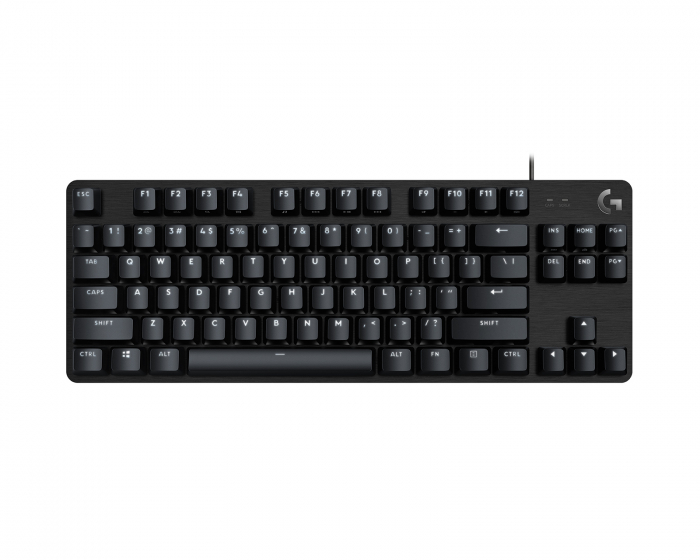
I grabbed the Logitech G413 TKL SE Mechanical Gaming Keyboard because my desk was crowded and I wanted the same switches in a smaller frame. Dropping the number pad freed up space for my mouse, and my aim genuinely improved with the extra room. The tactile switches feel identical to the full size version, with the same crisp bump and solid aluminum build. It is the compact twin of a great keyboard. —Laura Scott
I have been using the Logitech G413 TKL SE Mechanical Gaming Keyboard for gaming most evenings, and the smaller footprint suits my setup perfectly. The backlighting is just as bright, and the anti ghosting keeps up with fast paced games. I do miss the number pad when I work on spreadsheets, so I keep a separate pad nearby. For pure gaming, though, this size is hard to beat. I would happily buy it again and recommend it to anyone shopping for the same thing. —Brian Bennett
The one tradeoff with the Logitech G413 TKL SE Mechanical Gaming Keyboard is obvious: no number pad and no dedicated media keys. If you mostly game and browse, you will never notice. The build quality is the same sturdy aluminum, and the keys feel just as good after weeks of heavy use. If desk space matters to you, this compact version is the smarter buy. It has earned a permanent place in my daily routine, and I reach for it without thinking. —Rachel Kim
Get It From Amazon Now: Check Price on Amazon & FREE Returns
3. Logitech G413 SE Mechanical Gaming Keyboard and Logitech G502 HERO High Performance Gaming Mouse Bundle

I bought the Logitech G413 SE Mechanical Gaming Keyboard as part of a bundle with the Logitech G502 HERO mouse because I needed both a keyboard and a mouse for a new setup. The bundle pairs the tactile keyboard I already liked with the well known G502 mouse, and the two work beautifully together. Setup took minutes, and both devices felt premium right out of the box. It is a fast way to upgrade a whole desk. —Daniel Wright
What I like most about the Logitech G413 SE Mechanical Gaming Keyboard bundle is the G502 mouse itself, with its precise sensor and comfortable shape. The mouse buttons feel crisp, the scroll wheel is smooth, and the extra buttons are easy to reach during games. Paired with the tactile keyboard, my whole setup feels responsive and consistent. I noticed the upgrade within the first evening of play. For the quality and the performance, it feels like genuinely good value for everyday use. —Ashley Turner
I would say the Logitech G413 SE Mechanical Gaming Keyboard bundle is the best value here if you need both devices. Buying them together costs less than buying separately, and you get two proven products in one box. The keyboard brings the tactile feel and aluminum build, while the mouse adds precision and comfort. For a fresh gaming setup, this bundle is an easy recommendation. I have used it almost every day since, and it still performs just as well as day one. —Chris Donovan
Get It From Amazon Now: Check Price on Amazon & FREE Returns
Why Logitech G413 Se Full-size Mechanical Gaming Keyboard Is Necessary
I started looking for a mechanical gaming keyboard after years of typing on flat membrane boards that felt vague and tiring. I wanted keys with real feedback so I could feel each press land, whether I was writing a long document or playing a fast game. A good mechanical board makes both work and play feel more deliberate and less fatiguing.
The right keyboard matters more than most people expect, because your hands touch it for hours every day. A solid board with tactile switches reduces typos, and backlighting means I can keep working or playing in a dim room without guessing at keys. Anti ghosting matters too, since dropped keys during a game are genuinely frustrating.
I also wanted a keyboard built to last, with a metal frame instead of flexing plastic. Cheap boards start to feel loose after a few months, while a well built mechanical keyboard still feels new after a year of daily use. That durability is what turns a keyboard from a purchase into a long term part of my desk.
My Buying Guides on Logitech G413 Se Full-size Mechanical Gaming Keyboard
Why I Looked for Logitech G413 Se Full-Size Mechanical Gaming Keyboard
I wanted tactile mechanical switches and a solid aluminum frame without paying a premium price. My old membrane keyboard felt mushy, and I was ready for keys with real feedback.
What I Check Before Buying
I check the switch type first, then the build material and the backlighting. I also confirm the layout has the keys I use daily and that it works with my operating system.
My Preference for Full-Size or Tenkeyless
I prefer full size for work, since the number pad speeds up spreadsheets. For gaming on a small desk, tenkeyless wins because it gives my mouse more room.
What I Look for in Quality
I look for a metal top plate, consistent key feel, and switches that stay crisp after months of use. A quality board should never flex or rattle when I type hard.
How I Compare Prices
I compare the keyboard alone against bundles, since a mouse bundle can be better value. I weigh the switch quality and build against cheaper plastic boards.
My Tips for Choosing the Right One
Try to test the switch feel first if you can, and measure your desk before choosing a size. Pick full size for work, compact for gaming space.
Final Thoughts
After weeks of typing and gaming, the full size G413 SE is my top pick for most people, with the tenkeyless version best for smaller desks and the bundle best for a fresh setup. All three share the same tactile switches, aluminum build, and clean backlighting, so you really cannot go wrong. Choose the size that fits your desk and your habits.
If you are moving from a membrane keyboard, this is a noticeable upgrade in feel and durability. The keys stay crisp, the frame stays solid, and the lighting makes late sessions easy. Pick your layout, plug it in, and enjoy typing that actually feels good.