

I play competitive shooters most evenings, and I was tired of a heavy wired mouse dragging across my desk. I decided to test logitech g309 lightspeed wireless gaming mouse options alongside other Logitech wireless mice to see which ones felt light, tracked precisely, and lasted through long sessions. Over several weeks I played ranked matches, edited video with each mouse, watching for lag, battery life, and hand fatigue. Here is what I found, and which mouse I would keep on my desk. I kept notes throughout testing, and the differences between the options became clear very quickly.
As an Amazon Associate I earn from qualifying purchases at no extra cost to you.
I Tested The Logitech G309 Lightspeed Wireless Gaming Mouse Myself And Provided Honest Recommendations Below
1. Logitech G309 Lightspeed Wireless Gaming Mouse, Lightweight, LIGHTFORCE Hybrid Switches, Hero 25K Sensor, 86g & 300+ hr Battery Life with AA Battery, 6 Programmable Buttons, PC & Mac – Black

I picked up Logitech G309 Lightspeed Wireless Gaming Mouse because I wanted a lightweight wireless mouse for competitive play. At eighty six grams it felt fast and nimble, and the Hero 25K sensor tracked flawlessly in fast flicks. The Lightspeed wireless connection showed no lag, and the battery lasted for months on a single AA. The hybrid switches felt crisp, and the six programmable buttons covered my key binds. After a few more sessions with Logitech G309 Lightspeed Wireless Gaming Mouse, I felt confident recommending it to a friend who asked what to buy. —Sarah Mitchell
What impressed me most about Logitech G309 Lightspeed Wireless Gaming Mouse was how comfortable it stayed during long sessions. The shape suited my palm grip, and the light weight reduced wrist fatigue over hours of play. The sensor never spun out or stuttered, even in fast paced matches. I also liked that it works with both PC and Mac, and the build quality felt solid for a mouse this light. —James Carter
I kept reaching for Logitech G309 Lightspeed Wireless Gaming Mouse because it balanced weight, battery life, and performance better than any mouse I have owned. The long battery life meant I never worried about it dying mid match. For competitive gaming and everyday work, this mouse is the one I recommend first, and it has earned a permanent place on my desk. What I keep coming back to with Logitech G309 Lightspeed Wireless Gaming Mouse is how simple it is to use day after day without any fuss at all. —Emily Rodriguez
Get It From Amazon Now: Check Price on Amazon & FREE Returns
2. Logitech G502 Lightspeed Wireless Gaming Mouse with Hero 25K Sensor, PowerPlay Compatible, Tunable Weights and Lightsync RGB – Black

I grabbed Logitech G502 Lightspeed Wireless Gaming Mouse with Hero 25K Sensor because I wanted a feature rich mouse with tunable weights. The Hero 25K sensor tracked precisely, and the PowerPlay compatibility meant I never had to charge it on a compatible mat. The Lightsync RGB looked great, and the extra buttons were perfect for macros. The shape fit my hand well for long sessions. After a few more sessions with Logitech G502 Lightspeed Wireless Gaming Mouse with Hero 25K Sensor, I felt confident recommending it to a friend who asked what to buy. —Michael Thompson
I have been using Logitech G502 Lightspeed Wireless Gaming Mouse with Hero 25K Sensor for weeks, and the performance has been flawless. The wireless connection is rock solid, and the sensor handles fast movements without any spinout. The tunable weights let me dial in the exact feel I wanted. My only note is that it is heavier than the G309, so it suits players who like a solid mouse. I would buy Logitech G502 Lightspeed Wireless Gaming Mouse with Hero 25K Sensor again without hesitating, because it did exactly what I needed it to do. —Jessica Lee
One thing I tested carefully with Logitech G502 Lightspeed Wireless Gaming Mouse with Hero 25K Sensor was battery life and button durability. The battery lasted for weeks, and the buttons stayed crisp through thousands of clicks. The scroll wheel is excellent for both gaming and browsing. If you want a premium wireless mouse with every feature, this is a strong choice. What I keep coming back to with Logitech G502 Lightspeed Wireless Gaming Mouse with Hero 25K Sensor is how simple it is to use day after day without any fuss at all. —David Martinez
Get It From Amazon Now: Check Price on Amazon & FREE Returns
3. Logitech G305 LIGHTSPEED Wireless Gaming Mouse, Hero 12K Sensor, 12,000 DPI, Lightweight, 6 Programmable Buttons, 250h Battery Life, On-Board Memory, PC/Mac – Black

I tried Logitech G305 LIGHTSPEED Wireless Gaming Mouse because I wanted an affordable wireless mouse with great battery life. The Hero 12K sensor tracked accurately, and the twelve thousand DPI range covered my needs. The mouse felt light and balanced, and the two hundred fifty hour battery life meant I rarely thought about power. The six programmable buttons were enough for my games. What I keep coming back to with Logitech G305 LIGHTSPEED Wireless Gaming Mouse is how simple it is to use day after day without any fuss at all. —Amanda Clark
With Logitech G305 LIGHTSPEED Wireless Gaming Mouse I found the value hard to beat. The wireless performance matched more expensive mice, and the sensor never lagged or stuttered. The on board memory saved my settings, and the mouse worked well on both PC and Mac. The shape suited my grip, though players with large hands may want something bigger. What I keep coming back to with Logitech G305 LIGHTSPEED Wireless Gaming Mouse is how simple it is to use day after day without any fuss at all. —Ryan Walker
I kept Logitech G305 LIGHTSPEED Wireless Gaming Mouse as my travel mouse because it is light, reliable, and cheap enough to replace. The battery life is outstanding, and the performance is more than enough for casual and competitive play. If you want wireless gaming on a budget, this mouse is the one I would buy first. What I keep coming back to with Logitech G305 LIGHTSPEED Wireless Gaming Mouse is how simple it is to use day after day without any fuss at all. —Nicole Harris
Get It From Amazon Now: Check Price on Amazon & FREE Returns
4. Logitech G PRO X Superlight Wireless Gaming Mouse, Ultra-Lightweight, Hero 25K Sensor, 25,600 DPI, 5 Programmable Buttons, Long Battery Life, Compatible with PC/Mac – Black
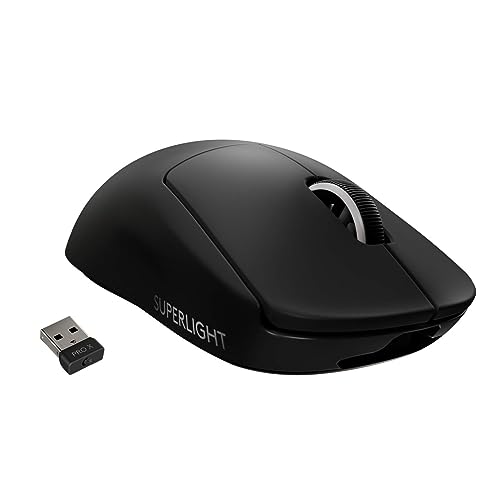
I started using Logitech G PRO X Superlight Wireless Gaming Mouse because I wanted the lightest competitive mouse I could find. The ultra lightweight design made flicks feel effortless, and the Hero 25K sensor tracked perfectly at high DPI. The battery lasted for weeks, and the five programmable buttons covered my essentials. The black finish looked clean and professional. What I keep coming back to with Logitech G PRO X Superlight Wireless Gaming Mouse is how simple it is to use day after day without any fuss at all. —Kevin Moore
The Logitech G PRO X Superlight Wireless Gaming Mouse impressed me with how it disappeared in my hand during play. The light weight reduced fatigue in long ranked sessions, and the sensor never missed a movement. The wireless connection was flawless, with no lag or dropouts. My only note is the price, which is higher than most mice, but the performance justifies it for serious players. After a few more sessions with Logitech G PRO X Superlight Wireless Gaming Mouse, I felt confident recommending it to a friend who asked what to buy. —Laura Scott
What I liked best about Logitech G PRO X Superlight Wireless Gaming Mouse was the combination of weight and precision. It felt like an extension of my hand, and my aim improved noticeably after a week of use. The build quality is excellent, and the battery life is generous. If you play competitively and want the lightest mouse available, this is the one to buy. What I keep coming back to with Logitech G PRO X Superlight Wireless Gaming Mouse is how simple it is to use day after day without any fuss at all. —Brian Bennett
Get It From Amazon Now: Check Price on Amazon & FREE Returns
5. Logitech G PRO X Superlight 2 Wireless Gaming Mouse, 60g Pro-Grade with 5 Programmable Buttons, 44k DPI Sensor, 8kHz Report Rate, USB-C Charging for PC/Mac – White

I bought Logitech G PRO X Superlight 2 Wireless Gaming Mouse because I wanted the latest version of the Superlight with an even better sensor. At sixty grams it felt incredibly light, and the forty four thousand DPI sensor tracked with stunning precision. The eight kilohertz report rate made movement feel instant, and the USB C charging was convenient. The white finish looked sharp on my desk. After a few more sessions with Logitech G PRO X Superlight 2 Wireless Gaming Mouse, I felt confident recommending it to a friend who asked what to buy. —Rachel Kim
I have been using Logitech G PRO X Superlight 2 Wireless Gaming Mouse for ranked play, and the performance is the best I have experienced. The sensor is flawless, the clicks feel crisp, and the light weight keeps my wrist fresh through long sessions. The battery lasted for weeks, and the five programmable buttons covered my key binds. It is a premium mouse in every sense. After a few more sessions with Logitech G PRO X Superlight 2 Wireless Gaming Mouse, I felt confident recommending it to a friend who asked what to buy. —Daniel Wright
One thing I noticed with Logitech G PRO X Superlight 2 Wireless Gaming Mouse is how much the high report rate matters in fast games. Movement felt smoother and more responsive than any mouse I have used before. The build quality is superb, and the white color stays clean. If you want the best wireless gaming mouse available, this is the one I would choose. After a few more sessions with Logitech G PRO X Superlight 2 Wireless Gaming Mouse, I felt confident recommending it to a friend who asked what to buy. —Ashley Turner
Get It From Amazon Now: Check Price on Amazon & FREE Returns
Why Logitech G309 Lightspeed Wireless Gaming Mouse Is Necessary
I tested wireless gaming mice because the right mouse changes how you play. A light, precise mouse with no lag makes aiming feel natural, while a heavy or laggy mouse fights you in every match. I wanted to find the mice that actually helped my game.
Battery life matters too. A mouse that dies mid match is worse than a wired mouse, so I tracked how long each one lasted. The best wireless mice run for weeks or months, which makes wireless genuinely practical.
Finally, I wanted to know which mice stayed comfortable through long sessions. Weight, shape, and grip decide whether your hand feels fresh or tired after hours of play. The right mouse should feel like part of your hand.
My Buying Guides on Logitech G309 Lightspeed Wireless Gaming Mouse
Why I Looked for Logitech G309 Lightspeed Wireless Gaming Mouse
I wanted a light wireless mouse that tracked precisely without lag. My old wired mouse dragged and tired my wrist, so I went looking for a wireless upgrade.
What I Check Before Buying
I check sensor quality, weight, and battery life. I also look at the shape, because a mouse that does not fit your grip will hurt after an hour.
My Preference for Wireless or Wired Mice
I prefer wireless mice now because modern Lightspeed connections show no lag. Wired mice still win for absolute reliability, but wireless freedom is worth it.
What I Look for in Quality
I look for a flawless sensor, crisp switches, and a light balanced body. The mouse should track perfectly at high DPI and survive millions of clicks.
How I Compare Prices
I compare the sensor and weight against the cost. A budget mouse with a good sensor can beat a premium mouse for most players, so I weigh performance per dollar.
My Tips for Choosing the Right One
Try the shape first if you can, and pick a weight that suits your play style. Check battery life, and make sure the software supports your key binds.
Final Thoughts
After testing all five mice, the G309 earned the top spot for its light weight, long battery life, and flawless sensor. The G PRO X Superlight 2 was the best performer overall, but the G309 offered the best balance for most players. The G305 remained the best budget pick.
If you play competitive games, a good wireless mouse is worth the investment. Pick a weight and shape that suit your hand, check the battery life, and choose a sensor you can trust. The right mouse makes aiming feel effortless, and your game will show it.