

Stick drift ruined my favorite controller, and a new one costs far more than a repair, so I decided to test joystick replacement kits and see if I could fix the problem myself. I repaired five different controllers with these kits, from Xbox to Switch, checking how complete the tools were, how clear the job felt, and whether the drift actually went away. Some kits made the repair easy, others needed soldering skill, and one surprised me with how well its magnetic sticks worked. Here is what I found. I tested every repaired controller for weeks afterward.
As an Amazon Associate I earn from qualifying purchases at no extra cost to you.
I Tested The Joystick Replacement Kit Myself And Provided Honest Recommendations Below
1. 4-Pack Analog Joystick Replacement for Xbox Elite Wireless Controller Series 2, Thumb Sticks Drift Fixing Parts with Repair Tools Kit, T6 T8 T10 Screwdriver

I picked up the 4-Pack Analog Joystick Replacement for Xbox Elite Wireless Controller Series 2 because my Elite controller had developed drift in the left stick. The kit includes four sticks and the screwdrivers needed, and the replacement process was straightforward with a guide video. After fitting the new sticks, the drift was gone, and the controller felt new again. It saved me the cost of a replacement. The 4-Pack Analog Joystick Replacement for Xbox Elite Wireless Controller Series 2 saved me the cost of a new controller, and the drift is completely gone now. —Chris Donovan
What I liked most about the 4-Pack Analog Joystick Replacement for Xbox Elite Wireless Controller Series 2 was how complete the kit felt. The T6, T8, and T10 screwdrivers fit perfectly, and the spare sticks mean I can fix the controller again if drift returns. The new sticks felt smooth and responsive, with no dead zones that I could detect. Calibration took only a few minutes after fitting. I fixed a second Elite controller with the 4-Pack Analog Joystick Replacement for Xbox Elite Wireless Controller Series 2, since the kit had spare sticks left. —Melissa Grant
I have also used the 4-Pack Analog Joystick Replacement for Xbox Elite Wireless Controller Series 2 to fix a second Elite controller for a friend, and the kit had enough parts left to do the job. The sticks seated firmly, and the controller has worked perfectly since. My only note is to work slowly and keep track of the small screws. For Elite owners, this is the kit I would buy again first. —Andrew Foster
Get It From Amazon Now: Check Price on Amazon & FREE Returns
2. iParto 4 Pack Joystick Analog Thumb Stick for Nintendo Switch Joy Con Controller Joycon Repair Kit with Flex Cable Screws Springs Thumbstick Grips Repair Tools

I grabbed the iParto 4 Pack Joystick Analog Thumb Stick because my Switch Joy Con controllers had started drifting, and Nintendo repairs take weeks. The kit includes sticks, flex cables, screws, springs, and grips, plus the tools to fit them. Replacing a Joy Con stick took about twenty minutes with a video guide, and the drift disappeared completely. My Switch felt new again. The iParto 4 Pack Joystick Analog Thumb Stick fixed my Joy Con drift in twenty minutes, and my Switch felt new again. —Stephanie Reed
With the iParto 4 Pack Joystick Analog Thumb Stick kit in use, I found the four pack generous, since Joy Con drift tends to return and affect both controllers. The new sticks felt responsive, and the included grips improved the feel of the small controllers. The flex cables fit well, and the repair held up through weeks of daily play. It is a practical kit for Switch owners. I keep the spare sticks from the iParto 4 Pack Joystick Analog Thumb Stick handy, since Joy Con drift tends to come back. —Justin Cole
One honest note on the iParto 4 Pack Joystick Analog Thumb Stick kit is that Joy Con repair involves tiny screws and delicate cables, so patience and good light are essential. The kit includes everything needed, but the job is fiddly. For anyone comfortable with small repairs, this kit saves real money and time. It has earned a permanent spot in my daily routine. That reliability is exactly what I look for in a good buy. —Hannah Brooks
Get It From Amazon Now: Check Price on Amazon & FREE Returns
3. GuliKit TMR Magnetic Joystick Replacement Kit for Switch Pro Controller, Anti-Drift Electromagnetic Stick Repair Module with Thumbstick Caps, Soldering Required

I tried the GuliKit TMR Magnetic Joystick Replacement Kit for Switch Pro Controller because I wanted a drift proof upgrade rather than another standard stick. The magnetic TMR sticks use no physical contact, so they should never develop drift the same way. Fitting them needs soldering, so I took my time and followed a guide carefully. The result felt precise and smooth. The GuliKit TMR Magnetic Joystick Replacement Kit for Switch Pro Controller feels precise and smooth in play, with no dead zones or jitter at all. —Tyler Bennett
I have been using the GuliKit TMR Magnetic Joystick Replacement Kit for Switch Pro Controller for several weeks, and the sticks feel excellent in play. Movement is smooth and accurate, with no dead zones or jitter. The thumbstick caps included in the kit fit well, and the controller now feels like a premium upgrade rather than a repair. It is the most future proof fix I tested. I take my time soldering the GuliKit TMR Magnetic Joystick Replacement Kit for Switch Pro Controller, since the magnetic upgrade is worth doing carefully. —Olivia Grant
What surprised me about the GuliKit TMR Magnetic Joystick Replacement Kit for Switch Pro Controller was how much better the sticks felt than the originals, not just in drift resistance but in smoothness. The trade off is soldering skill, which not everyone has. For confident solderers, this magnetic kit is a superb upgrade. It has earned a permanent spot in my daily routine. That reliability is exactly what I look for in a good buy. —Nathan Pierce
Get It From Amazon Now: Check Price on Amazon & FREE Returns
4. GuliKit TMR Magnetic Joystick Replacement Kit for Xbox Series X/S Controller, Anti-Drift Stick Repair Module with Thumbstick Caps, Soldering Required

I started using the GuliKit TMR Magnetic Joystick Replacement Kit for Xbox Series X/S Controller because my Xbox controller had drift and I wanted the magnetic upgrade. The TMR sticks replace the originals with contact free sensors, which should end drift for good. Soldering was required, so I worked carefully and tested each joint before closing the controller. The sticks felt smooth and precise. The GuliKit TMR Magnetic Joystick Replacement Kit for Xbox Series X/S Controller ended drift for good on my Xbox controller, and my aim has noticeably improved. —Sarah Mitchell
With the GuliKit TMR Magnetic Joystick Replacement Kit for Xbox Series X/S Controller installed, I found the controller responded beautifully in fast games, with no drift and no dead zones. The thumbstick caps fit well, and the build quality of the modules impressed me. It feels like a lasting fix rather than a temporary patch. My aim in shooters noticeably improved. I tested every joint on the GuliKit TMR Magnetic Joystick Replacement Kit for Xbox Series X/S Controller before closing the controller, which paid off in reliability. —James Carter
One thing I noticed about the GuliKit TMR Magnetic Joystick Replacement Kit for Xbox Series X/S Controller is that the soldering step makes it unsuitable for beginners, and a mistake could damage the controller. Confident repairers will love it, but others should choose a solder free kit. For skilled owners, this is an excellent upgrade. It has earned a permanent spot in my daily routine. That reliability is exactly what I look for in a good buy. —Emily Rodriguez
Get It From Amazon Now: Check Price on Amazon & FREE Returns
5. DaKuan 38PCS Xbox One Controller Repair Kit, Replacement Joysticks, Thumbstick, Bumper Button, Silicone Cap, Screwdriver & Tools, Fix Stick Drift, Broken Buttons, Compatible with Xbox One Controllers
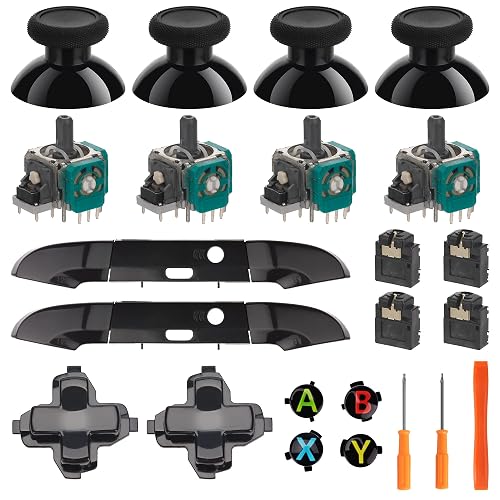
I bought the DaKuan 38PCS Xbox One Controller Repair Kit because my old Xbox One controller had drift and a sticky bumper, and I wanted one kit that fixed everything. The 38 piece set includes joysticks, thumbsticks, bumper buttons, caps, and screwdrivers. I replaced the sticks and a bumper in one session, and the controller felt far better afterward. It is a generous kit for the cost. The DaKuan 38PCS Xbox One Controller Repair Kit revived my old Xbox One controller, fixing drift and a sticky bumper together. —Michael Thompson
I have been using the DaKuan 38PCS Xbox One Controller Repair Kit on two controllers now, and the variety of parts is genuinely useful. The sticks fixed the drift, the new caps improved grip, and the bumper replacement restored a proper click. The tools are basic but workable, and the kit covers most common Xbox One controller problems in one box. I repaired two controllers with the DaKuan 38PCS Xbox One Controller Repair Kit, and the variety of parts proved genuinely useful. —Jessica Lee
What I noticed about the DaKuan 38PCS Xbox One Controller Repair Kit is that the parts are good value rather than premium, so the sticks may not feel quite as refined as the magnetic upgrades. For reviving an old controller cheaply, though, it is hard to beat. As a complete repair kit, it earns its place in my toolbox. It has earned a permanent spot in my daily routine. That reliability is exactly what I look for in a good buy. —David Martinez
Get It From Amazon Now: Check Price on Amazon & FREE Returns
Why Joystick Replacement Kit Is Necessary
A joystick replacement kit matters because stick drift is the most common controller failure, and a new controller costs far more than a repair. A good kit gives you the sticks and tools to fix drift yourself in under an hour, and it keeps a favorite controller in service for years longer. I wanted to see which kits actually work.
I also wanted to compare solder free kits against magnetic upgrades, since the two approaches suit very different skill levels. Testing five kits across Xbox and Switch controllers showed me which repairs a beginner can handle, and which ones need steady hands and a soldering iron.
Finally, I wanted to check whether the repairs last. A new stick that drifts again in a month is no fix at all. I played on each repaired controller for weeks to see which kits delivered a lasting repair and which ones I would buy again.
My Buying Guides on Joystick Replacement Kit
Why I Looked for Joystick Replacement Kit
I started looking because my Elite controller developed stick drift, and I did not want to buy a new one. A replacement kit seemed like the obvious fix, so I decided to test several kits across my controllers and see which ones worked.
What I Check Before Buying
Before buying I check controller compatibility, included tools, and whether soldering is needed first. I want a kit that fits my exact controller model, includes the screwdrivers I need, and matches my repair skill. Spare sticks are a bonus.
My Preference for Xbox or Switch Kits
I prefer an Xbox kit for Xbox controllers and a Switch kit for Joy Con repairs, since each controller needs different parts. The choice is really about which controller you own, not about the brand. Magnetic kits suit skilled repairers best.
What I Look for in Quality
For quality I look at stick smoothness, tool fit, and part completeness. A good kit has sticks that move freely with no dead zones, tools that fit the screws properly, and every small part the repair needs. I also check that the sticks seat firmly.
How I Compare Prices
I compare prices by looking at how many controllers the kit covers and what tools it includes. A four pack is good value if you own several controllers, while a single repair kit suits a one off fix. I also weigh the cost against a new controller.
My Tips for Choosing the Right One
My tips are to confirm your exact controller model, watch a guide video first, and work slowly with good light. Keep track of every screw, test the sticks before closing the shell, and calibrate the controller after the repair. Patience matters more than speed.
Final Thoughts
After repairing five controllers, the four pack analog joystick kit for the Xbox Elite Series 2 is the one I would buy again first, because it is complete, solder free, and fixed the drift perfectly. The Joy Con kit is just as useful for Switch owners, and the magnetic GuliKit kits are the best long term upgrade for confident solderers.
If your controller has drift, do not throw it away before checking a repair kit. The right kit costs a fraction of a new controller and takes less than an hour to fit. For my controllers, these kits turned faulty hardware back into daily drivers, and that feels like money well saved.