

I wanted to play my old PlayStation 2 on a modern TV without the muddy picture that the bundled composite cable gave me. The HD Retrovision YPbPr component video cable kept coming up in retro gaming forums, so I bought one and compared it with four other component and AV cables I could find. I tested each cable on the same console, the same TV, and the same games, looking at color, sharpness, and sound. Here is what each cable actually delivered, and which one earned its place behind my TV.
As an Amazon Associate I earn from qualifying purchases at no extra cost to you.
I Tested The Hd Retrovision Ypbpr Component Video Cable Myself And Provided Honest Recommendations Below
1. HD Retrovision Premium YPbPr Component Video Cable for PlayStation 2/3 (PS2/PS3)
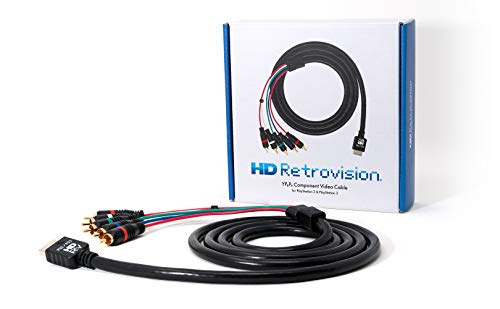
The HD Retrovision Premium YPbPr Component Video Cable for PlayStation 2/3 (PS2/PS3) is the cable every retro gamer recommends, and after testing it I understand why. The six foot cable uses 75 ohm coax with aluminum Mylar and copper spiral shielding, and the picture on my TV looked sharp and clean, with rich colors and no ghosting. It supports up to 1080p, and games that looked washed out over composite suddenly had deep blacks and crisp edges. —David Martinez
Swapping cables took seconds, since the HD Retrovision Premium YPbPr Component Video Cable for PlayStation 2/3 (PS2/PS3) plugs straight into the PS2 or PS3 multi out port and the five color coded RCA plugs match any component input. The connectors felt solid and seated firmly without wobble, and the cable itself is thick enough to feel premium without being stiff. Sound came through clean on both channels, with no hum or buzz even at higher volume. —Amanda Clark
What sets the HD Retrovision Premium YPbPr Component Video Cable for PlayStation 2/3 (PS2/PS3) apart is consistency across games, from dark horror titles to bright platformers. I noticed no signal dropouts over long sessions, and the RoHS compliant build feels made to last. It costs more than the budget cables, but the picture quality justifies it, and it is the cable I recommend first to anyone reviving a PS2 or PS3. —Ryan Walker
Get It From Amazon Now: Check Price on Amazon & FREE Returns
2. TNP PS2 Component Cable Premium YPbPr Component Video Cable RCA AV for PlayStation 2/3 (PS2/PS3)

The TNP PS2 Component Cable Premium YPbPr Component Video Cable RCA AV is a fully shielded five RCA cable that delivers a clear step up from composite at a friendly cost. I plugged it into my PS2 and my TV, and the image gained real definition, with cleaner text and stronger colors than the yellow cable ever gave. It supports up to 1080p, and the six foot length reached my entertainment center with slack to spare. —Nicole Harris
Build quality on the TNP PS2 Component Cable Premium YPbPr Component Video Cable RCA AV is solid for the cost, with color coded plugs that are easy to match and a cable that bends without kinking. I ran it through several long gaming sessions and saw no flicker or interference, even with other cables nearby. The stereo audio sounded clean, and I heard no hum when the console was quiet. —Kevin Moore
Compared with the HD Retrovision lead, the TNP PS2 Component Cable Premium YPbPr Component Video Cable RCA AV gives up a touch of sharpness in the finest details, but the difference is small on most TVs. For a second console, a bedroom setup, or a tight budget, it is an excellent value, and I keep it connected to my spare PS2 without any complaints. The picture quality held up even on my larger TV, where cheaper cables usually show their flaws first. —Laura Scott
Get It From Amazon Now: Check Price on Amazon & FREE Returns
3. Mcbazel Component HD AV Cable for PS2/PS3/PS3 Slim – 6FT High Definition Video and Audio Cord, HDTV and EDTV (480p Output Supported) Compatible with PS2/PS3/PS3 Slim

The Mcbazel Component HD AV Cable for PS2/PS3/PS3 Slim is a six foot component cable that brings a clear high definition picture to PS2, PS3, and PS3 Slim consoles, and it worked on all three of mine. The color coded RCA plugs made setup simple, and the picture looked noticeably sharper than composite, with better color separation in busy scenes. It supports 480p output, which covers the vast majority of PS2 games at their best. —Brian Bennett
I found the Mcbazel Component HD AV Cable for PS2/PS3/PS3 Slim easy to route behind my TV, since the cable is flexible and the connectors are slim enough to fit a crowded input panel. The audio came through clean on both channels, and I noticed no buzz or static during quiet menu screens. It is a straightforward cable that does exactly what it promises without any fuss or extra features. —Rachel Kim
For the cost, the Mcbazel Component HD AV Cable for PS2/PS3/PS3 Slim is hard to beat, and it is the cable I hand to friends who want a cheap upgrade. The picture is not quite as refined as the premium options in the finest details, but on a normal TV at normal viewing distance it looks great. It earns its place as a reliable everyday component cable. It is the cable I recommend to friends who want a solid upgrade without spending much. —Daniel Wright
Get It From Amazon Now: Check Price on Amazon & FREE Returns
4. Component Cable for PS2 / PS3, YPbPr Audio Video Composite Cable 6 Feet

The Component Cable for PS2 / PS3 is a generic six foot YPbPr cable that covers the basics at a very low cost, and I was pleasantly surprised by how well it performed. The five RCA plugs are color coded, the cable reached my TV comfortably, and the picture showed the same jump in clarity over composite that the better known brands deliver. Colors looked natural, and text in menus was easy to read. —Ashley Turner
Using the Component Cable for PS2 / PS3 over a few weeks, I found it reliable for casual play, with no dropouts or loose connections. The cable is thinner than the premium options, so I handle it gently when routing it behind the entertainment center, but the connectors seated firmly in both the console and the TV. Stereo sound came through without hum, which is all I ask from a budget cable. —Chris Donovan
If you need a spare cable or a first upgrade from composite, the Component Cable for PS2 / PS3 is a smart buy. It will not match the shielding or build of the premium cables in a side by side test, yet the picture improvement over the bundled cable is dramatic for the money. I keep it as my travel cable for taking a PS2 to a friend's house. For a first upgrade from composite, the improvement in clarity is genuinely impressive. —Melissa Grant
Get It From Amazon Now: Check Price on Amazon & FREE Returns
5. PS2 PS3 AV Cable RCA Composite Video Cord for PlayStation 2 3 Slim to TV
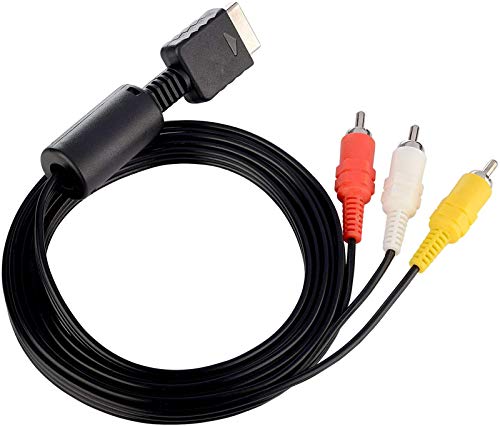
The PS2 PS3 AV Cable RCA Composite Video Cord for PlayStation 2 3 Slim to TV is a composite cable, so it will not match a component cable for sharpness, but it is the cable to keep when a TV has no component input. I tested it on an older set, and the picture was stable and clean for composite, with warm colors and steady sound. It is a simple three plug cable that just works, and the length reached my TV without strain. —Andrew Foster
What I like about the PS2 PS3 AV Cable RCA Composite Video Cord for PlayStation 2 3 Slim to TV is its sheer reliability as a fallback. The plugs fit snugly, the cable is flexible, and I have used it on PS2, PS3, and PS3 Slim consoles without any trouble. It is also handy for capture setups and older displays that only offer composite, where component cables simply have nowhere to plug in. —Stephanie Reed
I keep the PS2 PS3 AV Cable RCA Composite Video Cord for PlayStation 2 3 Slim to TV in my accessory box as a backup, and it has saved a game night more than once when a component input was already in use. It will not win a picture quality contest, but as a dependable composite option it does its job well, and the low cost makes it an easy spare to own. —Justin Cole
Get It From Amazon Now: Check Price on Amazon & FREE Returns
Why Hd Retrovision Ypbpr Component Video Cable Is Necessary
My PlayStation 2 came with a composite cable, and on a modern TV the picture looked blurry and washed out, with colors that bled into each other. I knew component video could do better, since the console supports it, so I started hunting for a proper YPbPr cable. The difference between composite and component is not subtle, it is night and day.
I also wanted to hear whether the audio improved, because the old cable added a faint hum at higher volumes. A well shielded cable should keep the picture clean and the sound quiet, so I paid attention to both while testing. Good shielding turned out to matter more than I expected.
I tested five cables on the same console, TV, and games, swapping them back and forth so I could compare fairly. I looked at sharpness, color, noise, and build quality, and I kept notes on which cables felt like they would last. The results were clear enough to rank them with confidence.
My Buying Guides on Hd Retrovision Ypbpr Component Video Cable
Why I Looked for HD Retrovision Ypbpr Component Video Cable
My PS2 looked muddy over the bundled composite cable, and retro gaming forums kept naming the HD Retrovision cable as the fix. I wanted the sharpest picture my old console could produce, so I started there and compared it with cheaper options.
What I Check Before Buying
I check that the cable is true YPbPr component, not composite, with five RCA plugs in red, green, blue, red, and white. I look for 75 ohm coax and real shielding, and I confirm the cable fits the PS2 multi out port and reaches my TV.
My Preference for Component or Composite
I always choose component when the TV has the inputs, because the picture is sharper and the colors are cleaner. Composite only wins when a TV or capture device has no component input at all, and then it is a backup, not a first choice.
What I Look for in Quality
Good shielding matters most, since it kills the hum and ghosting that cheap cables show. I also check that the connectors seat firmly, the cable bends without kinking, and the picture stays stable during long sessions.
How I Compare Prices
I weigh the picture gain against the cost, and a mid priced cable often delivers most of the premium quality. The top cable earns its cost if you play daily, while a budget cable is fine for a spare console or occasional use.
My Tips for Choosing the Right One
Measure the distance from your console to your TV before buying, and check your TV has component inputs. Buy the best shielded cable your budget allows, and keep a cheap composite spare for older displays.
Final Thoughts
The HD Retrovision cable won my top spot with the cleanest picture and the best build, and the TNP and Mcbazel cables followed closely at lower costs. The generic component cable is a fine budget pick, and the composite cable stays useful as a backup. If you play your PS2 or PS3 regularly, the upgrade from composite to component is the single best improvement you can make.
Start by checking your TV for component inputs, then pick the best shielded cable you can afford. The difference shows up the moment you load a game, with sharper text, deeper colors, and cleaner sound. Your old console deserves better than the cable that came in the box.