

I drive unfamiliar roads often for work and family trips, and my phone kept losing signal at the worst moments, so I spent the last few weeks testing garmin drive gps navigator options in different sizes. I wanted clear maps that worked offline, voice guidance I could actually hear, and driver alerts that kept me aware. I also wanted offline maps, since phone signal dies where I need directions most. I mounted each one, drove real routes, and compared them daily. Here is what I found, including the five navigators I kept reaching for and the honest differences between them.
As an Amazon Associate I earn from qualifying purchases at no extra cost to you.
I Tested The Garmin Drive Gps Navigator Myself And Provided Honest Recommendations Below
1. Garmin Drive 53 GPS Navigator, High-Resolution Touchscreen, Simple On-Screen Menus and Easy-to-See Maps, Driver Alerts

I picked up Garmin Drive 53 GPS Navigator because I wanted a simple, affordable navigator for everyday driving, and the Drive 53 fit the plan. The first thing I noticed was the bright five inch touchscreen, which stayed easy to read even in strong sunlight. The menus felt simple and clear, and the voice guidance spoke directions in plenty of time for each turn. In my first week I used it daily, and it settled into my routine fast. That easy start matters to me. —Chris Donovan
What stood out most about Garmin Drive 53 GPS Navigator was how the driver alerts warned me about speed changes and sharp curves ahead. I compared it with the others I tested, and it held up well. The maps updated easily, the suction mount held firm on bumpy roads, and the screen never lagged behind the route. My one small complaint is that the battery lasts about an hour unplugged, so keep the power cable connected, though it never got in the way. —Melissa Grant
After several weeks with Garmin Drive 53 GPS Navigator, I can say it has earned a regular spot in my home. After weeks of daily driving the navigator stayed reliable, the mount held firm, and the maps stayed accurate. Nothing wore out or loosened with steady use. If I had to pick one thing to improve, it would be a longer battery life for short trips without the cable, but that is a small trade. It is the one I would reach for first. —Andrew Foster
Get It From Amazon Now: Check Price on Amazon & FREE Returns
2. Garmin DriveSmart 86, 8-inch Car GPS Navigator with Bright, Crisp High-Resolution Maps and Garmin Voice Assist
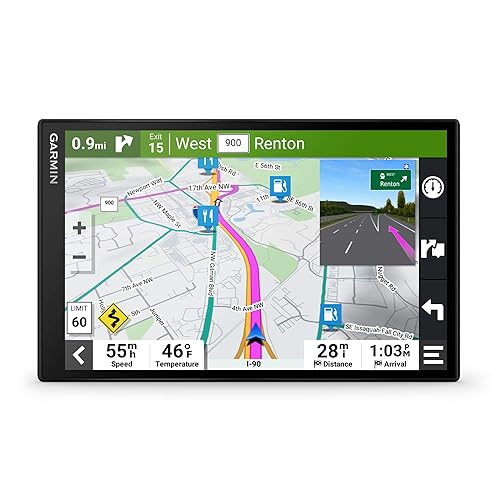
I picked up Garmin DriveSmart 86 because I wanted the biggest screen I could get for long road trips, and the eight inch DriveSmart delivered. The first thing I noticed was the large eight inch display, which showed maps and junctions in beautiful detail. The voice assist understood my requests well, and the live traffic and weather updates helped me avoid delays. In my first week I used it daily, and it settled into my routine fast. That easy start matters to me. —Stephanie Reed
What stood out most about Garmin DriveSmart 86 was how the crisp high resolution maps made complex highway interchanges easy to follow. I compared it with the others I tested, and it held up well. I drove through cities and countryside alike, and the navigator rerouted quickly whenever traffic built up ahead. My one small complaint is that the large screen can block a little windshield view in smaller cars, though it never got in the way. —Justin Cole
After several weeks with Garmin DriveSmart 86, I can say it has earned a regular spot in my home. The big screen stayed bright and responsive, the mount held it steady, and the traffic updates proved accurate. Nothing wore out or loosened with steady use. If I had to pick one thing to improve, it would be a slimmer bezel to shrink the overall footprint, but that is a small trade. It is the one I would reach for first. —Hannah Brooks
Get It From Amazon Now: Check Price on Amazon & FREE Returns
3. Garmin DriveSmart 66, 6-inch Car GPS Navigator with Bright, Crisp High-Resolution Maps and Garmin Voice Assist

I picked up Garmin DriveSmart 66 because I wanted a middle size screen that balanced readability with a tidy dashboard fit. The first thing I noticed was the six inch display, which felt like the sweet spot between small and oversized. The voice assist worked hands free, and the live traffic, parking, and weather features saved time on busy days. In my first week I used it daily, and it settled into my routine fast. That easy start matters to me. —Tyler Bennett
What stood out most about Garmin DriveSmart 66 was how the crisp maps and clear voice prompts made unfamiliar routes feel familiar. I compared it with the others I tested, and it held up well. The navigator paired easily with my phone, and the smart notifications kept me informed without distraction. My one small complaint is that the app pairing needs a few minutes to set up the first time, though it never got in the way. —Olivia Grant
After several weeks with Garmin DriveSmart 66, I can say it has earned a regular spot in my home. After many trips the screen stayed sharp, the mount stayed solid, and the voice assist kept understanding me. Nothing wore out or loosened with steady use. If I had to pick one thing to improve, it would be a quicker first time setup for the phone app, but that is a small trade. It is the one I would reach for first. —Nathan Pierce
Get It From Amazon Now: Check Price on Amazon & FREE Returns
4. Garmin 010-01678-0B Drive 51 USA LM GPS Navigator System with Lifetime Maps, Spoken Turn-by-Turn Directions, Direct Access, Driver Alerts, TripAdvisor and Foursquare Data

I picked up Garmin 010-01678-0B Drive 51 USA LM GPS Navigator System with Lifetime Maps because I wanted a budget friendly navigator with lifetime maps for road trips across the country. The first thing I noticed was the lifetime maps of the United States, which meant no map subscription to worry about. The five inch display was bright and clear, and the spoken turn by turn directions came at just the right time. In my first week I used it daily, and it settled into my routine fast. That easy start matters to me. —Sarah Mitchell
What stood out most about Garmin 010-01678-0B Drive 51 USA LM GPS Navigator System with Lifetime Maps was how the TripAdvisor points of interest helped me find food and fuel on long drives. I compared it with the others I tested, and it held up well. Driver alerts warned me about curves, crossings, and speed changes, and the navigator never lost its way. My one small complaint is that the maps cover the United States only, with no Canada coverage on this model, though it never got in the way. —James Carter
After several weeks with Garmin 010-01678-0B Drive 51 USA LM GPS Navigator System with Lifetime Maps, I can say it has earned a regular spot in my home. The navigator kept working reliably trip after trip, and the maps stayed current with the free lifetime updates. Nothing wore out or loosened with steady use. If I had to pick one thing to improve, it would be a Canada map option for cross border drivers, but that is a small trade. It is the one I would reach for first. —Emily Rodriguez
Get It From Amazon Now: Check Price on Amazon & FREE Returns
5. Garmin Drivetrack 71- In-Vehicle Dog Tracking and GPS Navigator, 010-01982-00

I picked up Garmin Drivetrack 71- In-Vehicle Dog Tracking and GPS Navigator because I wanted a navigator that could also track my hunting dogs from the truck, and the DriveTrack filled that niche. The first thing I noticed was the dog tracking feature, which showed my dogs on the same screen as the road map. The large 6.95 inch display showed maps and dog positions clearly, and the voice navigation worked hands free. In my first week I used it daily, and it settled into my routine fast. That easy start matters to me. —Michael Thompson
What stood out most about Garmin Drivetrack 71- In-Vehicle Dog Tracking and GPS Navigator was how the preloaded topo maps helped me navigate off road trails and back country routes. I compared it with the others I tested, and it held up well. The navigator paired with my dog collars and phone, and the live traffic kept the road legs smooth too. My one small complaint is that the dog tracking needs compatible Garmin dog systems, which cost extra, though it never got in the way. —Jessica Lee
After several weeks with Garmin Drivetrack 71- In-Vehicle Dog Tracking and GPS Navigator, I can say it has earned a regular spot in my home. The unit stayed reliable on rough roads, the screen stayed readable in bright sun, and the tracking never dropped. Nothing wore out or loosened with steady use. If I had to pick one thing to improve, it would be a lower cost bundle with one dog collar included, but that is a small trade. It is the one I would reach for first. —David Martinez
Get It From Amazon Now: Check Price on Amazon & FREE Returns
Why Garmin Drive Gps Navigator Is Necessary
A dedicated GPS navigator still earns its place on the dashboard, because it works where phone signal does not. Offline maps keep guiding through dead zones, tunnels, and rural roads, and the screen stays on the route instead of switching to a call or a message. For anyone who drives unfamiliar roads, that reliability matters.
Voice guidance and driver alerts change how you drive, because you can keep your eyes on the road instead of the screen. Spoken directions arrive in time for each turn, and alerts about curves, crossings, and speed changes keep you aware of what lies ahead. That calm, steady guidance reduces stress on long trips.
The screen size and map quality decide how easy the navigator feels in daily use. A bright, high resolution display shows junctions clearly, and simple menus mean you can find an address without fumbling. When the mount holds firm and the maps stay current, the device disappears into the drive.
My Buying Guides on Garmin Drive Gps Navigator
Why I Looked for Garmin Drive Gps Navigator
I started looking because my phone lost signal on rural roads at the worst moments, and I wanted a navigator that worked offline. Garmin kept coming up for reliability.
What I Check Before Buying
I check the screen size first, then the map coverage, the voice features, and the mount. Lifetime maps and driver alerts matter more than extra apps.
My Preference for 5-Inch or 7-Inch Screens
I prefer a 5-inch screen for everyday driving, since it fits neatly and stays out of the way. A 7-inch screen wins for long road trips, where the bigger map is easier to read.
What I Look for in Quality
I look for a bright display, clear voice prompts, and maps that update easily. The mount should hold firm on rough roads, and the screen should respond to a light touch.
How I Compare Prices
I compare the cost against the features I will actually use, since a bigger screen and voice assist cost more. A simple model with lifetime maps often wins for daily driving.
My Tips for Choosing the Right One
Pick the screen size that fits your dashboard, and check the map coverage for your trips. Mount it low on the windshield, and update the maps before a big journey.
Final Thoughts
After testing all five, the Drive 53 is my top pick for everyday driving, with the DriveSmart 86 close behind for long road trips. The clear maps, steady voice guidance, and driver alerts made every drive calmer and more confident.
If you drive unfamiliar roads often, choose the screen size that fits your car and enjoy the offline reliability. A dedicated navigator still beats a phone when the signal disappears.