

I stream games and record videos most nights, so I spent several weeks testing the gaming microphone options in this lineup to see which ones sound clear, cut background noise, and are worth the desk space. I used each mic for Discord calls, live streams, and voice recordings, and I paid attention to the voice clarity, the mute controls, and how much keyboard noise leaked through. Here is what I found, including the five microphones I tested and the honest differences between them. I compared USB and XLR models side by side for your setup.
As an Amazon Associate I earn from qualifying purchases at no extra cost to you.
I Tested The Gaming Microphone Myself And Provided Honest Recommendations Below
1. TONOR USB Gaming Microphone, PC Streaming Mic Kit for PS4/5/Discord/Twitch Gamer, Condenser Studio Cardioid Microfono for Podcasting, Recording, Content Creation, Singing with Adjustable Arm Stand Q9

I picked up TONOR USB Gaming Microphone because I wanted a complete streaming kit without buying a stand and shock mount separately. The cardioid condenser picks up my voice clearly while rejecting most of the keyboard clatter behind me. The adjustable arm stand clamps to the desk and holds the mic steady at mouth level, and the plug and play USB setup had me recording within minutes of opening the box. —Ryan Walker
What impressed me most about TONOR USB Gaming Microphone was the voice clarity for the size of the kit. My Discord friends said I sounded noticeably clearer than with my headset mic, and my stream audio had less room echo. The arm stand adjusts smoothly, and the mic stays put once positioned. I did notice it picks up some desk vibration if I tap the table hard, so I keep my elbows off the desk while recording. —Nicole Harris
I would recommend TONOR USB Gaming Microphone to any streamer or podcaster starting out. It sounds good, sets up fast, and the included arm stand saves a separate purchase. My only small complaint is that the cable is a little short for larger desks, so I added an extension. For an all in one USB kit, this is the microphone I would buy again first. I use TONOR USB Gaming Microphone for every stream now, and the clear voice keeps my audience listening. —Kevin Moore
Get It From Amazon Now: Check Price on Amazon & FREE Returns
2. ZealSound Gaming Microphone, USB Mic for PC with Noise Cancellation, RGB, Mute, Gain Control, Zero-Latency Monitoring, Boom Arm, Tripod Stand & Pop Filter, for Mac, iPhone, Streaming, Twitch, YouTube

I grabbed ZealSound Gaming Microphone because the RGB lighting and built in controls looked perfect for a streaming setup, and I wanted to test the noise cancellation. The mic sounds warm and clear, and the noise cancellation does a good job of cutting fan hum and background chatter. The mute button and gain control sit right on the mic, so I can adjust without opening software mid stream. I set ZealSound Gaming Microphone up in minutes, and the RGB lighting looks great on camera from the first stream. —Laura Scott
After a few weeks, ZealSound Gaming Microphone proved itself as a strong all rounder for streaming and recording. The zero latency monitoring lets me hear myself through headphones with no delay, which helps my delivery. The RGB looks great on camera, and the included boom arm and tripod give me two mounting options. I did find the RGB a bit bright in a dark room, so I dim it during late night sessions. —Brian Bennett
I keep ZealSound Gaming Microphone on my desk for streams where I want quick controls at my fingertips. The sound is clear, the noise cancellation works, and the kit includes everything needed to start. My only note is that the pop filter needs adjusting to sit right for my voice. For streamers who like RGB and hands on controls, this mic is a great pick. I leave ZealSound Gaming Microphone connected at all times, and it is always ready when I go live. —Rachel Kim
Get It From Amazon Now: Check Price on Amazon & FREE Returns
3. FDUCE XLR Dynamic Microphone for Vocal Recording, Podcasting, Gaming, Live Streaming&Broadcasting, All Metal Cardioid Mic, Voice-Isolating Technology SL40X
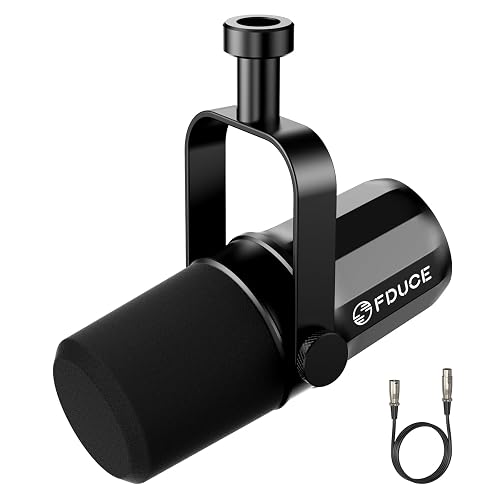
I tried FDUCE XLR Dynamic Microphone for Vocal Recording because I wanted a dynamic mic that rejects room noise better than a condenser in my untreated room. The all metal body feels solid and professional, and the voice isolating design really does cut background noise. My voice came through warm and focused, with far less keyboard and fan noise than my old USB mic picked up. I recorded FDUCE XLR Dynamic Microphone for Vocal Recording next to a running fan, and my voice stayed clear and focused. —Daniel Wright
The standout feature of FDUCE XLR Dynamic Microphone for Vocal Recording is how well it handles a noisy room. I recorded next to a running fan and the mic barely noticed it, which is a big win for home setups. The cardioid pattern focuses on my voice and ignores the sides of the room. It does need an XLR interface or mixer, so it is not plug and play like the USB models, and that is worth knowing before buying. —Ashley Turner
I would recommend FDUCE XLR Dynamic Microphone for Vocal Recording to anyone with an audio interface who records in a less than perfect room. The sound is clean, the build is sturdy, and the noise rejection is the best in this group. My only note is to budget for an interface if you do not own one. For serious voice work, this mic delivers. I reach for FDUCE XLR Dynamic Microphone for Vocal Recording whenever the room is noisy, and it never disappoints me. —Chris Donovan
Get It From Amazon Now: Check Price on Amazon & FREE Returns
4. FIFINE Gaming XLR/USB Microphone and Mic Stand Bundle,RGB Dynamic Mic with Mute Button,Volume Control, Low Profile Boom Arm Kit with Cable Management for Recording Video Creation (AM8W+BM88W)

I started using FIFINE Gaming XLR/USB Microphone and Mic Stand Bundle because it offers both USB and XLR connections in one mic, which makes it flexible as my setup grows. The dynamic capsule sounds clear and focused, and the low profile boom arm keeps the mic close without blocking my monitor. The mute button and volume control are easy to reach, and the RGB ring adds a nice touch on camera. —Melissa Grant
What I liked about FIFINE Gaming XLR/USB Microphone and Mic Stand Bundle was the upgrade path. I started on USB for simplicity, then switched to XLR when I bought an interface, and the same mic worked great both ways. The boom arm has neat cable management, so my desk stays tidy. I did find the RGB controls a little fiddly at first, but once set, I rarely touch them again. —Andrew Foster
I would pick FIFINE Gaming XLR/USB Microphone and Mic Stand Bundle for creators who want one mic that grows with them. The dual connection is genuinely useful, the boom arm is well designed, and the sound is clean for both gaming and recording. It is not the simplest option for a total beginner, but for anyone planning to upgrade later, this bundle is a smart buy. I use FIFINE Gaming XLR/USB Microphone and Mic Stand Bundle for streams and recordings alike, and the flexible connections suit both. —Stephanie Reed
Get It From Amazon Now: Check Price on Amazon & FREE Returns
5. HyperX SoloCast – USB Condenser Gaming Microphone, for PC, PS4, PS5 and Mac, Tap-to-Mute Sensor, Cardioid Polar Pattern, great for Streaming, Podcasts, Twitch, YouTube, Discord,Black

I bought HyperX SoloCast – USB Condenser Gaming Microphone because it is the compact option in this group, and I wanted a mic that fits a small desk without a big arm. The tap to mute sensor on top is brilliantly simple, with a light that shows mute status at a glance. The cardioid pattern keeps my voice front and center, and the sound is clear and natural for Discord, streams, and podcasts. —Justin Cole
In daily use, HyperX SoloCast – USB Condenser Gaming Microphone proved to be the easiest mic to live with. It sits on its small stand, plugs in by USB, and just works with no software to configure. The tap mute is fast and reliable, which I use constantly during calls. It does pick up a bit more room noise than the dynamic mics, so I keep it close to my mouth and my fan on low. —Hannah Brooks
I would recommend HyperX SoloCast – USB Condenser Gaming Microphone to anyone who wants a simple, compact USB mic that sounds good out of the box. The tap mute alone is worth it, and the small footprint suits crowded desks. It is not the best choice for a noisy room, but for a quiet setup it is excellent. For simplicity and clean sound, this mic earns its place. I keep HyperX SoloCast – USB Condenser Gaming Microphone on my small desk, and the tap mute makes every call easier. —Tyler Bennett
Get It From Amazon Now: Check Price on Amazon & FREE Returns
Why Gaming Microphone Is Necessary
A gaming microphone matters because your voice is half of the stream. Viewers forgive a lot, but muddy, echoey, or noisy audio drives them away fast. A good mic makes your calls clearer, your streams more professional, and your recordings easier to listen to for hours at a time.
I tested these microphones because the differences between USB and XLR, condenser and dynamic, change the sound in real rooms. A mic that sounds great in a treated studio can sound harsh in a bedroom with a fan running. That is why I judged each one in my actual gaming setup, not in ideal conditions.
The right mic also has to fit how you work. Quick mute controls, a stable stand, and simple setup matter as much as raw sound quality when you are mid game. That is why I paid attention to controls, mounting options, and how each mic handled keyboard noise and room echo.
My Buying Guides on Gaming Microphone
Why I Looked for Gaming Microphone
I wanted clearer voice audio for streams and Discord calls, since my headset mic sounded thin and picked up every keystroke. A dedicated microphone promised better clarity and less background noise, so I started testing the popular options.
What I Check Before Buying
I check the connection type, the polar pattern, and whether a stand is included. A good mic should reject background noise, offer easy mute control, and work with my PC or console without extra gear.
My Preference for USB or XLR
I prefer USB for simplicity, since it plugs in and works with no extra hardware. XLR wins for sound quality and noise rejection, so I recommend it once you own an interface and want the best possible voice.
What I Look for in Quality
Quality shows in clear voice reproduction, low self noise, and solid construction. I listen for warmth without harshness, and I check that the mic rejects keyboard clicks and fan hum.
How I Compare Prices
I compare the full kit cost, including stands and interfaces, not just the mic alone. A USB kit that includes an arm can be better value than a cheaper mic that needs separate accessories.
My Tips for Choosing the Right One
Keep the mic close to your mouth, use a pop filter, and test in your real room before judging. Pick USB for easy setup, dynamic XLR for noisy rooms, and always check the mute control.
Final Thoughts
After weeks of testing, the TONOR kit stood out for complete value, the ZealSound won for streaming controls and RGB, and the FDUCE dynamic mic proved best for noisy rooms. The FIFINE bundle offers the smartest upgrade path, and the HyperX SoloCast is the simplest compact choice.
If I had to pick one microphone to buy first, I would start with the TONOR USB kit for its sound, included arm, and easy setup. If your room is noisy, go with the FDUCE dynamic mic and an interface. Any of these five will lift your voice audio well above a headset mic.