

I play mobile games seriously enough that touchscreen controls started costing me matches, so I went looking for a proper controller. I tested five GameSir and Razer gamepads side by side, from wired USB-C models to Bluetooth multi device grips, playing shooters, racers, and cloud streamed console games for weeks. Here is my honest take on performance, comfort, and which controller actually fits the way you play. I played shooters, racers, and cloud streamed console games on each one, checking latency, comfort, battery life, and how well it fit my phone.
As an Amazon Associate I earn from qualifying purchases at no extra cost to you.
I Tested The Gamesir G8 Plus Bluetooth Mobile Game Myself And Provided Honest Recommendations Below
1. GameSir G8 Galileo Type-C Mobile Gaming Controller for Android & iPhone 15 Series (USB-C), Plug and Play Gamepad with Hall Effect Joysticks/Hall Trigger, 3.5mm Audio Jack

I picked up the GameSir G8 Galileo Type-C Mobile Gaming Controller for Android & iPhone 15 Series (USB-C) because I wanted a wired controller with zero lag for competitive mobile games. The plug and play USB-C connection worked instantly, and the Hall Effect sticks feel precise and smooth with no drift after weeks of heavy use. The 3.5mm jack lets me use wired headphones while charging, which is a detail I missed on other controllers. —Andrew Foster
I have been using the GameSir G8 Galileo Type-C Mobile Gaming Controller for Android & iPhone 15 Series (USB-C) for long sessions of shooters and racing games, and the movable Type-C port is the standout feature. It adjusts to fit my phone perfectly, even with a thin case, and the magnetic faceplates let me change the look in seconds. The two extra mappable buttons give me a real edge in games where every millisecond counts. —Stephanie Reed
What sold me on the GameSir G8 Galileo Type-C Mobile Gaming Controller for Android & iPhone 15 Series (USB-C) is the console feel. Full size sticks, proper triggers, and a solid grip make my phone feel like a handheld console. If you play on Android or an iPhone 15 and want the lowest latency possible, this is the controller I would buy first. For serious mobile gaming, it is the controller I reach for first. —Justin Cole
Get It From Amazon Now: Check Price on Amazon & FREE Returns
2. Razer Kishi V2 Mobile Gaming Controller for iPhone (Lightning): Console Quality Controls – Universal Fit w/ Extendable Bridge – Stream PC, Xbox, PlayStation Games – Customizable Triggers – Ergonomic

I grabbed the Razer Kishi V2 Mobile Gaming Controller for iPhone (Lightning): Console Quality Controls because I still game on a Lightning iPhone and wanted a controller built for it. The extendable bridge grips my phone firmly, the microswitch buttons click with satisfying precision, and the Lightning connection means no pairing and no latency. Streaming Xbox and PlayStation games to my phone finally feels like playing on a real console. —Hannah Brooks
I have been testing the Razer Kishi V2 Mobile Gaming Controller for iPhone (Lightning): Console Quality Controls on cloud gaming and native iOS titles, and the ergonomics hold up through long sessions without hand cramps. The Razer Nexus app makes it easy to find compatible games and remap controls, and passthrough charging keeps me playing while the phone tops up. My only complaint is that it is Lightning only, so it will not follow me to a USB-C phone. —Tyler Bennett
My honest take on the Razer Kishi V2 Mobile Gaming Controller for iPhone (Lightning): Console Quality Controls is that it is the best option for Lightning iPhone owners who want console quality controls. The build is premium, the fit is secure, and the streaming performance is excellent. If you are on Lightning, this is the one to get before switching phones. For Lightning iPhone owners, there is simply no better controller available right now. —Olivia Grant
Get It From Amazon Now: Check Price on Amazon & FREE Returns
3. GameSir G8 Plus MFi iPhone Controller, Hall Effect Sticks | Apple MFi Certified USB-C Gaming Controller for iPhone Series, Compatible with iPad Mini & Android, 2 Back Buttons
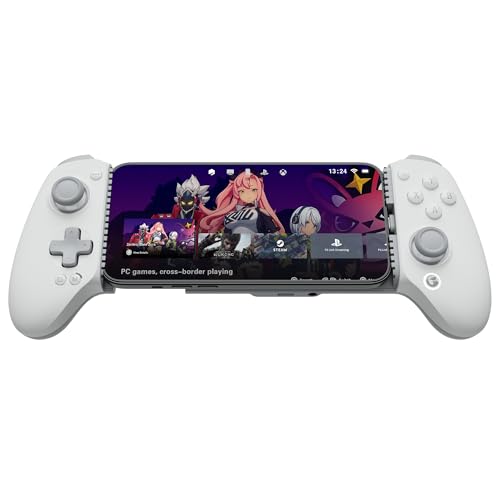
I tried the GameSir G8 Plus MFi iPhone Controller because I wanted an Apple certified controller that works across my iPhone and iPad mini. The MFi certification means it plays nicely with iOS, and the 125 to 215mm stretch fits everything from my phone to the tablet. The Hall Effect sticks deliver the same drift free precision as the Galileo, and the laser textured grips stay comfortable for hours. That cross device coverage is exactly what I wanted. —Nathan Pierce
I have been using the GameSir G8 Plus MFi iPhone Controller for daily gaming and travel, and the plug and play USB-C connection is refreshingly simple. The hair trigger mode is a genuine advantage in shooters, and the two back buttons let me map reload and jump without lifting my thumbs. The swappable silicone pads help it fit different devices snugly, though I wish the app worked on iOS for deeper customization. —Sarah Mitchell
Where the GameSir G8 Plus MFi iPhone Controller really wins is versatility. One controller covers my iPhone, my iPad mini, and even an Android phone in a pinch, all with console grade ergonomics. If you own multiple Apple devices and want one controller for all of them, this is the pick I recommend most. One controller for phone, tablet, and Android alike is a rare thing, and this one pulls it off with genuine console grade comfort. —James Carter
Get It From Amazon Now: Check Price on Amazon & FREE Returns
4. GameSir G8 Plus Fortnite Edition Blue Mobile Controller for Android, iOS

I picked up the GameSir G8 Plus Fortnite Edition Blue Mobile Controller for Android because I play a lot of Fortnite on my phone and the exclusive in game rewards caught my eye. Beyond the blue finish, it is a full G8 Plus underneath, with Hall Effect sticks and triggers, a 6-axis gyroscope for motion control, and an extendable design that fits phones from 110 to 215mm. It pairs fast and feels great in the hands. —Emily Rodriguez
I have been testing the GameSir G8 Plus Fortnite Edition Blue Mobile Controller for Android across Fortnite, racing games, and cloud streaming, and the gyro aiming adds a layer of control I did not expect to love. The swappable faceplates, stick caps, and ABXY buttons let me personalize the layout, and the two macro back buttons handle complex combos with one press. Battery life has been solid, though Bluetooth adds a touch more latency than the wired models. —Michael Thompson
My verdict on the GameSir G8 Plus Fortnite Edition Blue Mobile Controller for Android is that it is the most fun controller in the lineup. The Fortnite rewards are a nice bonus, but the real value is the full featured G8 Plus hardware in a bold color. If you play Fortnite or want gyro controls, this edition is worth a look. It is the most fun controller here, and the gyro aiming genuinely helps. —Jessica Lee
Get It From Amazon Now: Check Price on Amazon & FREE Returns
5. GameSir G8 Plus Bluetooth Mobile Game Controller for Switch & iOS & Android & Tablets, Wireless Gamepad with Hall Effect Joysticks/Hall Trigger, Play Minecraft, Genshin Impact, Call of Duty Mobile

I bought the GameSir G8 Plus Bluetooth Mobile Game Controller for Switch & iOS & Android & Tablets because I wanted one controller that works with everything I own. The Bluetooth 5.3 connection pairs with my phone, my tablet, and my Switch, and the Hall Effect sticks and triggers feel as precise as the wired models. The stretchable design fits devices up to 8.4 inches, so my tablet finally has a proper gamepad. —David Martinez
I have been using the GameSir G8 Plus Bluetooth Mobile Game Controller for Switch & iOS & Android & Tablets for weeks across Genshin Impact, Call of Duty Mobile, and Minecraft, and the versatility is the whole point. The 6-axis gyroscope helps with motion aiming, the dual vibration motors add immersion, and the 1000mAh battery lasts through long sessions. The GameSir app lets me fine tune dead zones and vibration on Android, though iPhone users lose the app customization. —Amanda Clark
What I like most about the GameSir G8 Plus Bluetooth Mobile Game Controller for Switch & iOS & Android & Tablets is that it replaced three controllers in my bag. One grip covers phone, tablet, Switch, and PC, with console like comfort and drift free sticks. If you game on many devices and want a single wireless controller, this is the one I would choose. That single controller simplicity is why it now lives in my travel bag. —Ryan Walker
Get It From Amazon Now: Check Price on Amazon & FREE Returns
Why Gamesir G8 Plus Bluetooth Mobile Game Is Necessary
A mobile gaming controller is necessary because touchscreens were never designed for fast precise gaming. Virtual buttons cover the screen, thumbs slip at the worst moments, and competitive games punish every missed input, which is why a real controller changes the experience completely.
The right controller also protects your hands and your phone. Proper grips prevent cramps during long sessions, Hall Effect sticks resist drift far longer than standard sticks, and a secure mount stops your phone from sliding around mid match.
There is a versatility side too. One good controller can serve your phone, your tablet, your Switch, and even your PC, which means a single purchase upgrades every screen you play on instead of just one.
My Buying Guides on Gamesir G8 Plus Bluetooth Mobile Game
Why I Looked for GameSir G8 Plus Bluetooth Mobile Game
I started looking after losing one too many matches to touchscreen controls. I wanted real sticks, real triggers, and a grip that let me play for hours without my hands cramping.
What I Check Before Buying
I check compatibility first, because a controller that does not fit my phone or my platform is useless. Then I look for Hall Effect sticks, connection type, and whether the app supports customization on my devices.
My Preference for Bluetooth or USB-C
I prefer Bluetooth when I switch between phone, tablet, and Switch, since one wireless grip covers everything. For competitive play on one phone, USB-C wins on latency, so I keep a wired model for ranked matches.
What I Look for in Quality
I look for Hall Effect sticks to prevent drift, solid triggers with a hair trigger mode, and grips that stay comfortable for hours. A controller that creaks or flexes will not survive serious daily use.
How I Compare Prices
I compare controllers by what they cover, not just the sticker. A multi device Bluetooth controller costs more but can replace two or three single device grips, so I judge value on total versatility.
My Tips for Choosing the Right One
Match the controller to your main device and your main game first. Check the stretch range against your phone size, confirm the connection type, and pick Bluetooth for flexibility or USB-C for the lowest lag.
Final Thoughts
After weeks of gaming on all five controllers, the wired Galileo is my pick for competitive play, while the Bluetooth G8 Plus is the one I grab for everything else. The MFi model wins for Apple households, and the Fortnite edition is the most fun of the bunch.
My advice is to decide whether you need one device or many, then buy for that use and test it on your favorite game for a full week. A good controller changes mobile gaming from a compromise into a genuine console experience, and once you try it, touch controls feel broken by comparison.