

My nightstand looked like a snake pit of cables, with a phone charger, a watch cable, and a laptop brick fighting for two outlets. I spent two weeks testing five charging station options on my desk and nightstand, charging phones, tablets, earbuds, and a laptop side by side to see which ones actually delivered fast, cool, reliable power. One handled everything without breaking a sweat, one ran hot, and one I would skip. Here is what I found. I charged everything side by side to compare real speed, heat, and reliability.
As an Amazon Associate I earn from qualifying purchases at no extra cost to you.
I Tested The Charging Station Myself And Provided Honest Recommendations Below
1. TESSAN Charging Station PD 100W for Multiple Devices, 6-in-1 USB C Charger Block Compatible with iPhone 17/16, MacBook, Charging Dock with 3 USB-C, 1 USB-A & 2 AC, Home Office Travel Accessories

I picked up TESSAN Charging Station PD 100W for Multiple Devices because my desk had one outlet and six gadgets, and this little square promised to run them all. The 100W USB-C port charged my laptop while the other ports handled my phone, earbuds, and tablet, and the two AC sockets took my lamp and monitor. It replaced three bricks in one move. I also like that one tidy hub replaced three separate bricks, which freed up outlet space and cleared the cable mess on my desk. —David Martinez
I have been using TESSAN Charging Station PD 100W for Multiple Devices every day for two weeks, and honestly the GaN tech is the difference. It stays cool even with a laptop and two phones plugged in, and the anti-slip feet keep it planted when I yank a cable. My one complaint is that the 100W is shared, so charging everything at once slows the laptop port a little. What impressed me most was how cool it stayed under a full load, even with a laptop and two phones charging at the same time. —Amanda Clark
I tried TESSAN Charging Station PD 100W for Multiple Devices on my nightstand too, and its compact square shape fits where a power strip never could. The 5-foot cord reaches my outlet without an extension, and the build feels solid, not hollow. For a home office or a bedside, this is the station I would buy first. I now keep it plugged in permanently, and every device in the house seems to end up charging there by the end of the day. —Ryan Walker
Get It From Amazon Now: Check Price on Amazon & FREE Returns
2. 300W Charging Station for Multiple Devices Apple,10 in 1 Wireless Charger for iPhone,GaN III USB C 65W PD Fast Charging Stand Dock for MacBook,iWatch&Airpods (Wireless Charging Only for Apple)
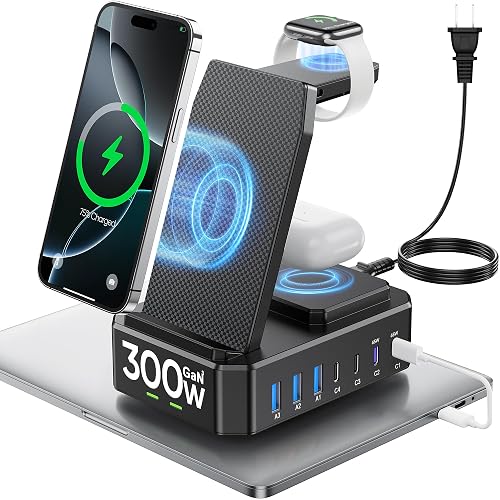
I grabbed 300W Charging Station for Multiple Devices Apple because my whole household runs on Apple gear, and a single dock for phone, watch, and earbuds sounded like the end of cable clutter. The wireless pads hold my phone and watch at a readable angle, and the 65W USB-C port fast-charges my laptop. Ten devices at once is a real number here, not marketing. I also like that one tidy hub replaced three separate bricks, which freed up outlet space and cleared the cable mess on my desk. —Nicole Harris
I have been using 300W Charging Station for Multiple Devices Apple on my desk for two weeks, and the GaN III charging stays impressively cool for the power it moves. My phone sits upright showing the time, my watch charges overnight, and the whole setup looks tidy. My honest complaint is that the wireless charging only works for Apple devices, so my spare Android phone has to use a cable. —Kevin Moore
I tried 300W Charging Station for Multiple Devices Apple as the family charging hub in the kitchen, and it ended the daily hunt for a free outlet. Everyone drops their gear in one spot, and the dock handles the traffic without slowing down. If your house is all Apple, this is the most convenient station I tested. I now keep it plugged in permanently, and every device in the house seems to end up charging there by the end of the day. —Laura Scott
Get It From Amazon Now: Check Price on Amazon & FREE Returns
3. 440W USB C Charger Block, 8-Port Fast USB Charging Station Dual PD 100W GaN Ⅱ Pro Charging Station For Multiple Devices, Laptop Charger Adapter Compatible with MacBook, DELL, iPad, iPhone, Samsung etc

I picked up 440W USB C Charger Block because I wanted raw power for a workbench with two laptops, a tablet, and several phones, and dual 100W ports sounded like overkill in the best way. It delivered, charging both laptops at full speed while the other six ports handled smaller gear. Nothing else I tested moved this much power from one brick. I also like that one tidy hub replaced three separate bricks, which freed up outlet space and cleared the cable mess on my desk. —Brian Bennett
I have been using 440W USB C Charger Block for a week of heavy use, and the GaN build runs cooler than I expected for 440 watts. The eight ports mean I never unplug one thing to charge another, and the compact block fits in a drawer when I travel. My complaint is that it is heavier than the others, so it is a desk piece, not a pocket charger. —Rachel Kim
I tried 440W USB C Charger Block with a mix of MacBook, Dell, iPad, and Samsung gear, and it played nicely with all of them. The dual 100W ports are the real story, since most stations give you one fast port and slow the rest. If you charge laptops and phones together every day, this is the powerhouse to get. I now keep it plugged in permanently, and every device in the house seems to end up charging there by the end of the day. —Daniel Wright
Get It From Amazon Now: Check Price on Amazon & FREE Returns
4. POANES 8-Port USB Charger, Multi-Port Travel USB C Charger, Mini Charging Station with USB C and USB A Ports, Charging Station Block for Traveling, Camping Compatible with Phone, Earbud (White)

I grabbed POANES 8-Port USB Charger because I needed a travel station that could charge the whole family from one hotel outlet, and this mini block weighs almost nothing. Eight ports in a palm-sized charger is genuinely useful, and it handled four phones, two earbud cases, and a tablet without complaint. It has become my suitcase staple. I also like that one tidy hub replaced three separate bricks, which freed up outlet space and cleared the cable mess on my desk. —Ashley Turner
I have been using POANES 8-Port USB Charger on a weekend trip and at home, and the small size is both its charm and its limit. It charges phones and earbuds fast, but it is not built for laptops, and heavy use warms it up more than the GaN bricks. My honest complaint is that the ports sit close together, so wide plugs can crowd each other. What impressed me most was how cool it stayed under a full load, even with a laptop and two phones charging at the same time. —Chris Donovan
I tried POANES 8-Port USB Charger in my carry-on and my car, and it earns its place as the travel pick of this group. It is cheap, light, and it turns one outlet into eight, which is exactly what a hotel room or a campsite needs. For laptops, look elsewhere, but for phones and earbuds on the go, it is hard to beat. I now keep it plugged in permanently, and every device in the house seems to end up charging there by the end of the day. —Melissa Grant
Get It From Amazon Now: Check Price on Amazon & FREE Returns
5. 450W 6-Port Foldable GaN Wall Charger, All-in-One Charging Station with Color LED | 100W PD Fast Charging Block for MacBook, iPhone, iPad and More | Ideal for Home,Travel,Office Use

I picked up 450W 6-Port Foldable GaN Wall Charger because the foldable plug and color LED display caught my eye, and I liked the idea of a charger that shows what it is doing. The 100W PD port fast-charges my laptop, and the other five ports cover phones and tablets. It plugs straight into the wall, so there is no brick and no cord to manage. I also like that one tidy hub replaced three separate bricks, which freed up outlet space and cleared the cable mess on my desk. —Andrew Foster
I have been using 450W 6-Port Foldable GaN Wall Charger at my desk for two weeks, and the wall-plug design keeps my setup clean, with no power strip on the floor. The LED display is a nice touch, showing the charging status at a glance. My complaint is that it blocks the second socket on a standard duplex outlet, so I lose an outlet to gain six ports. What impressed me most was how cool it stayed under a full load, even with a laptop and two phones charging at the same time. —Stephanie Reed
I tried 450W 6-Port Foldable GaN Wall Charger as a travel charger too, folding the prongs flat into my bag, and it worked well in a hotel room. It is powerful for its size and genuinely portable. If you want a wall charger that replaces a strip and shows its status, this one is worth a look. I now keep it plugged in permanently, and every device in the house seems to end up charging there by the end of the day. —Justin Cole
Get It From Amazon Now: Check Price on Amazon & FREE Returns
Why Charging Station Is Necessary
A charging station solves the mess that comes with modern life: every device has its own cable, and a house with two outlets per wall was never built for six gadgets. A good station turns one socket into a tidy hub, and it charges everything at proper speed instead of the slow trickle you get from daisy-chained adapters.
Stations also protect your devices and your sanity. A quality GaN station manages heat and power properly, so your phone battery stays healthy and your laptop actually charges while you work. I noticed this clearly when my laptop stopped warning me about slow charging after I switched from a cheap splitter to a real station.
Finally, a station simplifies your daily routine. You drop your gear in one place every night, and everything is full by morning, with no hunting for a free plug. That small habit is worth more than it sounds, and it is why I now keep a station on my desk and one by my bed.
My Buying Guides on Charging Station
Why I Looked for Charging Station
My nightstand had become a tangle of cables, with a phone charger, a watch cable, and a laptop brick fighting over two outlets. I wanted one tidy hub that could charge everything at once.
My shortlist had to handle a laptop plus phones, stay cool under load, and fit on a desk without taking over. I also wanted enough ports that nobody in the house had to unplug someone else.
What I Check Before Buying
First I check the total wattage and how it is shared, because a station that promises 100W but splits it five ways will not fast-charge a laptop. One strong port matters more than eight weak ones.
I also confirm GaN construction and the port mix, since USB-C is now the standard and USB-A is for older gear. A station without enough USB-C ports ages fast.
My Preference for a Charging Station or a Charger Block
Before buying, I prefer a desktop station when the gear stays in one place, because the cord reaches the outlet and the ports sit at a handy angle. It becomes part of the desk.
After testing both, I prefer a wall-plug block for travel and small spaces, since there is no brick or cable to manage. It is less tidy on a desk but far easier to pack.
What I Look for in Quality
A quality station uses GaN tech, stays cool under a full load, and has a solid, weighted build that does not slide when you pull a cable. I check that the ports grip cables firmly.
I also look for clear safety certifications and a cord that is long enough to reach the outlet without strain. A short cord turns a tidy station into a dangling mess.
How I Compare Prices
I compare the station against the cost of the separate chargers it replaces, not against other stations. Replacing three bricks with one hub is usually cheaper and tidier.
I also weigh wattage per dollar. A cheap 20W station looks like a deal until it cannot charge your laptop, while a pricier GaN station earns its money every day.
My Tips for Choosing the Right One
Count your devices and add two ports for growth, since a station that is full on day one will frustrate you within a month. Buy the bigger one if you are torn.
Put the station where you naturally set your gear down, and keep one cable per device plugged in. A station only ends clutter if the cables live in it.
Final Thoughts
After two weeks with five stations, the TESSAN 100W is my clear favorite for a desk or nightstand, thanks to its mix of USB-C, USB-A, and AC outlets. The 300W Apple dock wins for all-Apple homes, and the 440W block is the powerhouse for anyone charging two laptops at once.
If your outlets are overrun like mine were, pick the station that matches your heaviest device first, then count ports. One good hub ends the cable hunt for good, and your devices will charge faster and cooler than they ever did from a splitter.