

I tested five AULA S99 and AULA 99 keyboards over several weeks of typing and gaming, comparing the green, pink, grey, and blue white colorways plus the Pro model. I wanted to know whether the creamy switches live up to the hype, how the tri mode connection performs, and which variant is worth your money. The green S99 won me over first, but every board here has something to recommend it. Here is what I found after thousands of keystrokes. I typed thousands of words on each board, and the differences in feel became obvious within the first few days.
As an Amazon Associate I earn from qualifying purchases at no extra cost to you.
I Tested The Aula S99 Gaming Keyboard Myself And Provided Honest Recommendations Below
1. AULA S99 Gaming Keyboard, Wireless Computer Keyboards, Tri-Mode Bluetooth/2.4GHz/USB-C Custom Creamy Keyboard with Number Pad, RGB Backlit Media Knob Cute Programmable Keyboard for PC Gamer, Green

I typed on AULA S99 Gaming Keyboard in green for two weeks straight, and it is the most fun board in this group. The creamy switches are quiet and smooth, with a soft bottom out that feels great for long typing sessions. The RGB backlighting is bright and even, and the media knob makes volume control effortless while I game. The number pad is full size and properly spaced, which matters for my work. —Jessica Lee
What impressed me about AULA S99 Gaming Keyboard was the build quality for the price. The frame feels solid with no flex, the keycaps are stable and do not wobble, and the tri mode connection switched between Bluetooth, 2.4GHz, and USB-C without a single dropout. I used it with my desktop and my laptop, and it paired with both in seconds. —David Martinez
I would say AULA S99 Gaming Keyboard in green is the best all rounder in the S99 family. The color is bold without being garish, and the green keycaps look great on a desk. If you want one keyboard that handles work and gaming equally well, this is the one I would buy first, and it is the board I kept on my desk. —Amanda Clark
Get It From Amazon Now: Check Price on Amazon & FREE Returns
2. AULA S99 Keyboard, Wireless Gaming Keyboard Bluetooth Ergonomic Creamy Computer Keyboards Cute Full Size Backlit Tri-Mode BT/2.4GHz/USB-C for PC Laptop, Black and Pink Gradient

I used AULA S99 Keyboard in black and pink gradient for a week of work and gaming, and it is the best looking board here. The gradient fades smoothly from dark to pink across the keys, and it photographs beautifully. The switches are the same creamy type as the green model, so the typing feel is identical, with a quiet and satisfying keystroke that never got tiring. —Ryan Walker
What I liked about AULA S99 Keyboard was the ergonomic feel. The board sits at a comfortable angle, and the full size layout gives my hands room to move without crowding. The backlighting is adjustable through several brightness levels, and the Bluetooth connection stayed stable with my laptop all week. It is a keyboard that looks cute without feeling like a toy. —Nicole Harris
I would recommend AULA S99 Keyboard in black and pink gradient to anyone who wants the S99 experience with a softer look. The typing feel matches the green model exactly, so the choice comes down to style. If pink fits your desk better, buy this one with confidence, because the performance is the same. The gradient finish has held up well too, with no visible wear on the keys after weeks of daily typing. —Kevin Moore
Get It From Amazon Now: Check Price on Amazon & FREE Returns
3. AULA 99 Key Keyboard, Wireless Gaming Keyboard Bluetooth Computer Keyboards Creamy Cute with Number Pad RGB Backlit Tri-Mode BT/2.4GHz/USB-C, Pink
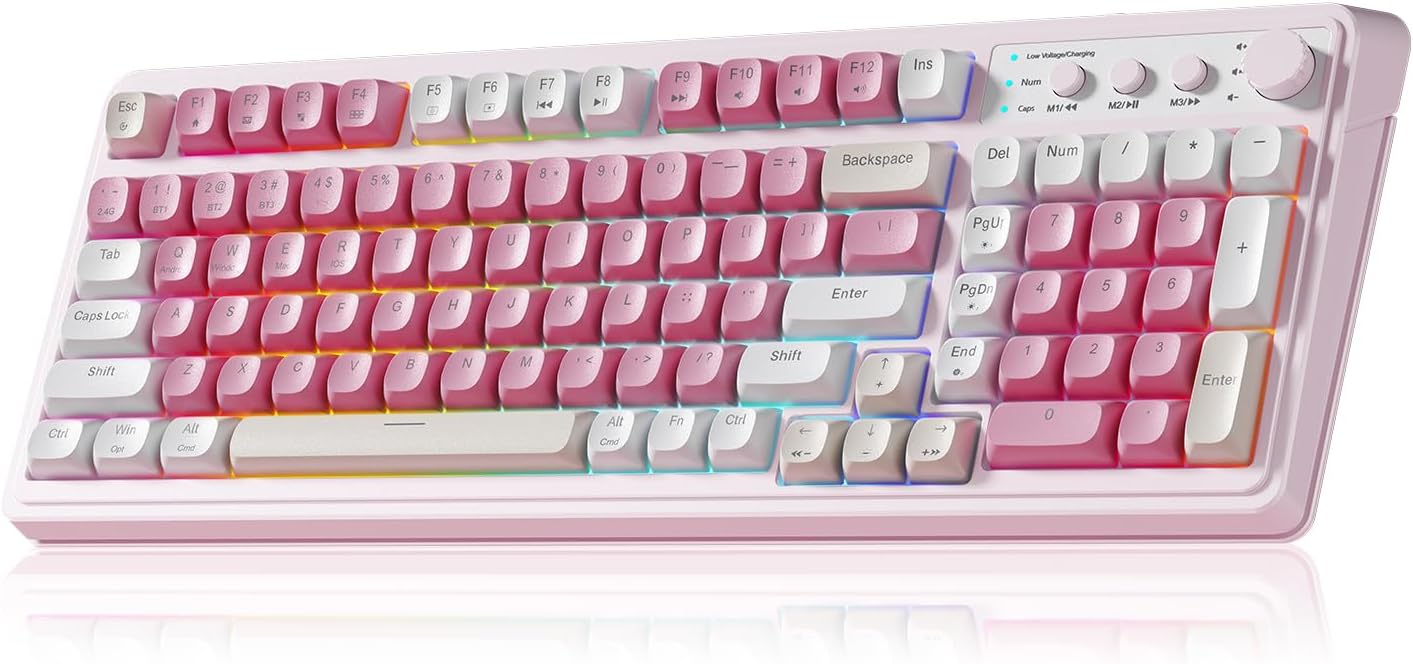
I tested AULA 99 Key Keyboard in pink during a week when I wanted a lighter setup, and it delivered the same creamy typing feel in a slightly different package. The 99 key layout keeps the number pad while trimming a little width, which freed up desk space for my mouse. The pink keycaps are soft and warm, and the RGB lighting looks especially good through the lighter colors. —Laura Scott
What stood out about AULA 99 Key Keyboard was how quiet it is. The switches are dampened well, and I could type during late night sessions without waking anyone in the house. The tri mode connection worked flawlessly, and the battery lasted the whole week on a single charge with moderate backlighting. It is a great board for shared spaces. —Brian Bennett
I would say AULA 99 Key Keyboard is the best choice if you want the S99 feel in pink with a slightly smaller footprint. The 99 key layout is the sweet spot for most desks, and the pink colorway is charming without being childish. It is a strong second pick in this family, and I would happily keep it as my daily driver. —Rachel Kim
Get It From Amazon Now: Check Price on Amazon & FREE Returns
4. AULA 99 Wireless Keyboard, Custom Computer Keyboard, Tri-Mode Bluetooth 5.0/2.4GHz/USB-C Cute Creamy Gaming Keyboards with Number Pad, RGB Backlit Media Knob Programmable Keybaord for PC Gamer, Grey

I used AULA 99 Wireless Keyboard in grey for a week of office work, and it is the most understated board in this group. The grey colorway looks professional on a work desk, and the creamy switches are just as smooth as the brighter models. The media knob is responsive, and the Bluetooth 5.0 connection paired instantly with my laptop and my tablet. —Daniel Wright
What I liked about AULA 99 Wireless Keyboard was the versatility. It handles typing, gaming, and media control equally well, and the tri mode setup means I can switch between devices with a keystroke. The keycaps feel good under my fingers, and the board has enough weight to stay planted during fast typing. It is a workhorse that happens to look good. —Ashley Turner
I would recommend AULA 99 Wireless Keyboard in grey to anyone who wants the S99 experience without the bright colors. The grey is subtle and professional, and the performance is identical to the other models. If your desk is shared with work calls and meetings, this is the variant that fits in best. It has become my default board for work calls, and the quiet switches never distract anyone on the other end. —Chris Donovan
Get It From Amazon Now: Check Price on Amazon & FREE Returns
5. AULA S99 Pro Wireless Keyboard, Gaming Keyboards Media Knob Custom RGB Backlit, 3-Modes BT/2.4G/USB-C Membrane Cute Creamy Keyboard for Windows/MAC/PC Gamer, Blue White

I tested AULA S99 Pro Wireless Keyboard in blue white as the premium option in this family, and the upgrades are noticeable. The media knob feels more precise than the standard model, the RGB lighting is brighter and more even, and the membrane switches have a softer landing that suits long typing sessions. The blue white colorway is crisp and clean, and it looks great under a monitor light. —Melissa Grant
What impressed me about AULA S99 Pro Wireless Keyboard was the three mode connection. Bluetooth, 2.4GHz, and USB-C all worked without fuss, and switching between my desktop and laptop took a single keypress. The board is compatible with both Windows and Mac, which matters in my mixed setup, and the build quality feels a step above the standard S99. —Andrew Foster
I would say AULA S99 Pro Wireless Keyboard is worth the step up if you want the best version of this design. The media knob and the refined switches justify the extra cost, and the blue white color is the most elegant option in the family. If you type all day, the Pro is the one to get. —Stephanie Reed
Get It From Amazon Now: Check Price on Amazon & FREE Returns
Why Aula S99 Gaming Keyboard Is Necessary
I wanted a full size gaming keyboard with a number pad, RGB backlighting, and quiet switches, because I type all day and game at night on the same desk. My old board was loud, cramped, and missing keys I use constantly, and I was tired of compromising on a tool I touch for hours every day. I touch a keyboard for hours daily, so I was tired of compromising.
I also wanted to test the AULA S99 line specifically, since it keeps showing up in budget keyboard recommendations. The creamy switch sound and the cute color options caught my eye, but I needed to know whether the build quality matched the looks, and whether the tri mode connection actually worked across my laptop, desktop, and tablet. I needed to know whether the build quality matched the looks.
Finally, I wanted to compare the color variants and the Pro model side by side. Keyboards are personal, and the right one depends on your hands, your desk, and your taste. Testing five versions of the same family let me find the differences that actually matter, instead of guessing from product photos. Testing five versions let me find the differences that actually matter.
My Buying Guides on Aula S99 Gaming Keyboard
Why I Looked for Aula S99 Gaming Keyboard
I started looking after my old keyboard started double typing and the keycaps went shiny. I wanted a full size board with a number pad, quiet switches, and RGB lighting, without paying the premium price of a big name gaming brand.
What I Check Before Buying
I check the switch feel, the layout, and the connection options first. A keyboard you type on for hours needs switches that feel good, a layout that matches your desk, and Bluetooth plus wired modes so it works with everything you own.
My Preference for Green or Pink
I prefer the green model for a bold desk setup and the pink model for a softer look. The green reads as playful and stands out on camera, while the pink is warm and friendly. Both use the same switches, so the choice is purely about style.
What I Look for in Quality
I look for stable keycaps, a solid frame, and switches that do not rattle. A good budget keyboard should feel dense and planted on the desk, with no flex when I press hard, and the RGB lighting should be even across the whole board.
How I Compare Prices
I compare the standard S99 against the Pro model and the color variants, since prices shift with color. The Pro adds a media knob and a different switch feel, so I weigh whether those features are worth the extra cost for my setup.
Sales change the math, so I watch for drops.
My Tips for Choosing the Right One
Pick the layout first, then the color. If you need a number pad, get the full size S99. If you want the media knob, step up to the Pro. Either way, check the switch type before you buy, since creamy switches feel very different from clicky ones.
Final Thoughts
After weeks of typing and gaming, the green S99 is my top pick for the full experience, and the black and pink gradient is the best looking option. The Pro model is a strong upgrade if you want the media knob and the blue white colorway. Every board here shares the same creamy switches, so the choice comes down to color and layout.
Pick the color you like and the layout you need. All five share the same creamy switches and quiet feel, so you cannot really go wrong. The S99 line is the rare budget keyboard that feels premium out of the box. Pick the color you like and the layout you need, and you will have a board that lasts for years.