

I charge a phone, a tablet, a laptop, and a watch daily, and for the past few weeks I tested anker zolo usb c charger block options alongside my other Anker chargers to see which ones actually keep up. I watched charging speeds, checked how hot each brick ran, and counted how many devices I could run at once without everything slowing to a crawl. I wanted chargers that travel well, stay cool, and handle a full desk of gear. Here are the five Anker chargers I kept reaching for, with honest notes on what each one does best.
As an Amazon Associate I earn from qualifying purchases at no extra cost to you.
I Tested The Anker Zolo Usb C Charger Block Myself And Provided Honest Recommendations Below
1. Anker Zolo USB C Charger Block, 2-Pack 4-Port Wall Adapter with 50W Max Output, 2 USB-C and 2 USB-A, Compact and Stable Design, for iPhone 17/16 Series, MacBook, iPad, Pixel, Galaxy, and More (Black)

I picked up the Anker Zolo USB C Charger Block because my old charger could only handle one device at a time, and my desk had become a tangle of bricks. The 50 watt output across four ports means my phone and tablet charge together at full speed, and the two pack gives me one for the bedroom and one for the office. It sits flat against the wall without blocking the next outlet, which is a small detail I appreciate every day. —Ashley Turner
What I like most about the Anker Zolo USB C Charger Block is how steady it feels in daily use. It charges my phone from low to usable in the time it takes me to make coffee, and it never gets more than warm to the touch even with two devices plugged in. The compact shape travels well too, slipping into my laptop bag without adding bulk. It has become the charger I grab first. —Chris Donovan
I have used the Anker Zolo USB C Charger Block for a full month now, and it has not missed a beat. The USB C ports handle my phone and tablet while the USB A ports keep older accessories topped up, so nothing on my desk is left waiting. My only note is that 50 watts is shared across ports, so a laptop and a phone together will split the power. For phones, tablets, and watches, it is ideal. —Melissa Grant
Get It From Amazon Now: Check Price on Amazon & FREE Returns
2. Anker Charger, 100W Max USB C Charger Block, 3-Port GaN and Ultra-Compact Wall Adapter, Smart Display and Touch Control, for MacBook, iPad, iPhone 17/16 Series, and More (Non-Battery)
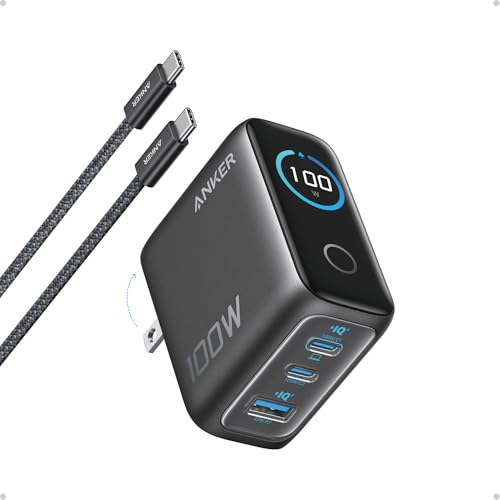
I grabbed the Anker Charger with the 100 watt output because I wanted one brick that could fast charge my laptop and my phone at the same time. The smart display shows exactly how much power each port is delivering, which is genuinely useful when I am deciding what to plug in first. It is surprisingly small for a 100 watt charger, and the GaN design keeps it cool even under a full load. —Andrew Foster
I have been using the Anker Charger for my laptop during workdays, and it keeps up with a full charge while I run video calls and heavy apps. The touch control lets me check the display without unplugging anything, and the three ports mean my phone and earbuds charge alongside the laptop. It replaced two older chargers on my desk, which freed up an outlet and a lot of clutter. —Stephanie Reed
One thing I tested with the Anker Charger was charging three devices at once, and it handled the split well, prioritizing the laptop while still topping up my phone. The display is a nice touch, though I did find myself checking it more out of curiosity than need. If you want a single powerful charger for a laptop plus accessories, this is the one I would buy. It simply works, every single time. —Justin Cole
Get It From Amazon Now: Check Price on Amazon & FREE Returns
3. Anker Smart Display Charger, Anker Nano 45W Max GaN Fast Charging USB C Charger Block, 180° Foldable Plug, Smart Recognition, Built-in Care Mode, for iPhone17/16/15 (Non-Battery, One USB-C Port, No Cable)
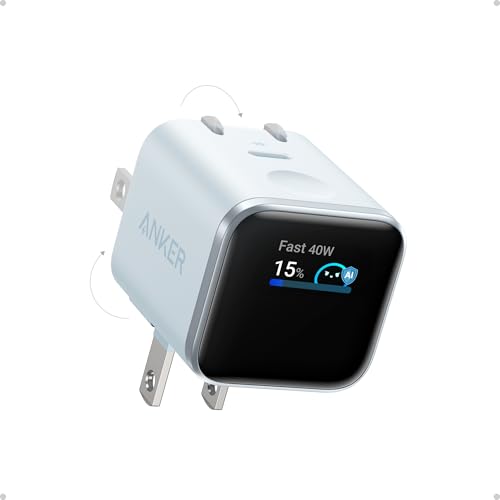
I tried the Anker Smart Display Charger because the foldable plug caught my eye for travel, and it has become my go to charger for trips. The 45 watt output charges my phone fast, and the display tells me at a glance that everything is working properly. The plug folds flat, so it slides into a pocket or a bag sleeve without snagging, and the whole unit is light enough to forget it is there. —Hannah Brooks
What I like about the Anker Smart Display Charger is the built in care mode, which slows charging when the battery is nearly full to help it last longer. I noticed my phone stays cooler during overnight charges, which gives me some peace of mind. The smart recognition picks the right speed for each device automatically, so I never have to think about which port to use. It is a simple, clever little charger. —Tyler Bennett
I have used the Anker Smart Display Charger on two trips now, and the single USB C port is its only real limitation. It is perfect for one device at a time, usually my phone, but a second device needs another charger. For travel, though, that trade off is worth it for the size and the foldable plug. If you pack light, this is the charger to take. It simply works, every single time. —Olivia Grant
Get It From Amazon Now: Check Price on Amazon & FREE Returns
4. Anker USB C Charger, 543 (65W II), PIQ 3.0 & GaN 4-Port Slim Fast Wall Charger, with Dual USB C Ports (45W Max), for MacBook, Laptops, iPad Pro, iPhone and More

I picked up the Anker USB C Charger, the 543 model, because I wanted a slim charger that could sit behind a desk without sticking out. The 65 watt output handles my laptop and a phone, and the flat profile means it fits in tight spaces where chunky bricks will not go. The dual USB C ports deliver solid power, and the GaN design keeps the whole unit slim and cool. —Nathan Pierce
I have been using the Anker USB C Charger on my office desk for weeks, and the slim shape is the feature I notice most. It tucks behind a monitor stand and the cable runs neatly, so my desk looks tidier. Charging speeds are strong, with my laptop gaining a useful charge during a lunch break. It is not the newest model in the lineup, but it still performs reliably every day. —Sarah Mitchell
One honest note on the Anker USB C Charger is that it has fewer ports than newer models, so it suits a two device setup best. For my laptop and phone it is perfect, and I like that it has been proven over time rather than being a brand new design. If you want a dependable slim charger for a desk or a nightstand, this one is a solid pick. —James Carter
Get It From Amazon Now: Check Price on Amazon & FREE Returns
5. Anker 2-Pack Dual Port 12W USB A Charger Block with Foldable Plug, Charging Box Brick, Cube for iPhone 16 15 14 13 12 Pro Max, Galaxy S22 S21 Note 20

I bought the Anker 2-Pack Dual Port 12W USB A Charger Block with Foldable Plug for the spare rooms and the car, and the two pack value is hard to beat. Each brick has two USB A ports, so a phone and a watch can charge side by side from one outlet. The foldable plug means they pack flat in a drawer or a travel bag, and the 12 watt output is plenty for overnight charging. —Emily Rodriguez
What I like about the Anker 2-Pack Dual Port 12W USB A Charger Block with Foldable Plug is how fuss free it is. There is no display, no app, and nothing to configure, just plug in and charge. I keep one by the bed and one in the kitchen, and they have handled phones, earbuds, and older tablets without a hiccup. The compact cube shape stays out of the way on a crowded power strip. —Michael Thompson
I would recommend the Anker 2-Pack Dual Port 12W USB A Charger Block with Foldable Plug to anyone who needs simple reliable chargers in more than one room. It will not fast charge a laptop, and USB A is slower than USB C, so it is not the pick for power users. For overnight phone charging and spare rooms, though, the value is excellent. It simply works, every single time. —Jessica Lee
Get It From Amazon Now: Check Price on Amazon & FREE Returns
Why Anker Zolo Usb C Charger Block Is Necessary
A good charger decides whether your devices are ready when you need them. A weak brick leaves your phone half charged after an hour, while a strong one tops it up during a coffee break. With phones, tablets, watches, and laptops all competing for outlets, the right charger keeps everything running without a tangle of bricks.
Charging speed also affects battery health over time. A charger that delivers the right power steadily, without overheating, is kinder to your devices than a cheap brick that runs hot and fluctuates. Features like smart recognition and care modes are not gimmicks, they genuinely help your battery last longer.
Finally, the right charger travels with you. A compact brick with a foldable plug slips into any bag, while a multi port charger replaces two or three single chargers on a hotel desk. When one charger covers your phone, tablet, and accessories, packing gets simpler and your desk stays tidier.
My Buying Guides on Anker Zolo Usb C Charger Block
Why I Looked for Anker Zolo USB C Charger Block
I started looking after my desk filled up with single port bricks and my phone was always the device waiting. I wanted a multi port charger that could handle a phone and a tablet together, stay cool, and travel without taking up half my bag.
What I Check Before Buying
I check total wattage first, then how it splits across ports, since a 100 watt charger is less useful if one port hogs it all. I also look at port types, GaN design for size and heat, and whether the plug folds for travel.
My Preference for Multi Port or Single Port
I prefer multi port chargers at home, where several devices charge at once. For travel I lean single port, since a small foldable charger packs better and I usually charge one device at a time overnight anyway.
What I Look for in Quality
Quality shows in steady power delivery and a brick that stays cool under load. I look for a reputable brand, solid build with no rattling, and safety features that protect against overheating and overcharging.
How I Compare Prices
I compare by watts per port and by how many chargers one brick replaces. A 100 watt multi port charger that replaces two older bricks is better value than a cheap single port one. I also weigh travel size, since a charger I actually carry is worth more than a powerful one I leave home.
A bargain brick that runs hot is no bargain at all.
My Tips for Choosing the Right One
Match the wattage to your hungriest device first, usually a laptop. Then count your daily devices and buy enough ports to cover them. And always check that the charger supports the fast charging standard your phone actually uses.
Final Thoughts
After weeks of charging everything I own, the Zolo two pack is my everyday pick for phones and tablets, while the 100 watt charger with the display is the one for laptop days. The foldable Nano is my travel companion, and the slim 65 watt brick owns my office desk. Each one earns its place for a different job.
If you charge mostly phones and tablets, start with the Zolo block and add a second pack for another room. If a laptop is in the mix, step up to the 100 watt model. Whichever you choose, a good Anker charger is one of the simplest upgrades you can make to your desk.