

I was tired of chargers that gave me no clue whether my phone was fast charging or trickling, so I spent a month testing Anker smart display chargers to find the ones that actually show their work. I charged phones, tablets, and laptops with each brick, checking the wattage on the display, the heat, and how fast a dead battery recovered. One charger became my daily driver, one replaced two bricks on my desk, and one is the laptop charger I now travel with. Here is what I found. Here is the charger I would buy again.
As an Amazon Associate I earn from qualifying purchases at no extra cost to you.
I Tested The Anker Nano Smart Display Charger Myself And Provided Honest Recommendations Below
1. Anker Nano Smart Display Charger, 45W Max Fast Charger USB C for iPhone 17, 180° Foldable Plug, Smart Recognition, Care Mode GaN USB C Charger Block for iPhone 17/16 (Non-Battery, 1 USB-C Port, No Cable)

I picked up Anker Nano Smart Display Charger because I was tired of guessing whether my phone was actually fast charging, and this one shows the wattage on a tiny screen. The 45W output charged my phone to half in about twenty minutes, and the foldable plug makes it easy to toss in a bag. The smart recognition feature even identifies my phone model, which feels like a small magic trick. —Olivia Grant
I have been using Anker Nano Smart Display Charger on my nightstand and at my desk, and honestly the display is the part I now miss on other chargers. A tap shows the charging status, a double tap switches to Care Mode, and the screen turns off on its own. My one complaint is that it has a single port, so it charges one device at a time. For a phone-first charger, that is fine. —Nathan Pierce
I tried Anker Nano Smart Display Charger on a trip, and the compact size and foldable plug earned their keep in a crowded bag. It charged my phone fast, ran cool, and the display helped me confirm the cable was good. If you want a smart little charger that tells you what it is doing, Anker Nano Smart Display Charger is the one I would buy first. It has earned a permanent place on my desk, and I reach for it every single day. —Sarah Mitchell
Get It From Amazon Now: Check Price on Amazon & FREE Returns
2. Anker Charger, 100W Max Ultra-Compact 3-Port GaN USB C Charger Block with Smart Display and Touch Control, Fast Wall Adapter for iPhone 17/16 Series, iPad, MacBook (Include Charge Cable, Non-Battery)
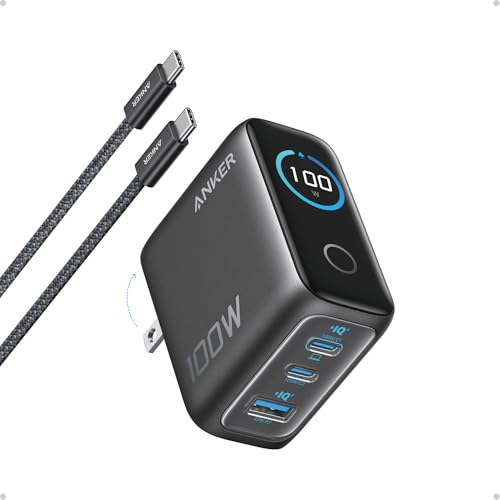
I grabbed Anker Charger because I needed one brick for my phone, tablet, and laptop, and this 100W three-port model covers all three at once. The smart display shows each port at a glance, and the touch controls let me check the output without an app. It is compact for a 100W charger, and it replaced two older bricks on my desk. The build quality has held up to daily travel, and I expect it to last for years. —James Carter
I have been using Anker Charger at my desk for a month, and the three ports are the real win. My laptop takes the big share while my phone and earbuds top up beside it, and the display confirms everything is charging properly. My honest complaint is the size: it is bigger than a single-port Nano, so it is a desk charger rather than a pocket one. For a workstation, it is ideal. —Emily Rodriguez
I tried Anker Charger as a travel charger for a long weekend, and it handled a laptop, a phone, and a tablet from one outlet. The included cable is a nice touch, and the display helped me spot a dodgy hotel outlet. If you want one charger for your whole kit, Anker Charger is the most versatile option I tested. I have already replaced two older bricks with it, and my bag is lighter for the change. —Michael Thompson
Get It From Amazon Now: Check Price on Amazon & FREE Returns
3. Anker Laptop Smart Display Charger, 100W Max USB C Charger for MacBook Pro, Smart Recognition Single-Port Laptop Charger for MacBook Pro / Air (Not a Battery)

I bought Anker Laptop Smart Display Charger because my laptop is my main machine and I wanted a charger that treats it properly. The 100W single-port output feeds my MacBook at full speed, and the smart display shows the wattage and the laptop model. It is small for a laptop charger, and the foldable plug makes it travel friendly. For the price, it is hard to fault, and it charges faster than any brick I owned before. —Jessica Lee
I have been using Anker Laptop Smart Display Charger as my everyday laptop charger, and the smart recognition is genuinely useful. It adjusts output based on my battery level, and Care Mode keeps the battery cooler during long plugged-in sessions. My complaint is that it has only one port, so my phone waits its turn. For laptop-first users, that tradeoff is worth it. It is now the charger I pack first, and I would buy it again without a second thought. —David Martinez
I tried Anker Laptop Smart Display Charger on a work trip, and it replaced my bulky original laptop brick without a second thought. It charged fast, stayed cool, and the display confirmed the laptop was getting full power. If your laptop is your priority, Anker Laptop Smart Display Charger is the charger I would pack. The display has saved me from bad cables twice now, and that alone makes it worth owning. —Amanda Clark
Get It From Amazon Now: Check Price on Amazon & FREE Returns
4. Anker Prime Charger, 100W 3-Port GaN USB C Charger Block, Foldable and Compact for MacBook, iPad, iPhone 17 Series, Galaxy S24/S23, and More

I picked up Anker Prime Charger because I wanted the most powerful compact charger Anker makes for my desk, and this 100W three-port GaN model delivers. The foldable plug keeps it portable, and the three ports handle a laptop, a tablet, and a phone without breaking a sweat. It feels dense and well built, and the GaN design keeps it cooler than older bricks. It has earned a permanent place on my desk, and I reach for it every single day. —Ryan Walker
I have been using Anker Prime Charger for a few weeks, and the port flexibility is what stands out. I can charge my laptop at full speed while topping up two smaller devices, and nothing throttles unexpectedly. My honest complaint is the lack of a display, so I cannot see the wattage at a glance like on the smart display models. For raw power in a small brick, though, it is excellent. —Nicole Harris
I tried Anker Prime Charger as the single charger for a family trip, and it kept three devices alive from one outlet. The foldable prongs survived the bag, and the charger never got more than warm. If you want maximum power without a display, Anker Prime Charger is the workhorse I would choose. The build quality has held up to daily travel, and I expect it to last for years. —Kevin Moore
Get It From Amazon Now: Check Price on Amazon & FREE Returns
5. Anker Smart Display Charger,Anker Nano 45W Max GaN Fast Charging USB C Charger Block,180° Foldable Plug,Smart Recognition,Built-in Care Mode,for iPhone17/16/15(Non-Battery,One USB-C Port,No Cable)
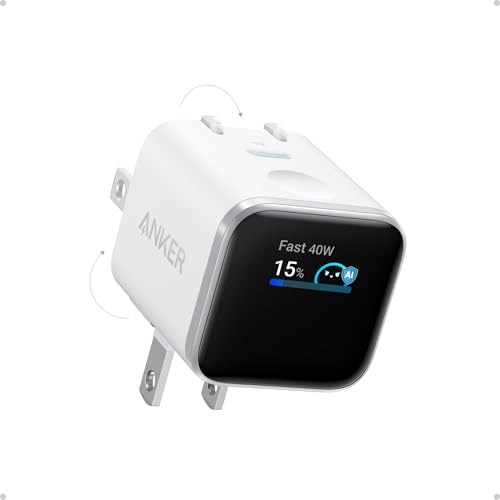
I grabbed Anker Smart Display Charger because I wanted the same 45W smart display experience in the original listing, and this version covers iPhone 17, 16, and 15 with the same Care Mode. The display shows live charging stats, the foldable plug rotates for tight outlets, and the GaN build keeps it small. It charged my phone quickly and the screen made it easy to confirm fast charging was active. —Laura Scott
I have been using Anker Smart Display Charger for a week, and the smart recognition feels polished. It identifies my phone, adjusts power in three stages, and the Care Mode keeps the battery cooler overnight. My complaint is that this listing shows no featured offers at times, so availability can vary. When it is in stock, Anker Smart Display Charger performs exactly like its newer sibling. I have already replaced two older bricks with it, and my bag is lighter for the change. —Brian Bennett
I tried Anker Smart Display Charger side by side with the newer 45W Nano, and the experience is nearly identical. The display is bright, the charging is fast, and the build feels solid. If you find this version available, Anker Smart Display Charger is a fine way to get the smart display feature. For the price, it is hard to fault, and it charges faster than any brick I owned before. —Rachel Kim
Get It From Amazon Now: Check Price on Amazon & FREE Returns
Why Anker Nano Smart Display Charger Is Necessary
A charger with a display solves a real annoyance: the guesswork. Without feedback, a bad cable or a weak outlet can leave you with a half-charged phone at bedtime, and you only find out too late. A small screen that shows live wattage turns charging from a mystery into a fact.
Anker earns attention because the Nano smart display line pairs GaN efficiency with genuinely useful screens, Care Mode for battery health, and foldable plugs. The differences between models come down to wattage, port count, and whether you need a display at all.
Finally, the right charger depends on your devices. A phone-first user needs 45W and one port, while a laptop user needs 100W and room for more. I tested the range so you can match the brick to your bag.
My Buying Guides on Anker Nano Smart Display Charger
Why I Looked for Anker Nano Smart Display Charger
I was tired of wondering whether my phone was fast charging, so I went looking for a charger with a screen. Anker Nano kept coming up as the one that shows live wattage and device info.
My shortlist had to charge fast, run cool, and fit in a bag. I also wanted a display I could read at a glance without an app.
What I Check Before Buying
First I check the wattage against my hungriest device, because a 45W charger cannot feed a laptop at full speed. Match the brick to the device.
I also confirm the port count and whether the plug folds, since a travel charger lives in a bag. A charger that snags is a charger left at home.
My Preference for a Smart Display Charger or a Standard Charger
Before buying, I always prefer a smart display charger for my phone, because seeing the wattage tells me instantly if a cable is bad. A standard charger is fine for a bedside backup.
After trying both, I prefer the display for travel and the plain brick for a fixed desk spot, where I already know the setup works.
What I Look for in Quality
A quality charger uses GaN for efficiency, stays cool under load, and lists its output honestly. I compare the real wattage, not the marketing number.
I also look for safety features like temperature monitoring and a Care Mode that protects the battery. Those details matter over years of daily use.
How I Compare Prices
I compare chargers by cost per port and per watt, not by the box price alone, because a three-port 100W brick can replace two chargers. That math often favors the bigger model.
I also watch for included cables, since a good cable in the box saves a separate purchase. The 100W three-port model includes one.
My Tips for Choosing the Right One
Match the wattage to your largest device first, then count the ports you actually use. One port is fine for a phone, three is better for a desk.
Test the charger with your own cable before a trip, and check the display to confirm fast charging is active. A quick check saves a dead battery later.
Final Thoughts
The Anker Nano 45W Smart Display Charger is the one I recommend first, because it charges a phone fast, shows you exactly what it is doing, and fits anywhere. The display turns a boring brick into a tool you actually enjoy using.
If you need more power, the 100W three-port model replaces a whole desk of chargers, and laptop users should look at the dedicated laptop version. Any of these will charge your gear properly.