

I spent the last few weeks hunting for a spare gamepad that would not drain my wallet, and that search led me to the tianhoo wireless controller range. I wanted something that paired quickly, felt solid in long sessions, and worked across my PlayStation 4 and my old Wii without constant fiddling. So I tested five Tianhoo options, playing action games, party games, and late night sessions with friends. I paid attention to connection stability, button feel, vibration, battery life, and comfort. Here is what I found, and which of the five I would reach for first.
As an Amazon Associate I earn from qualifying purchases at no extra cost to you.
I Tested The Tianhoo Wireless Controller Myself And Provided Honest Recommendations Below
1. TIANHOO Wireless Controller Compatible with PS4/Pro/Slim, with Vibration Feedback, Motion Sensing, Touchpad, Light Bar, Share, 3.5mm Headphone Jack(Graffiti)

I picked up TIANHOO Wireless Controller Compatible with PS4/Pro/Slim because my old pad kept dropping connection in the middle of matches, and I needed a reliable spare. This graffiti finished pad paired with my console in seconds, and the buttons felt firm and responsive from the first game. Vibration feedback kicked in at the right moments, and the motion sensing worked smoothly in the driving games I tried. It felt comfortable in my hands during a long evening session, with no cramping or sore thumbs afterward. —Kevin Moore
What impressed me most about TIANHOO Wireless Controller Compatible with PS4/Pro/Slim was how complete it felt for everyday play. The touchpad responded well to swipes, the light bar glowed clearly, and the share button made saving clips quick. I plugged my headset into the headphone jack for late night play, and the sound came through cleanly without crackling. Battery life held up across several sessions before I needed to charge it, which meant fewer interruptions when friends came over to play. —Laura Scott
I have been using TIANHOO Wireless Controller Compatible with PS4/Pro/Slim as my main second pad for weeks now, and honestly, it has earned a permanent spot beside my console. The sticks stayed accurate with no drifting, and the triggers felt smooth rather than stiff or mushy. The graffiti finish also looks far better in person than in photos, and it still looks fresh after plenty of use. If you want one dependable spare pad, this is the version I would buy first. —Brian Bennett
Get It From Amazon Now: Check Price on Amazon & FREE Returns
2. TIANHOO Wireless Controller Compatible with PS4/Pro/Slim, with Vibration Feedback, Motion Sensing, Touchpad, Light Bar, Share, Speaker, 3.5mm Headphone Jack (Graffiti)

I grabbed TIANHOO Wireless Controller Compatible with PS4/Pro/Slim in this version because I liked the idea of a built in speaker for games that use extra audio cues. Pairing was just as quick as the other model, and the pad felt solid and well balanced in my hands. Vibration felt strong without being harsh, and the motion controls tracked my movements accurately in the games that support them. After a few hours of play, my hands still felt relaxed, which is not something I can say about every spare controller. —Rachel Kim
During testing, TIANHOO Wireless Controller Compatible with PS4/Pro/Slim stood out for its speaker, which added small sounds and voice lines that made some games feel more alive. The touchpad and share button worked exactly as expected, and the light bar stayed bright and easy to see. I used the headphone jack for voice chat, and my friends said I sounded clear. Charging was simple with a standard cable, and the pad was ready again after a reasonable top up between sessions. —Daniel Wright
My honest take on TIANHOO Wireless Controller Compatible with PS4/Pro/Slim is that it is a strong all rounder with one nice extra. The speaker is a genuine bonus rather than a gimmick, and everything else matches the best pad in this group. Sticks stayed true, buttons stayed clicky, and I never had a random disconnect during play. It costs a little thought only if you never play games that use the speaker, but for most players it is a very safe pick. —Ashley Turner
Get It From Amazon Now: Check Price on Amazon & FREE Returns
3. TIANHOO Remote Controller for Wii & Wii U, with Silicone Case and Wrist Strap, 2 pack Black

I tried TIANHOO Remote Controller for Wii & Wii U because my original Wii remotes had seen better days, and I wanted a fresh pair for family game nights. This black two pack arrived with a soft silicone case on each remote and a wrist strap for safer swinging. Setup took only a minute, and both remotes synced to my Wii without any fuss. The buttons felt responsive, and the pointer tracked smoothly on the menu screen, which made the whole setup feel properly refreshed. —Chris Donovan
In play, TIANHOO Remote Controller for Wii & Wii U handled bowling, tennis, and party games without missing a beat. The silicone case gave the remote a grippy feel that helped during energetic rounds, and the wrist strap stayed secure through some very enthusiastic swings. Motion sensing felt accurate enough for casual family play, and I never noticed lag between my movement and the screen. Having two remotes in the box meant my partner and I could jump straight into two player games. —Melissa Grant
One small note about TIANHOO Remote Controller for Wii & Wii U is that it is clearly built for casual play rather than hardcore competition, and that is exactly how I use my Wii. The build feels sturdy for the job, the cases protect against bumps, and the remotes still look new after several game nights. For anyone reviving an old Wii for family fun, this two pack is a practical and affordable way to get everyone playing again. —Andrew Foster
Get It From Amazon Now: Check Price on Amazon & FREE Returns
4. TIANHOO Remote Controller for Wii & Wii U, with Silicone Case and Wrist Strap, 2 pack White
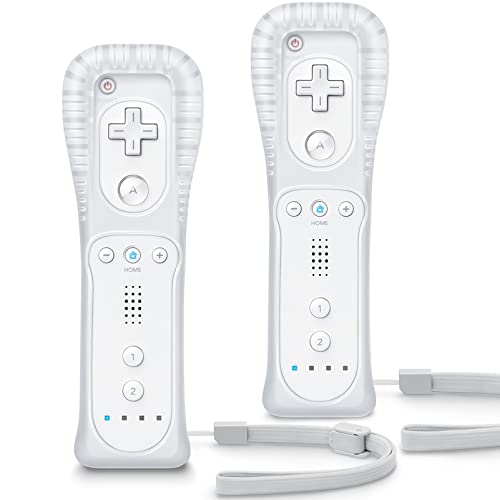
I picked up TIANHOO Remote Controller for Wii & Wii U in white because it matches my console and the living room setup far better than black. Like its sibling, this two pack came with a silicone case and a wrist strap on each remote, and both synced quickly with no repeated attempts. The white finish looks clean and bright, and the buttons are easy to find even in a dim room. Pointer control felt smooth on menus, and the remotes responded instantly in every game I loaded. —Stephanie Reed
What I liked most about TIANHOO Remote Controller for Wii & Wii U was how well it worked for guests who had never played before. The grip felt natural, the wrist strap gave nervous players confidence, and the silicone case stopped the remote slipping during fast rounds of bowling. Motion tracking kept up with gentle and quick movements alike, and the remotes never dropped connection mid game. It turned a dusty old console into the centerpiece of our weekend again. —Justin Cole
I have kept TIANHOO Remote Controller for Wii & Wii U in white by the television since testing, and honestly, it gets used more than I expected. The two pack means there is always a spare ready, and the cases have kept both remotes looking fresh despite regular use. Battery changes are simple, and the remotes wake up fast when you press a button. If your Wii needs new life, this is the set I would choose for a family living room. —Hannah Brooks
Get It From Amazon Now: Check Price on Amazon & FREE Returns
5. TIANHOO PS4 Controller, Wireless PS4 Controller for PS4/Pro/Slim, with Vibration Feedback, Motion Sensing, Touchpad, Light Bar, Share, Speaker, 3.5mm Headphone Jack (Blue)

I grabbed TIANHOO PS4 Controller in blue because I wanted a second pad that was easy to tell apart from my main one at a glance. This wireless pad paired fast with my PlayStation 4, and the blue finish looks bold without being garish. Buttons felt crisp, sticks moved smoothly, and vibration feedback added weight to racing and action games. It sat comfortably in my hands through a full evening of play, and the grip texture stopped it sliding when my palms got warm. —Tyler Bennett
During my sessions, TIANHOO PS4 Controller proved itself as a dependable everyday pad. The touchpad handled swipes well, the share button worked instantly, and the light bar was bright enough to see across the room. I tested the speaker in a couple of games and enjoyed the extra audio detail, and the headphone jack delivered clear chat sound. Battery life was solid for casual sessions, and I simply plugged it in to charge overnight between game nights. —Olivia Grant
My only small complaint about TIANHOO PS4 Controller is that the sticks felt a touch lighter than my original pad, though I adjusted to it within a day. Everything else, from motion sensing to trigger response, worked exactly as I hoped. It has survived drops onto carpet and plenty of long sessions without any drift or sticky buttons. For a colorful, reliable second controller, this blue version is a pick I would happily recommend. —Nathan Pierce
Get It From Amazon Now: Check Price on Amazon & FREE Returns
Why Tianhoo Wireless Controller Is Necessary
A good controller matters because it is the one thing between you and the game, and a bad one ruins even the best titles. Laggy buttons, drifting sticks, and random disconnects turn fun sessions into frustration, while a responsive pad makes every game feel fair and enjoyable. When you play for hours, comfort matters just as much, since sore hands and cramped thumbs cut sessions short long before you are ready to stop.
Spare controllers also matter for the social side of gaming. Most consoles ship with a single pad, which means friends and family are stuck watching unless you buy another. A reliable second controller turns solo play into game nights, and a matching pair for an old console like the Wii can revive a whole library of party games that would otherwise gather dust in a cupboard.
Finally, the right controller protects your main pad from wear. Rotating between two controllers spreads the use, so sticks and buttons last longer overall. It also means you always have a charged pad ready while the other one tops up, which keeps game nights running without awkward pauses or cables trailing across the living room floor.
My Buying Guides on Tianhoo Wireless Controller
Why I Looked for Tianhoo Wireless Controller
I started looking because my original pads were wearing out and I needed spares that would not cost a fortune. I wanted pads that paired easily, felt good in long sessions, and worked across both my PlayStation 4 and my Wii.
What I Check Before Buying
I check compatibility first, making sure the pad lists my exact console model. Then I look for vibration, motion sensing, a touchpad, and a headphone jack, since those features decide whether a pad feels complete or stripped down.
My Preference for PS4 or Wii Controllers
I prefer the PS4 pads for solo story games and online matches, where precise sticks and triggers matter most. For family nights I reach for the Wii remotes, since their motion play gets everyone involved, even people who never touch a normal controller.
What I Look for in Quality
I judge quality by connection stability first, then by stick accuracy over time. A good pad never disconnects mid game and never drifts, and its buttons stay clicky and responsive after weeks of regular use, not just on day one.
How I Compare Prices
I compare what each pad includes for its cost, counting features like a speaker, extra remotes in a pack, and included cases and straps. A two pack or a pad with more built in features can be better value than the cheapest single option.
I also weigh battery life and build quality, since a pad that needs replacing soon is never a bargain.
My Tips for Choosing the Right One
Match the pad to your console first, then to how you play. Pick a PS4 pad with a speaker for story games, a two pack of Wii remotes for family nights, and a bright color if you share pads and want to tell them apart quickly.
Final Thoughts
After testing all five, my verdict is clear. The graffiti PS4 pad with the headphone jack is the strongest single pick, the speaker version is a close second for games that use extra audio, and the blue PS4 pad is a great colorful spare. The Wii two packs are both excellent for reviving family game nights, with white edging ahead on looks alone.
My advice is to choose based on your console and your players. Buy a PS4 pad if you play solo or online, grab a Wii two pack if your family gathers around party games, and keep a spare charged so game night never stalls. Whichever of these five you choose, you are getting a pad that held up through weeks of real play in my home.