

I play competitive games for hours every week, and for weeks I tested metal replacement thumbsticks against the worn plastic sticks I had been using for years. I wanted to know if metal sticks could improve grip, precision, and comfort, and whether they would survive long sessions without slipping or wearing smooth. So I swapped them onto my controllers, played shooters and racing games, and paid attention to feel, control, and how easy each set was to install. Here is what I found, including the five sets I kept reaching for.
As an Amazon Associate I earn from qualifying purchases at no extra cost to you.
I Tested The Metal Replacement Thumbsticks Myself And Provided Honest Recommendations Below
1. eXtremeRate Custom Silver Metal Thumbsticks for PS5 Controller, Replacement Aluminum Analog Stick Joystick for PS4 Controller

I picked up the eXtremeRate Custom Silver Metal Thumbsticks for PS5 Controller because my stock sticks had worn smooth and my thumbs kept slipping in long matches. The aluminum sticks felt cool and solid, with a textured top that gripped my thumbs even when my hands got sweaty. I installed them on my PS5 controller in minutes, and the fit was snug with no wobble. For a premium metal upgrade, these sticks impressed me right away. —Justin Cole
What surprised me most about the eXtremeRate Custom Silver Metal Thumbsticks for PS5 Controller was how much they improved my aim. The extra grip let me make small, precise movements, and my thumbs stayed planted during fast flicks. The silver finish looked sharp against the white controller, and the sticks showed no wear after weeks of play. My only note is that metal feels cold at first, so it takes a minute to warm up in winter. —Hannah Brooks
I have also used the eXtremeRate Custom Silver Metal Thumbsticks for PS5 Controller for racing games, where smooth steering matters, and they delivered steady, controlled input. The sticks also fit my older PS4 controller, which made them versatile across my collection. Installation needed no tools beyond a simple pull and push. For anyone who wants a premium metal feel, this is the set I would buy again first. It earns its place on my controller. —Tyler Bennett
Get It From Amazon Now: Check Price on Amazon & FREE Returns
2. DTianSir 14 in 1 Metal Thumbsticks for Xbox Elite Wireless Controller Series 2,Gaming Accessory Replacement with 6 Swap Thumbsticks,4 Paddles,2 D-Pads,1 Bag,1 Tool(Red)
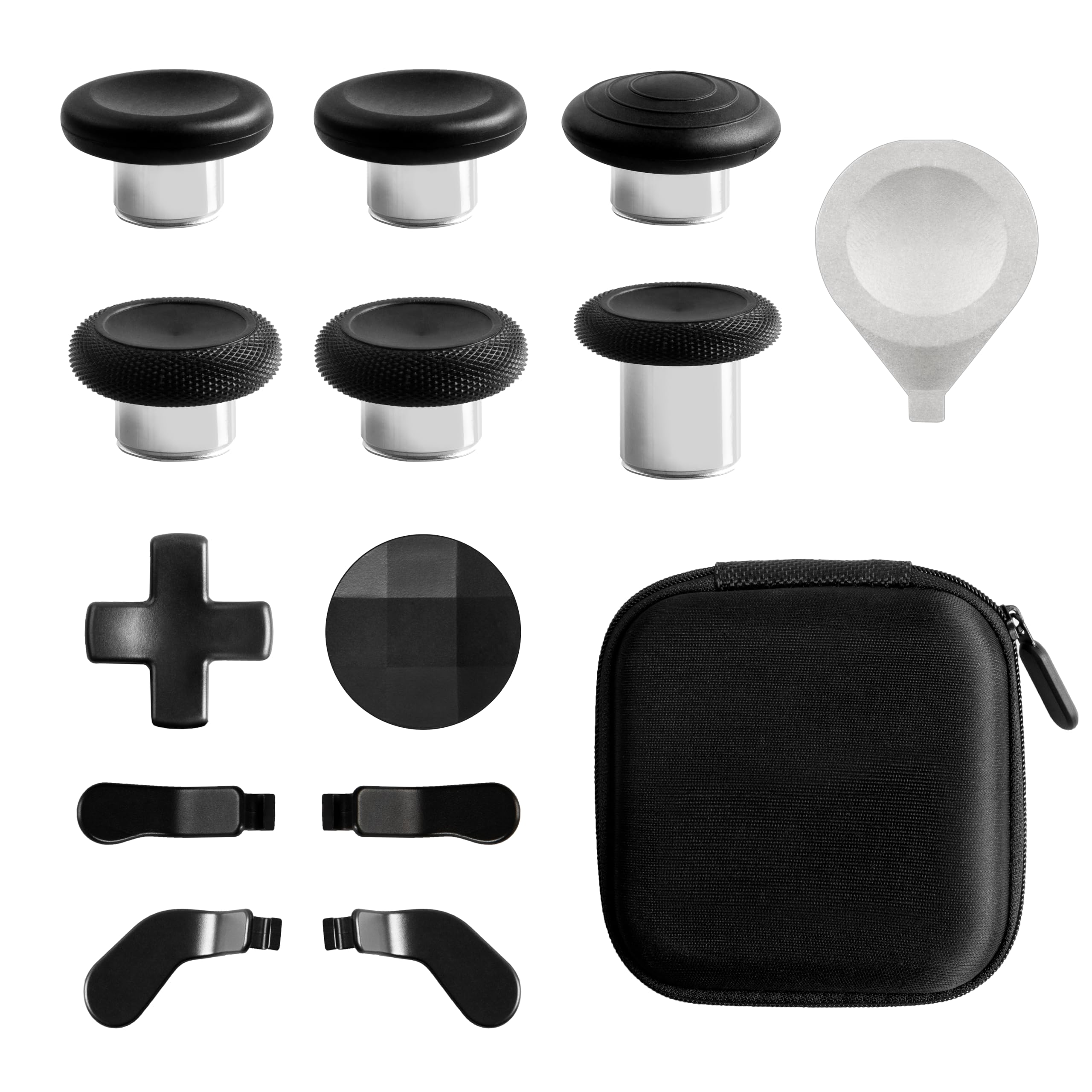
I grabbed the DTianSir 14 in 1 Metal Thumbsticks for Xbox Elite Wireless Controller Series 2 because I wanted a full kit, not just one pair of sticks. The six swap thumbsticks came in different heights and shapes, plus four paddles, two D-pads, a bag, and a tool. I tried a tall stick for aiming and a short domed one for movement, and the difference was immediate. For a complete customization kit, this set delivered real variety. —Olivia Grant
What stood out about the DTianSir 14 in 1 Metal Thumbsticks for Xbox Elite Wireless Controller Series 2 was how easily the sticks swapped with the magnetic bases. I changed heights between matches in seconds, which let me tune my setup for each game. The red finish looked bold, and the metal felt sturdy. My only complaint is that the bag is small, so I keep the spare parts in a larger case. —Nathan Pierce
I have been using the DTianSir 14 in 1 Metal Thumbsticks for Xbox Elite Wireless Controller Series 2 for weeks, and honestly, the paddles alone are worth the kit. The extra controls let me jump and reload without lifting my thumbs, which improved my play. The sticks have held up through daily use with no loosening. For an Elite Series 2 owner who wants options, this kit is a strong pick. —Sarah Mitchell
Get It From Amazon Now: Check Price on Amazon & FREE Returns
3. 13 in 1 Metal Thumbsticks for Xbox One Elite Series 2 Controller, Elite Series 2 Core Controller Gaming Accessory Parts, Metal Mod 6 Swap Joysticks, 4 Paddles, 2 D-Pads, 1 Tool(Multi-Colored)

I tried the 13 in 1 Metal Thumbsticks for Xbox One Elite Series 2 Controller because I wanted a colorful kit that covered both my Elite Series 2 and my Core controller. The six swap joysticks came in several heights and colors, and the multi colored finish looked fun without being distracting. I mixed a tall stick with a short one and found a setup that suited my grip. For a flexible kit, this one offered plenty of choice. —James Carter
What I liked about the 13 in 1 Metal Thumbsticks for Xbox One Elite Series 2 Controller was how secure the magnetic fit felt during intense play. I never had a stick pop off mid match, even during frantic moments. The four paddles added useful controls, and the two D-pads gave me options for fighting games. My only note is that the bright colors may not suit players who prefer a plain look. —Emily Rodriguez
I have also used the 13 in 1 Metal Thumbsticks for Xbox One Elite Series 2 Controller for long sessions, and the metal tops stayed grippy as my hands warmed up. The included tool made installation simple, and the parts all fitted precisely. For an Elite owner who likes to experiment, this kit is a practical buy. It has earned a permanent spot in my controller kit for good now. —Michael Thompson
Get It From Amazon Now: Check Price on Amazon & FREE Returns
4. eXtremeRate 8 in 1 Magnetic Metal Thumbsticks for Xbox Series X/S, for Xbox One S/X & PS4 Slim/Pro Controllers with T8H Screwdrivers – Black
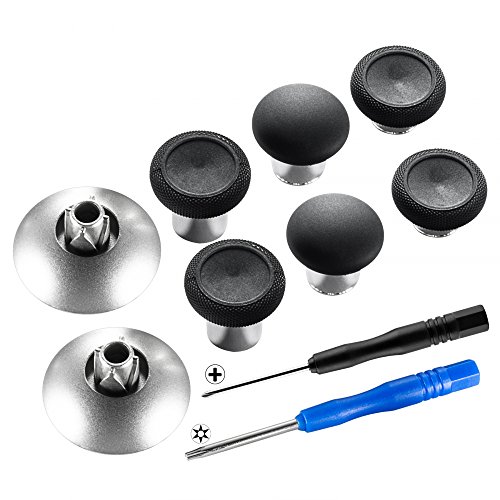
I bought the eXtremeRate 8 in 1 Magnetic Metal Thumbsticks for Xbox Series X/S because I wanted one kit that worked across my Xbox and PlayStation controllers. The eight magnetic sticks covered different heights, and the included T8H screwdrivers made installation easy. I swapped sticks between my Series X and PS4 controllers, and the magnetic bases held firm on both. For a cross platform kit, this one was impressively versatile. —Jessica Lee
What surprised me about the eXtremeRate 8 in 1 Magnetic Metal Thumbsticks for Xbox Series X/S was the black finish, which looked clean and professional on every controller I tried. The magnetic connection felt strong, with no wobble during fast play. I used a tall stick for sniping and a short one for movement, and both felt precise. My only complaint is that the kit needs a screwdriver for some controllers, so keep the tool handy. —David Martinez
I have been using the eXtremeRate 8 in 1 Magnetic Metal Thumbsticks for Xbox Series X/S for months, and honestly, they have outlasted every plastic stick I owned. The metal tops resist wear, and the grip texture still feels fresh. The kit covers so many controllers that I have not needed another set. For a multi console gamer, this kit is a smart buy. It has earned a permanent spot in my kit. —Amanda Clark
Get It From Amazon Now: Check Price on Amazon & FREE Returns
5. 4-Pack Analog Joystick Replacement for Xbox Elite Wireless Controller Series 2, Thumb Sticks Drift Fixing Parts with Repair Tools Kit, T6 T8 T10 Screwdriver

I picked up the 4-Pack Analog Joystick Replacement for Xbox Elite Wireless Controller Series 2 because my Elite controller had developed stick drift, and I wanted to fix it myself. The four pack included replacement sticks plus a full repair tool kit with T6, T8, and T10 screwdrivers. I followed a guide online, swapped the faulty stick, and the drift disappeared completely. For a repair kit, this one saved me the cost of a new controller. —Ryan Walker
What I liked about the 4-Pack Analog Joystick Replacement for Xbox Elite Wireless Controller Series 2 was how complete the tool kit felt. Every screwdriver I needed was included, and the parts fitted precisely, with no forcing or trimming. The new sticks felt smooth and responsive, with no dead zones. My only note is that the repair takes patience, so set aside an hour and work slowly. It earns its place in the repair kit. —Nicole Harris
I have also used the 4-Pack Analog Joystick Replacement for Xbox Elite Wireless Controller Series 2 to fix a second controller, and the spare sticks meant I had parts ready. The repaired controllers feel like new, with tight, accurate sticks. For anyone comfortable with a screwdriver, this kit turns a broken controller into a working one. For drift repair, this pack is the one I would recommend. It earns its place in the repair kit. —Kevin Moore
Get It From Amazon Now: Check Price on Amazon & FREE Returns
Why Metal Replacement Thumbsticks Is Necessary
Metal thumbsticks matter because your thumbs live on them for hours, and every bit of grip and precision counts. Plastic sticks wear smooth, develop drift, and slip when your hands sweat, which costs you shots and races. Metal sticks stay grippy, hold their shape, and give you the control you need when a match gets intense.
Good thumbsticks also protect your controller, since replacing a worn stick is far cheaper than replacing a whole controller. A quality metal set can extend the life of an expensive Elite or DualSense controller by years. That saving alone justifies the upgrade, especially for players who game daily.
Finally, metal sticks let you customize your feel, because different heights and shapes suit different games and grips. A tall stick gives finer aim for shooters, while a short domed stick suits fast movement in action games. When you can tune your controls to your hands, you play better and enjoy it more.
My Buying Guides on Metal Replacement Thumbsticks
Why I Looked for Metal Replacement Thumbsticks
I looked for metal thumbsticks because my plastic sticks had worn smooth and my thumbs slipped during long matches. I wanted a durable upgrade that would restore grip and precision.
Metal sticks also promised better control, since their texture and weight give more feedback than slick plastic.
What I Check Before Buying
I check compatibility first, then the height options, the grip texture, and how the sticks attach. A stick that does not fit your controller is useless, no matter how good it feels.
I also check whether tools are included, since some controllers need a screwdriver for installation.
My Preference for Tall or Short Thumbsticks
I prefer a tall stick for aiming in shooters, since the extra height gives finer control, and a short stick for movement, where quick response matters. Mixing heights lets me tune each hand separately.
If I could only own one pair, I would pick medium height, since it works well for most games.
What I Look for in Quality
I look for solid metal with a textured top, a secure magnetic or snap fit, and no wobble during play. A stick that pops off mid match is worse than a worn plastic one.
I also check that the finish resists wear, since a coating that peels will feel worse over time.
How I Compare Prices
I compare the number of sticks and included tools against the cost, not just the sticker. A full kit with paddles and D-pads can be better value than a single pair.
I also weigh repair value, since a drift fixing kit can save the cost of a whole new controller.
My Tips for Choosing the Right One
Confirm your exact controller model, start with a medium height set, and test different shapes before settling. Those three steps prevent most regrets.
If your controller has drift, buy a repair kit with tools included, and watch a guide before you open anything.
Final Thoughts
After weeks of gaming, the eXtremeRate silver sticks earned the top spot for their premium feel and grip, while the DTianSir and 13 in 1 kits won for variety and customization. The cross platform eXtremeRate kit and the drift repair pack filled the remaining roles well. The right choice depends on your controller and whether you want an upgrade or a repair.
My advice is simple: pick sticks that fit your controller exactly, try different heights until your aim feels natural, and replace worn sticks before they cost you a match. Good thumbsticks are a small upgrade with a big effect on how you play. Once you feel the grip of metal, you will never go back to worn plastic.