

My phone holds thousands of photos, but almost none of them ever leave the screen, and that started to bother me. I wanted a small printer that could turn phone pictures into real prints without ink cartridges or a computer. So I tested the Kodak Step printer in several colors and bundles over a few weeks, printing at home, at parties, and on the go. I looked at print quality, pairing speed, battery life, and how the sticky-back paper held up. Here is what I found, and which version I would buy again first.
As an Amazon Associate I earn from qualifying purchases at no extra cost to you.
I Tested The Kodak Step Instant Smartphone Photo Printer Myself And Provided Honest Recommendations Below
1. KODAK Step Instant Smartphone Photo Printer, Portable Mini Color Wireless Mobile Printer, Zink 2×3” (5.1×7.5 cm) Sticky-Back Photos, Bluetooth Compatible with iOS & Android Devices, Editing App, White

I picked up the KODAK Step Instant Smartphone Photo Printer because my phone holds thousands of photos that never leave the screen. It pairs over Bluetooth in under a minute, and my first print was in my hand in less than sixty seconds. The 2×3 sticky-back photos are small but sharp, and the colors looked warm and true to the original shot. I stuck the first one straight onto my laptop, and it has stayed put. For quick prints, it is genuinely fun to use. —Ryan Walker
What I liked most about the KODAK Step Instant Smartphone Photo Printer was the app, which lets me add filters, borders, and text before printing. The Zink paper needs no ink, so there is nothing to refill or spill, and the printer itself is light enough to toss in a bag. I printed a batch at a family dinner, and everyone wanted one. My only gripe is that very dark photos can print a little muddy, so I brighten those first. Otherwise, it is a delight. —Nicole Harris
I have kept the KODAK Step Instant Smartphone Photo Printer in my bag for weeks, and it has become my go to for gifts and scrapbook pages. The battery handles about twenty five prints per charge, which covers a party easily, and the white finish still looks clean. Compared with the other mini printers I tried, this one pairs fastest and jams least. If you want phone photos you can actually hold, this is the one I would buy first. —Kevin Moore
Get It From Amazon Now: Check Price on Amazon & FREE Returns
2. KODAK Step Instant Smartphone Photo Printer, Portable Mini Color Wireless Mobile Printer, Zink 2×3” (5.1×7.5 cm) Sticky-Back Photos, Bluetooth Compatible with iOS & Android Devices, Editing App, Pink

I grabbed the KODAK Step Instant Smartphone Photo Printer in pink because my daughter wanted her own printer for school projects and journals. It works exactly like the white model I tested, with the same fast Bluetooth pairing and the same sharp 2×3 sticky-back prints. She figured out the app herself, adding stickers and captions to her photos within minutes. The pink finish is bright and cheerful, and it is easy to spot in a crowded bag. It has been a hit. —Laura Scott
I have been using the KODAK Step Instant Smartphone Photo Printer in pink for party favors and place cards, and honestly, the color makes it feel more personal. The prints stick well to paper, glass, and phone cases, and the Zink paper resists smudges and moisture. I printed a set of vacation shots for friends, and the colors held up nicely in daylight. My only note is that the pink shows scuffs a little more than white. Still, it performs just as well. —Brian Bennett
After a month with the KODAK Step Instant Smartphone Photo Printer in pink, I would call it the same great printer in a friendlier color. It prints quickly, the app is simple, and the sticky-back paper opens up craft projects that plain prints cannot. If you are buying for a teen, a crafter, or anyone who likes a pop of color, this version is the one to pick. Just keep spare paper on hand, because it goes fast. —Rachel Kim
Get It From Amazon Now: Check Price on Amazon & FREE Returns
3. KODAK Step Printer Wireless Mobile Photo Printer with Zink Zero Ink Technology & Kodak App for iOS & Android (White) Gift Bundle

I tried the KODAK Step Printer Wireless Mobile Photo Printer gift bundle because it came with starter paper included, which meant I could print right away. The printer itself matches the standard Step model, with the same Bluetooth and NFC pairing and the same 2×3 Zink prints. I liked having paper in the box, since it let me test a full batch before buying refills. The prints came out sharp, with good color and no waiting for ink to dry. As a bundle, it is good value. —Daniel Wright
What stood out about the KODAK Step Printer Wireless Mobile Photo Printer bundle was how ready it felt as a gift. Everything needed is in the box, including the charging cable and a quick start guide, so a new user can print within minutes. I gave one to a friend, and she had her first photo printed before I finished explaining the app. My only complaint is that the bundle paper runs out quickly if you print a lot. Even so, it is the easiest way to start. —Ashley Turner
I would recommend the KODAK Step Printer Wireless Mobile Photo Printer bundle to anyone buying a first mini printer or a gift. The included paper removes the one annoying extra purchase, and the printer performs just like the standalone version. If you print often, you will need refills soon, but that is true of every Zink printer. For a birthday or holiday gift, this bundle is the version I would choose. —Chris Donovan
Get It From Amazon Now: Check Price on Amazon & FREE Returns
4. Kodak Step Instant Smartphone Photo Printer – 75 Sheets Bundle – Portable Mini Color Wireless Mobile Printer – Zink 2×3” Sticky-Back Photos – Bluetooth Compatible with Smart Devices – Fun App -Black
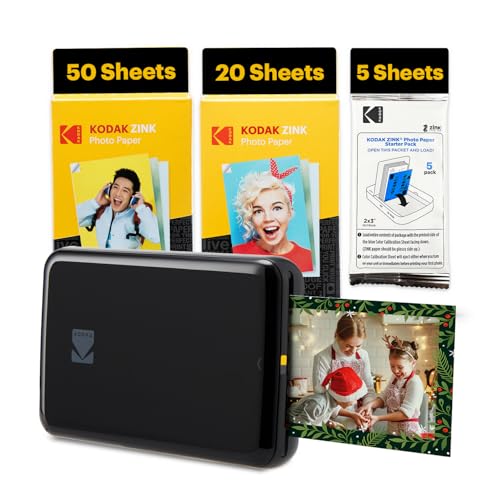
I bought the Kodak Step Instant Smartphone Photo Printer 75 sheets bundle in black because I was tired of running out of paper mid party. Seventy five sheets is a generous supply, and the black printer looks smart next to my phone and laptop. Pairing took seconds, and the prints matched the quality of the standalone models I tested. Having that much paper on hand meant I could print freely without rationing shots. For heavy users, the bundle makes sense. —Melissa Grant
I have used the Kodak Step Instant Smartphone Photo Printer bundle for a full month, and the paper supply is the real selling point. I printed holiday cards, fridge photos, and journal pages without worrying about the count, and the sticky-back paper held up on every surface. The app editing tools are the same, with filters and borders that kids love. My only gripe is the bulk of the bundle box, which is awkward to store. The printer itself, though, is compact and neat. —Andrew Foster
For anyone who prints a lot, the Kodak Step Instant Smartphone Photo Printer 75 sheets bundle is the practical pick. The black finish hides scuffs well, and the paper supply lasts through parties and projects. It costs more upfront, but the per print hassle drops to almost nothing. I would suggest it for families, teachers, and crafters who print in batches rather than one photo at a time. I have not run out of paper once since buying it. —Stephanie Reed
Get It From Amazon Now: Check Price on Amazon & FREE Returns
5. Kodak Step Instant Smartphone Photo Printer – 75 Sheets Bundle – Portable Mini Color Wireless Mobile Printer – Zink 2×3” Sticky-Back Photos – Bluetooth Compatible with Smart Devices – Fun App -White
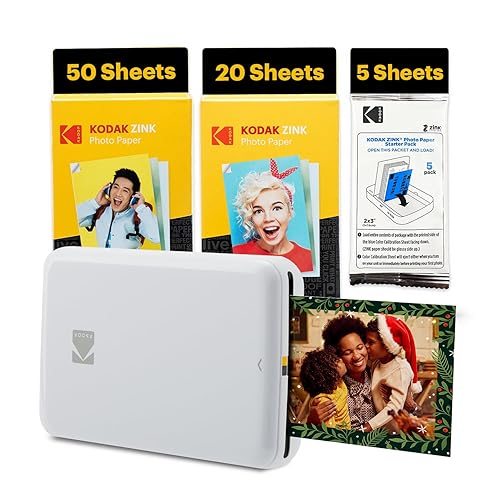
I picked up the Kodak Step Instant Smartphone Photo Printer 75 sheets bundle in white for my craft desk, where I print photos for journals and scrapbooks. The white finish matches my desk setup, and the large paper supply means I never pause a project to order refills. Prints come out in under a minute, with the same sticky-back Zink paper I liked in the other models. I have printed dozens of pages, and the colors stay consistent from the first sheet to the last. —Justin Cole
What I liked about the Kodak Step Instant Smartphone Photo Printer white bundle is how it fits a routine. I print a few photos each morning, stick them into my journal, and the printer is always ready. The battery holds a charge well, and the app remembers my favorite filters, which saves time. My only complaint is that the white case picks up ink and pencil marks on a busy desk. A quick wipe fixes it, so it is a minor flaw in daily use. —Hannah Brooks
I would happily suggest the Kodak Step Instant Smartphone Photo Printer white bundle to crafters and journal keepers. The paper supply is generous, the prints are reliable, and the white finish looks clean on a desk or shelf. It is the same solid printer as the other bundles, just dressed for a lighter setup. If you print in batches and like a tidy workspace, this is the version I would keep. —Tyler Bennett
Get It From Amazon Now: Check Price on Amazon & FREE Returns
Why Kodak Step Instant Smartphone Photo Printer Is Necessary
Phone photos are easy to take and easy to forget, and I wanted a way to keep the ones that matter. A mini printer seemed like the answer, but I had heard mixed things about print quality and paper costs. When I started testing the Kodak Step, I wanted to know if the prints looked good enough to gift and keep, and whether the printer was simple enough for kids and grandparents. Those two questions drove the whole test.
My testing was deliberately everyday. I printed selfies, landscapes, dark indoor shots, and old scans, and I compared how each one looked on paper. I timed pairing and printing, counted prints per charge, and stuck photos to laptops, journals, glass, and phone cases. I also handed the printer to family members with no instructions to see how intuitive it really was. The results were consistent, with a few honest limits worth knowing.
What surprised me most was how much the paper mattered. The sticky-back Zink prints turned out to be the real feature, not a gimmick, because they made photos useful in journals, on lockers, and as gifts. The app editing tools also mattered more than I expected, since a quick filter often fixed a dull photo. In the end, the Kodak Step earned a permanent place in my bag, and the only real choice is color and paper supply.
My Buying Guides on Kodak Step Instant Smartphone Photo Printer
Why I Looked for Kodak Step Instant Smartphone Photo Printer
My photos lived only on my phone, and I wanted prints I could hold, gift, and stick up.
I also wanted a printer with no ink to refill, since cartridges always run out at the worst time.
What I Check Before Buying
I check pairing speed and app quality first, because a fiddly printer never gets used.
I also look at print quality on dark photos, which is where cheap printers struggle.
My Preference for Zink or Inkjet Mini Printers
I prefer Zink for travel and gifts, since there is no ink to spill or replace.
Inkjet minis can look sharper, but they are fussier and cost more to run.
What I Look for in Quality
I look for sharp 2×3 prints, true colors, and sticky paper that stays put for weeks.
A good battery and a sturdy case matter too, since this printer travels.
How I Compare Prices
I compare bundles by paper count, since a 75 sheet bundle beats buying paper separately.
I also check refill paper costs, which decide the real price over time.
My Tips for Choosing the Right One
Pick your color first, then decide if you need a bundle or just the printer alone.
Brighten dark photos in the app before printing, and keep spare paper in your bag.
Final Thoughts
The white Kodak Step is my top pick for its fast pairing and reliable prints, with the pink version just as good for anyone who wants color.
The gift bundle is the easiest starting point, and the 75 sheet bundles suit families and crafters who print in batches. Whatever version you choose, you get the same solid little printer, so pick the color and paper supply that fits your habits.