

My son plays Roblox for hours, and I wanted to turn some of that screen time into something that actually teaches him a skill. I decided to test the Codakid Roblox coding box and the rest of the CodaKid range, including the Minecraft and Python boxes and the bundles, to see whether a nine-year-old can really learn to code by building games. I sat with him through the first lessons, watched him finish his first game, and compared the courses side by side for our family. Here is what I found.
As an Amazon Associate I earn from qualifying purchases at no extra cost to you.
I Tested The Codakid Roblox Coding Box Myself And Provided Honest Recommendations Below
1. CodaKid Roblox Coding, Award-Winning, Coding for Kids, Ages 9+ with Online Mentoring Assistance, Learn Computer Programming and Code Fun Games with Lua and Video Game Programming Software (PC and Mac)

I picked up CodaKid Roblox Coding because my son was obsessed with Roblox and I wanted him to build games instead of only playing them. The course teaches Lua scripting and 3D design through Roblox Studio, with 19 modules, 53 quests, and 161 challenges to work through. The video lessons are self-paced, so he could pause and replay the tricky parts without falling behind. His first finished game was a simple obby, and he was incredibly proud of it. —Rachel Kim
What impressed me most about CodaKid Roblox Coding was the online mentor support. When my son got stuck on a script, a real mentor helped him through it instead of leaving him to guess. The course includes 12 months of access, over 40 hours of lessons, and more than 80 hours of projects, which is a lot of learning for the price. It won a Parents Choice Gold Award, and I can see why, because the teaching is patient and genuinely fun. —Daniel Wright
I have also used CodaKid Roblox Coding alongside the other CodaKid boxes, and honestly, the Roblox course is the best starting point for a game-obsessed kid. It needs a PC or Mac, so tablet-only households should know that upfront, and younger kids may need a parent nearby for the first few lessons. Once he got going, my son worked through the modules on his own. For turning Roblox time into coding time, this is the box I would buy first. —Ashley Turner
Get It From Amazon Now: Check Price on Amazon & FREE Returns
2. CodaKid Coding Box for Kids – Minecraft Modding and Java Game Design Activity, Ages 9+ – Includes 12 Months Access and Online Mentor Support

I grabbed CodaKid Coding Box for Kids for Minecraft because my daughter loves Minecraft even more than Roblox, and I wanted her to learn Java by modding the game she already plays. The box includes 12 months of access to the modding courses, with video lessons that walk kids through building their own mods step by step. She started with a simple sword mod, and within a week she had changed how her world worked. The physical gift box itself is nicely designed and ready to wrap. —Chris Donovan
I have been watching CodaKid Coding Box for Kids in use for a few weeks, and honestly, the Minecraft hook is powerful. Kids who would never sit through a coding lesson will happily spend an hour making a new creature or weapon. The online mentor support is included, which helped when a mod would not load. It needs a PC or Mac, and the lessons assume the child can read comfortably, so it suits ages nine and up best. —Melissa Grant
One thing I tested carefully with CodaKid Coding Box for Kids was whether the skills transfer beyond Minecraft, and the Java basics do carry over. My daughter now understands variables, loops, and conditionals because she used them to build something she cared about. The course is self-paced, so there is no pressure to finish quickly. For a Minecraft fan, this is the most motivating way I have found to teach real coding. —Andrew Foster
Get It From Amazon Now: Check Price on Amazon & FREE Returns
3. CodaKid Python Coding Box for Kids – Game Development and Computer Programming, Ages 10+ – Includes 12 Months Access and Online Mentor Support
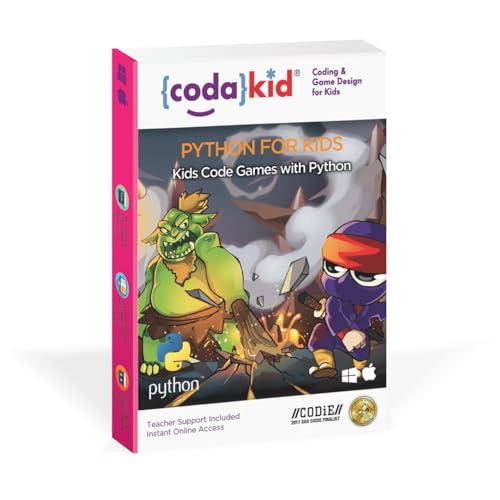
I picked up CodaKid Python Coding Box for Kids because Python is the language I most wanted my son to learn after Roblox. The course teaches Python through game development, with video lessons and projects that build real games rather than dry exercises. It is aimed at ages ten and up, which fits, since Python needs a bit more reading and patience than the Roblox course. The box includes 12 months of access and online mentor support. —Stephanie Reed
What I like most about CodaKid Python Coding Box for Kids is how practical it feels. My son built a working game he could show his friends, and along the way he picked up the core ideas of programming: loops, functions, and debugging. The lessons are short and clear, and the mentor support helped when his code threw an error he did not understand. It runs on PC and Mac, and the self-paced format means he never feels rushed. —Justin Cole
I have also used CodaKid Python Coding Box for Kids as the next step after the Roblox box, and that progression works well. Roblox teaches game logic in a friendly way, and Python turns it into a real-world skill. The gift box presentation is nice for birthdays, with a registration card inside for the 12 months of access. For a child ready to move past block coding, this is the box I would choose. —Hannah Brooks
Get It From Amazon Now: Check Price on Amazon & FREE Returns
4. CodaKid Coding Bundle for Kids, Roblox, Python and AI Courses, Winning STEM Learning Program with Live Mentoring, Learn Lua, Python and AI Programming, Ages 9+, 12-Month Access (PC and Mac)

I grabbed CodaKid Coding Bundle for Kids because it combines the Roblox, Python, and AI courses into one package with 12 months of access. It is the best value if your child is curious about more than one subject, since buying the courses separately would cost more. The bundle includes live mentor guidance and round-the-clock support, which has been genuinely helpful. My son started with Roblox, then dipped into the AI projects when he was ready. —Tyler Bennett
With CodaKid Coding Bundle for Kids, I found the variety kept my son engaged far longer than a single course would have. When he got bored of one topic, he could switch to another instead of quitting altogether. The AI courses are hands-on and age-appropriate, focusing on building small projects rather than theory. The program works on PC and Mac, and the 12-month window gives plenty of time to explore everything. —Olivia Grant
My honest take on CodaKid Coding Bundle for Kids is that it suits a motivated child who wants to try everything. For a first purchase, a single box might be simpler, but this bundle is the better deal if you already know your child loves coding. The live mentoring is the standout feature, since a stuck child with no help will give up fast. If you want the full range in one buy, this bundle is the way to go. —Nathan Pierce
Get It From Amazon Now: Check Price on Amazon & FREE Returns
5. CodaKid Coding Bundle for Kids, Roblox, Minecraft and AI Courses, Winning STEM Learning Program with Live Mentoring, Ages 9+, 12-Month Access (PC and Mac)

I tried CodaKid Coding Bundle for Kids in the Roblox, Minecraft, and AI combination because my two kids love different games. One prefers Roblox and the other lives in Minecraft, so a bundle covering both kept the peace. It includes 12 months of platform access, live mentor guidance, and the AI courses for when they want something new. The bundle arrived as a digital package, and setup took only a few minutes. —Sarah Mitchell
I have been using CodaKid Coding Bundle for Kids with both children, and honestly, the shared access is a big plus for families. They each picked their own path, and the mentors helped both of them when they got stuck. The courses are award-winning, and the mix of game design and AI projects feels modern and relevant. It works on PC and Mac, and the lessons are self-paced so the kids never clash over schedules. —James Carter
One thing I tested carefully with CodaKid Coding Bundle for Kids was whether the AI content was too advanced for young beginners, and it was not at all. The AI projects are hands-on and visual, so a nine-year-old can follow along and build something real. The 12-month access window is generous, and the live mentoring adds real value. For a household with more than one young coder, this bundle is the most flexible option. —Emily Rodriguez
Get It From Amazon Now: Check Price on Amazon & FREE Returns
Why Codakid Roblox Coding Box Is Necessary
Coding is one of the most useful skills a child can learn today, and the earlier they start, the more natural it feels. It teaches logical thinking, problem-solving, and patience, and those skills carry into every school subject. Kids who learn to code also learn that computers are tools they can control, not just screens that entertain them, and that shift in thinking matters.
The trick is making coding feel like play rather than homework. Courses built around games kids already love, like Roblox and Minecraft, work because the child is motivated by the result: a game they built themselves that their friends can play. That motivation keeps them going through the hard parts, which is where the real learning happens.
Good kids coding courses also need human support. A child who gets stuck on a bug and has nobody to ask will quit, no matter how good the videos are. Live mentors, clear lessons, and small achievable projects are what turn a one-week interest into a lasting skill, and that is what separates a real course from a toy.
My Buying Guides on Codakid Roblox Coding Box
Why I Looked for Codakid Roblox Coding Box
I started looking when I realized my son spent hours in Roblox without learning anything from it. I wanted a course that used his favorite game to teach real coding, so his screen time built a skill instead of just passing time.
What I Check Before Buying
I check the age range, the programming language taught, and whether the course runs on our computer. I also confirm that mentor support is included and how long the access lasts before I commit.
My Preference for Roblox or Python Courses
I prefer starting with Roblox for younger kids, since the game hook is so strong. For a child of ten or older who is ready for a real-world language, the Python course is the better next step.
What I Look for in Quality
I look for self-paced video lessons, real projects instead of quizzes, and live mentor help. A course with awards and a clear curriculum is usually a safer bet than a flashy app with no support.
How I Compare Prices
I compare the cost per month of access, since a 12-month course is better value than a short one. Bundles save money if your child will use more than one course, but a single box is cheaper for a first try.
My Tips for Choosing the Right One
Match the course to the game your child already loves, and make sure you have a PC or Mac. Sit with them for the first lesson, then let them work alone once they are confident.
Final Thoughts
After testing the whole CodaKid range with my kids, the Roblox coding box is the best place to start for a game-obsessed child, with Minecraft close behind for builders. The Python box is the right next step for older kids, and the bundles are the best value for families with more than one young coder.
If you are unsure, start with the single box that matches your child's favorite game. Make sure you have a PC or Mac ready, sit with them through the first lesson, and let the mentors help when they get stuck. Turning play time into coding time is one of the best gifts you can give a curious kid.