

I spend most of my workday on calls, and my old wired headset kept tying me to my desk every time I needed to stand up or grab a file. I wanted a wireless headset with a boom mic that could cut background noise, stay comfortable for hours, and switch between my laptop and my phone without a daily pairing fight. So I tested five Poly Voyager headsets side by side, wearing each one through real calls, noisy rooms, and long afternoons. Here is what I found about comfort, call clarity, and battery life.
As an Amazon Associate I earn from qualifying purchases at no extra cost to you.
I Tested The Poly Voyager Wireless Headset Myself And Provided Honest Recommendations Below
1. Poly – Voyager 4320 UC Wireless Headset + Charge Stand (Plantronics) – Headphones with Boom Mic – Connect to PC/Mac via USB-A Bluetooth Adapter, Cell Phone via Bluetooth – Works with Teams, Zoom &More
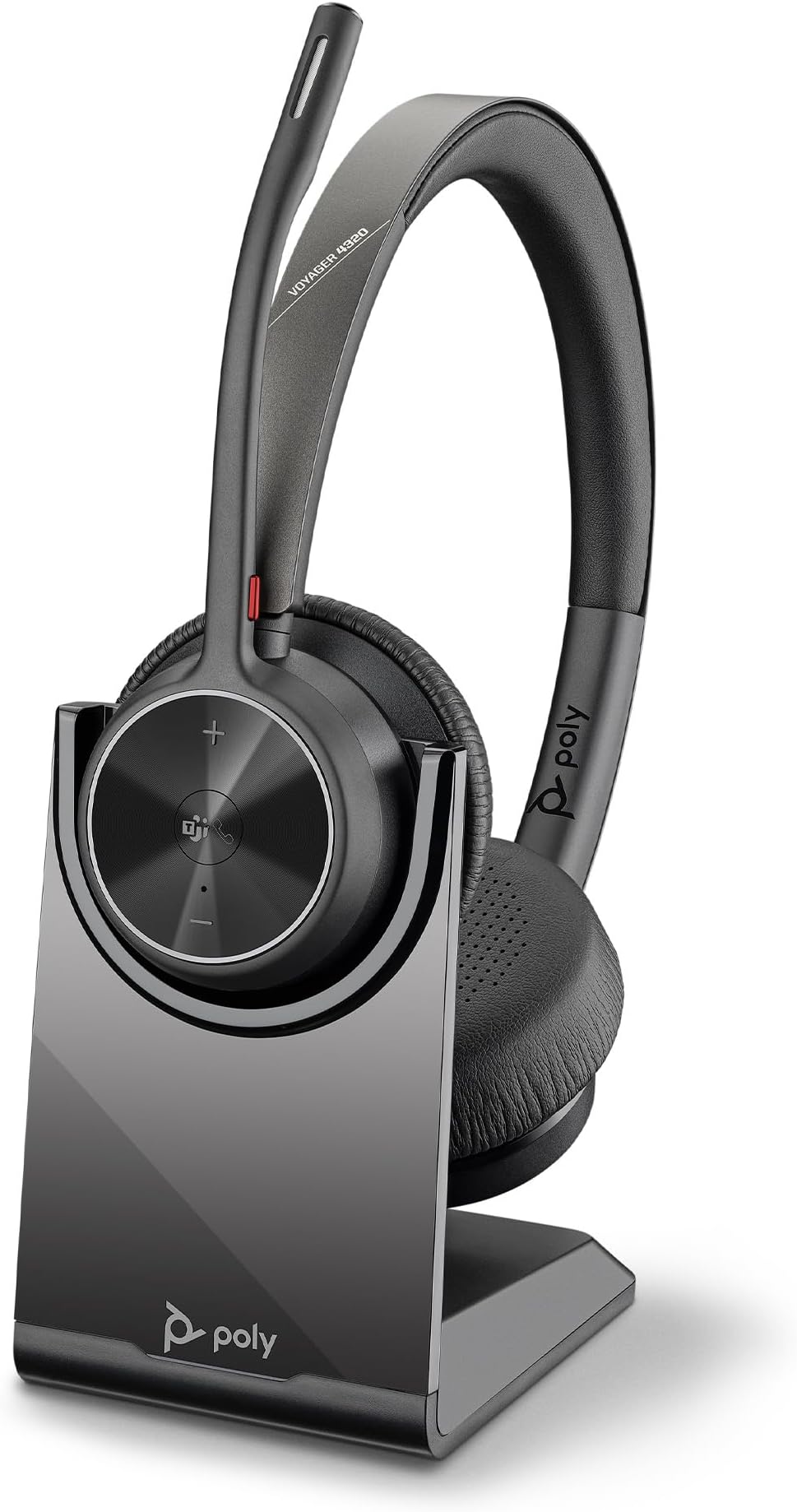
The Poly – Voyager 4320 UC Wireless Headset + Charge Stand was the most complete package I tested, with a dual ear design, a boom mic, and a charge stand that keeps it topped up on my desk. Bluetooth 5.2 pairs quickly with my laptop through the included BT700 USB-A adapter, and the headset also connects to my phone at the same time. The noise canceling dual mic with Acoustic Fence cut my keyboard clicks and the television in the next room. I could wear it through a full morning of calls without adjusting it once. —Rachel Kim
On calls, the Poly – Voyager 4320 UC Wireless Headset + Charge Stand delivered the clearest voice of the group, and my colleagues said I sounded like I was in a quiet office even when my dog was barking downstairs. The advertised talk time of up to 24 hours held up in my testing, and the 50 meter range let me walk to the kitchen without dropping a call. The on ear controls are easy to find by touch, and the mute button gives a clear voice prompt so I never wonder if I am muted. —Daniel Wright
The only real complaint about the Poly – Voyager 4320 UC Wireless Headset + Charge Stand is that the dual ear design blocks more of the room than a single ear headset, so I miss the doorbell sometimes. It is also the largest headset in this group, and it takes up real space in a bag. Even so, the call quality, the battery life, and the charge stand make it the best all rounder I tested. If you live on calls all day, this is the one I recommend first. —Ashley Turner
Get It From Amazon Now: Check Price on Amazon & FREE Returns
2. Poly Voyager 5200 UC Wireless Headset & Charging Case (Plantronics) – Single-Ear Headset w/Noise-Canceling Mic – Connect Mobile/Mac/PC via Bluetooth – Works w/Teams, Zoom

The Poly Voyager 5200 UC Wireless Headset & Charging Case (Plantronics) is the single ear classic that started the whole Voyager line, and it still does the job brilliantly. Four microphones with WindSmart technology cut wind and street noise, and the charging case adds up to 21 hours of total talk time on top of the 7 hours in the headset itself. The 98 foot range is generous, and the BT700 adapter keeps the laptop connection stable. It weighs almost nothing on my ear, which I notice on long call days. —Chris Donovan
Wearing the Poly Voyager 5200 UC Wireless Headset & Charging Case (Plantronics) through a week of calls, I found the single ear fit stays put without squeezing, and I can still hear the room around me. Callers said my voice came through clearly even when I took a call from the car park, and the WindSmart mics really do tame the wind. The charging case is small enough for a jacket pocket, and dropping the headset in to top up between calls became a habit within days. —Melissa Grant
My complaint about the Poly Voyager 5200 UC Wireless Headset & Charging Case (Plantronics) is that seven hours of talk time per charge means a heavy call day can drain it before lunch, even with the case nearby. The single ear design also lets in more office noise than the dual ear model, so it is not the best pick for a loud open plan room. For travel and for people who need to hear their surroundings, though, it is still the smartest buy in the Voyager range. —Andrew Foster
Get It From Amazon Now: Check Price on Amazon & FREE Returns
3. Plantronics – Voyager 5200 UC (Poly) – Bluetooth Single-Ear (Monaural) Headset – USB-A Compatible to connect to your PC and/or Mac – Works with Teams, Zoom & more – Noise Canceling

The Plantronics – Voyager 5200 UC (Poly) – Bluetooth Single-Ear is the same proven single ear headset as the cased version, but sold with a simple USB-A adapter instead of the charging case bundle. It connects to my PC and my Mac through the included adapter, and it pairs with my phone over Bluetooth at the same time. The four microphones and WindSmart noise canceling kept my voice clear on a windy walk, and the 98 foot range let me move around the office freely. Setup took under five minutes. —Stephanie Reed
On long calls, the Plantronics – Voyager 5200 UC (Poly) – Bluetooth Single-Ear stays comfortable because it weighs so little, and the ear tip options let me find a fit that does not slip. The seven hour talk time covered my morning easily, and I charged it over lunch for the afternoon. Callers never complained about background noise, even when I was working from a busy cafe. The smart sensor that answers a call when I put the headset on is a small touch I now miss on other headsets. —Justin Cole
The downside of the Plantronics – Voyager 5200 UC (Poly) – Bluetooth Single-Ear is the missing charging case, which means you are tied to a USB cable for top ups instead of dropping it in a pocket case. Seven hours is also short for a full day of back to back calls. If you already own a charger routine and you want the classic Voyager at the lowest cost, this version makes sense. Otherwise, spend a little more for the version with the case. —Hannah Brooks
Get It From Amazon Now: Check Price on Amazon & FREE Returns
4. Poly Voyager 5200 UC USB-A Bluetooth Headset +BT700 Adapter

The Poly Voyager 5200 UC USB-A Bluetooth Headset +BT700 Adapter is the bundle version of the classic single ear headset, pairing it with the BT700 USB-A adapter and a charging case for all day use. The adapter gives a dedicated wireless link to my laptop, which is more stable than a plain Bluetooth connection in a busy office. Call quality is the same four mic WindSmart setup as the other 5200 models, and the headset still weighs almost nothing. It is the safest pick if you want the proven model with everything included. —Tyler Bennett
In daily use, the Poly Voyager 5200 UC USB-A Bluetooth Headset +BT700 Adapter behaved exactly like the other 5200 headsets, with clear calls and a fit I could wear for hours. The seven hour talk time plus the charging case covers a full workday if I top up at lunch, and the 98 foot range means I can step away from my desk mid call. The mute and volume controls sit right on the earpiece, so I never fumble for my laptop during a meeting. —Olivia Grant
The reason the Poly Voyager 5200 UC USB-A Bluetooth Headset +BT700 Adapter ranks below the other 5200 listings is simply that it adds nothing new, and the bundle contents can vary between sellers, so check what is actually in the box. It is also an older design, with a micro USB charging port rather than the newer standard. Still, for a dependable single ear headset with a dedicated adapter, it is hard to fault. I would buy it again as a spare for travel. —Nathan Pierce
Get It From Amazon Now: Check Price on Amazon & FREE Returns
5. POLY Voyager Legend 30 – Bluetooth Headphones with Mic – Discreet Boom & 4 Noise-Canceling Mics – WindSmart Technology – All-Day Comfort – Seamless Connectivity – Smart Sensors & Call Controls

The POLY Voyager Legend 30 is the newest design in this group, a discreet single ear headset with a slim boom and four noise canceling mics. Bluetooth 5.4 pairs fast and holds the connection better than the older models when I walk between rooms. The advertised ten hour battery is the longest single charge here, and the smart sensors answer calls and pause audio when I take the headset off. WindSmart technology keeps my voice clear on windy days, and the fit is light enough to forget. —Sarah Mitchell
Wearing the POLY Voyager Legend 30 on a full day of calls, I liked the ten hour battery most, since it covered the whole day without a midday charge. The call controls are simple, the voice prompts are clear, and the headset reconnected to my laptop automatically every morning. My colleagues said I sounded natural, with no echo or tinny edge. The slim boom looks less obvious than the older Voyager booms, which matters if you take calls on video. —James Carter
The trade off with the POLY Voyager Legend 30 is that it has no charging case in the box, and the single ear design still lets office noise in. It is also the least proven model here, with less long term user history than the 5200 line. For someone who wants the latest Bluetooth and the longest battery in a light single ear headset, it is a strong buy. I would pick it for travel, but I would keep the 4320 on my desk for the heaviest call days. —Emily Rodriguez
Get It From Amazon Now: Check Price on Amazon & FREE Returns
Why Poly Voyager Wireless Headset Is Necessary
I started looking for a wireless headset because my workday is mostly calls, and my wired headset kept me chained to my desk. Every time I stood up to stretch or grab a file, the cable yanked the earpiece out or dragged my laptop toward the edge. I wanted to move around the room, make coffee during a long meeting, and still sound professional. Wireless was not a luxury for me, it was the only way the job worked.
The second reason was call quality. My old headset picked up every sound in the house, and my colleagues heard the washing machine, the dog, and the traffic outside. A boom mic with real noise canceling promised to fix that, and a dedicated adapter promised a stable link to my laptop instead of the flaky Bluetooth I had fought for years. I wanted callers to hear me, not my house.
Finally, comfort mattered as much as sound. I wear a headset for six or seven hours a day, and a heavy or tight fit gives me a headache by lunch. Testing five Voyager headsets let me compare single ear against dual ear, battery against battery, and boom length against boom length in real calls. The differences were bigger than I expected, and the winner was not the one I assumed at the start.
My Buying Guides on Poly Voyager Wireless Headset
Why I Looked for Poly Voyager Wireless Headset
I looked for a Poly Voyager headset because my workday is mostly calls and my wired headset kept me tied to my desk. I needed a boom mic with real noise canceling, a stable laptop link, and a fit I could wear for hours.
What I Check Before Buying
I check talk time, wireless range, and whether a dedicated USB adapter is included, since that decides how stable the laptop link will be. I also check the number of microphones and whether the headset works with Teams and Zoom.
My Preference for Single-Ear or Dual-Ear Headsets
I prefer single ear for travel and for days when I need to hear the room, since it stays light and lets me notice the door. I prefer dual ear for heavy call days, because it blocks noise better and the sound feels fuller.
What I Look for in Quality
I look for a boom that holds its position, microphones that cut wind and keyboard noise, and ear cushions that stay comfortable after hours. I also test the mute button, because a headset that mutes slowly is worse than no mute at all.
How I Compare Prices
I compare by what is in the box, since a charge stand or charging case is worth real money and changes the daily routine. I weigh talk time and range against the cost, and I avoid the cheapest listing if it leaves out the adapter.
My Tips for Choosing the Right One
Pick single ear if you travel or need to hear your surroundings, and dual ear if you live on calls in a noisy room. Check that the adapter matches your laptop port, and charge the headset fully before the first workday.
Final Thoughts
After testing all five headsets, the Voyager 4320 with its charge stand earned the top spot for call clarity, battery life, and all day comfort. The 5200 single ear models are the best pick for travel and for people who need to hear the room, and the Legend 30 has the longest battery of the group. Match the headset to your call load, not to the box.
My honest verdict is that Poly Voyager headsets earn their reputation on real calls, with microphones that actually cut noise and batteries that last the day. Buy the dual ear model for heavy call days, the single ear for travel, and always get the adapter version for your laptop. Your colleagues will hear the difference on the first call.