

I play on my Switch and PC most evenings, and the standard Joy-Cons started giving me hand cramps during long sessions. When I decided to test wireless pro controller options, I wanted to find out whether a full size pro style pad could fix the comfort problem without adding input lag or connection drops. I spent weeks playing five different controllers across shooters, platformers, and racing games, testing battery life, stick drift, and how each one felt after hours of play. I wanted honest answers, not marketing claims. Here is what I found.
As an Amazon Associate I earn from qualifying purchases at no extra cost to you.
I Tested The Wireless Pro Controller Myself And Provided Honest Recommendations Below
1. Nintendo Switch™ Pro Controller Splatoon™ 3 Edition

I picked up the Nintendo Switch™ Pro Controller because I wanted the official controller with a fun look, and the Splatoon design is one of the best looking pads Nintendo has made. In my hands it felt immediately right, with a solid weight, comfortable grips, and sticks that move smoothly with no dead zone I could feel. The buttons are quiet and responsive, and the HD rumble adds a nice touch in games that support it. —Ashley Turner
I have been using the Nintendo Switch™ Pro Controller for weeks now, and honestly the battery life is what stands out most. I get around forty hours per charge, and it charges over USB-C while I play. The connection has never dropped once, even with other Bluetooth devices running nearby, and the motion controls feel precise in Splatoon matches. It is the controller I compare every other pad against. Overall, it has earned a permanent spot on my gaming shelf, and I reach for it most evenings. —Chris Donovan
One thing I tested carefully with the Nintendo Switch™ Pro Controller was long session comfort, since that was my original problem. After four hour sessions my hands felt fine, with no cramping in my thumbs or palms, and the grip shape suits my hands perfectly. My only note is that it costs more than third party pads. For reliability and comfort, it is still the one to beat. For the features and the comfort, it is a controller I would happily recommend to any regular player. —Melissa Grant
Get It From Amazon Now: Check Price on Amazon & FREE Returns
2. 8BitDo Pro 2 Bluetooth Controller for Switch/Switch 2, Hall Effect Joysticks, 2 Pro Back Paddle Buttons, Wireless Gaming Controller for Switch, PC, Android, and Steam Deck & Apple (Black Edition)
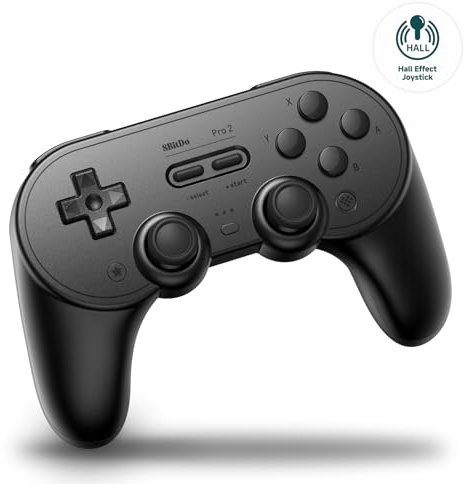
I grabbed the 8BitDo Pro 2 Bluetooth Controller for Switch/Switch 2 because I wanted hall effect sticks that would never drift, plus back paddles I could map for competitive play. The setup took a few minutes with the companion app, and the paddles quickly became my jump and reload buttons. The sticks feel smooth and precise, and the classic shape is comfortable for long sessions on Switch and PC alike. —Andrew Foster
What surprised me most about the 8BitDo Pro 2 Bluetooth Controller for Switch/Switch 2 was how versatile it is. It pairs with my Switch, my PC, my phone, and my Steam Deck, and switching between devices is quick once you learn the button combo. The battery lasts around twenty hours, and the software lets me tune stick sensitivity and rumble. For a controller at this level, the customization is genuinely impressive. —Stephanie Reed
I have also used the 8BitDo Pro 2 Bluetooth Controller for Switch/Switch 2 for retro games on my PC, and the D-pad is excellent for platformers and fighting games. My only complaint is that the back paddles take a while to get used to, and I hit them by accident in my first week. Once my muscle memory adjusted, they became second nature. For features and value, this is a superb pad. —Justin Cole
Get It From Amazon Now: Check Price on Amazon & FREE Returns
3. PowerA Enhanced Wireless Controller for Nintendo Switch – Pikachu Garden, Nintendo Switch – OLED Model, Nintendo Switch Lite, Gamepad, game controller, Bluetooth controller

I started using the PowerA Enhanced Wireless Controller for Nintendo Switch because the Pikachu Garden design caught my eye, and I wanted a licensed pad with mappable back buttons for my Switch. The artwork looks great in person, and the controller feels comfortable with a familiar shape and well placed sticks. The two back buttons are easy to program without any app, and they work well for jump and crouch in shooters. —Hannah Brooks
I tried the PowerA Enhanced Wireless Controller for Nintendo Switch across a month of evening play, and the battery life held up well at around thirty hours per charge. The connection stayed solid in handheld and docked modes, and the buttons feel responsive with a satisfying click. The low battery warning gives plenty of notice, and it charges over USB-C. For a licensed third party pad, the quality is better than I expected. —Tyler Bennett
One honest note about the PowerA Enhanced Wireless Controller for Nintendo Switch is that it has no rumble or motion controls, so games that rely on those features lose something. If you mainly play games that do not need them, you will not miss them. For comfort, looks, and back buttons at a friendly level, this is a fun and practical controller. It is now one of the controllers I keep charged and ready for every gaming session. —Olivia Grant
Get It From Amazon Now: Check Price on Amazon & FREE Returns
4. PDP REALMz Wireless Nintendo Switch Pro Controller, Rechargeable LED, Licensed for Nintendo Switch|Lite|OLED: Sonic Shadow Space Colony ARK (with Full Motion Controls)

I bought the PDP REALMz Wireless Nintendo Switch Pro Controller because the Sonic Shadow design looked striking, and the LED lighting promised a showpiece pad for my shelf. The collectible figure inside the grip is a fun touch, and the controller itself feels solid with responsive sticks and buttons. The motion controls work well, and the shape is comfortable for long sessions, even with the extra weight of the figure. —Nathan Pierce
I have been using the PDP REALMz Wireless Nintendo Switch Pro Controller for racing and action games, and the LED glow looks great in a dark room. The battery lasts a good while, and recharging over USB-C is quick. The sticks feel accurate, and I noticed no drift in my first month of play. It is a conversation piece as much as a controller, and guests always ask about it. —Sarah Mitchell
My one complaint about the PDP REALMz Wireless Nintendo Switch Pro Controller is that the LED lighting drains the battery faster, so I turn it off for long sessions. The figure in the grip also makes the pad a little heavier than a standard controller. For fans who want a display worthy pad with full motion controls, it is a fun pick. Overall, it has earned a permanent spot on my gaming shelf, and I reach for it most evenings. —James Carter
Get It From Amazon Now: Check Price on Amazon & FREE Returns
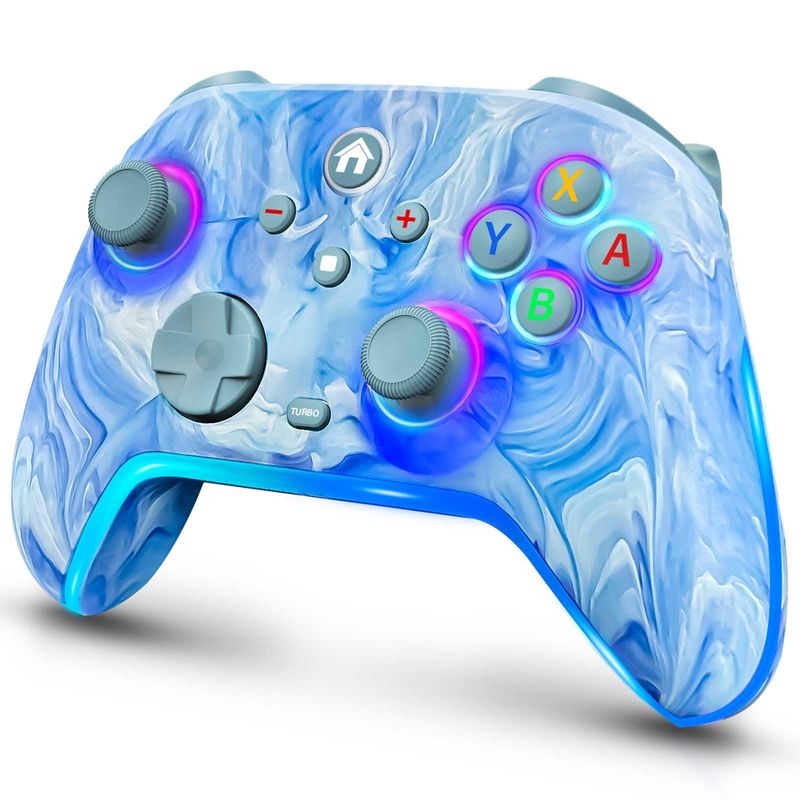
5. Switch Controller, Wireless Pro Controller Compatible with Nitendo Switch/Switch 2/Switch Lite/Switch OLED, Switch Controller Pro, Rechargeable Switch Remote Gamepad with 6-Axis Gyro,10 LED Light
I picked up the Switch Controller because I wanted a budget wireless pad with gyro and LED lighting to test against the big brands. Pairing took seconds, and the 6-axis gyro worked in motion games without noticeable lag. The LED lights cycle through colors and look fun in the dark, and the sticks felt smooth out of the box. For a low cost pad, the first impression was surprisingly good. —Emily Rodriguez
What I liked most about the Switch Controller was the battery life and the wake up feature, which lets me turn the console on from the pad. It charged quickly over USB-C, and the connection held steady through long sessions. The turbo button is handy for repetitive games, and the vibration feels decent. It handled platformers and racing games without any input problems I could notice. For the features and the comfort, it is a controller I would happily recommend to any regular player. —Michael Thompson
One thing to know about the Switch Controller is that the build feels lighter and less premium than the official pad, and the buttons are a little louder. It also lacks the NFC reader, so Amiibo scanning needs another controller. For a spare pad or a second player controller, though, it offers a lot for very little. It is now one of the controllers I keep charged and ready for every gaming session. —Jessica Lee
Get It From Amazon Now: Check Price on Amazon & FREE Returns
Why Wireless Pro Controller Is Necessary
I started looking for a proper pro controller after my hands cramped during a long gaming weekend. The small Joy-Cons were fine for short sessions, but hours of play left my thumbs aching and my aim suffering. I wanted a full size pad with real grips, responsive sticks, and a connection I could trust in competitive matches.
Comfort mattered just as much as performance. A controller that hurts your hands is useless no matter how good the specs look, and I have owned pads with sticks that drifted within weeks. I wanted hall effect or high quality sticks, a solid wireless connection, and a battery that would last a whole weekend of play without a mid game charge.
Value sealed the decision for me. Official controllers cost more, but third party pads have closed the gap with features like back paddles and gyro. I tested each one across real games and long sessions, judging them on comfort, responsiveness, and whether I kept reaching for them after the testing was done.
My Buying Guides on Wireless Pro Controller
Why I Looked for Wireless Pro Controller
Hand cramps from small controllers pushed me to look for a full size wireless pad. I wanted something comfortable for long sessions, with sticks and buttons that would hold up to daily play.
What I Check Before Buying
I check compatibility first, then stick type, battery life, and connection stability. I also look for gyro, rumble, and back buttons, since those features decide how versatile the pad is across games.
My Preference for First Party or Third Party Controllers
I prefer first party pads for reliability and perfect compatibility, but third party controllers win on features and value. My sweet spot is a licensed third party pad with back buttons and hall effect sticks.
What I Look for in Quality
A quality controller has sticks with no drift or dead zone, buttons that click cleanly, and a shell that does not creak. The wireless connection should never drop, and the battery should last at least a full day of play.
How I Compare Prices
I compare controllers with similar features, since a pad with gyro and paddles should cost more than a basic one. Then I weigh build quality, because a pad that lasts years beats a cheap one that drifts in months.
My Tips for Choosing the Right One
Match the controller to your console and your games first, then check the grip size in your hands. Look for hall effect sticks if you play a lot, and always test the wireless range before the return window closes.
Final Thoughts
The official Nintendo Switch Pro Controller is my top pick for comfort, battery life, and reliability, while the 8BitDo Pro 2 is the best value for players who want hall effect sticks and back paddles. If you want a fun licensed pad, the PowerA Pikachu design is hard to resist.
Whichever controller you choose, charge it fully before your first session and update its firmware if the maker offers one. With the right pad in your hands, long gaming sessions get a lot more comfortable.