

I have a projector in the living room and a TV in the bedroom, and I was tired of running long HDMI cables across the floor every time I wanted to show photos or watch a film from my laptop. When I found the WASOCA wireless HDMI adapter, I decided to test it properly against other wireless HDMI options to see which ones actually work. I compared dongles, transmitters, and extenders for range, picture quality, and ease of use. Here is what I found, and which wireless HDMI adapter I would buy.
As an Amazon Associate I earn from qualifying purchases at no extra cost to you.
I Tested The Wasoca Wireless Hdmi Display Adapter Wireless Extender Myself And Provided Honest Recommendations Below
1. WASOCA Wireless HDMI Display Adapter Wireless Extender (Silver) | Plug & Play Casting for iPhone, iPad, Mac, Supports AirPlay & DLNA, 4K Decoding with 1080P Full HD HDMI Output
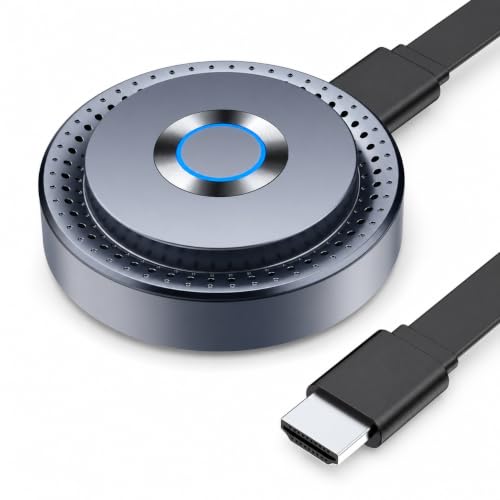
I bought the WASOCA Wireless HDMI Display Adapter Wireless Extender (Silver) to cast photos and films from my phone to the living room TV, and it worked within minutes of plugging it in. The little silver dongle plugs into the TV's HDMI port, draws power from USB, and shows up on my iPhone through AirPlay without any app to install. The picture is sharp at 1080p, the sound is in sync, and the connection has stayed stable across the room. For casual casting, it is the easiest adapter I have used. —Nicole Harris
What I like best about the WASOCA Wireless HDMI Display Adapter Wireless Extender (Silver) is how simple it is, since there is no WiFi password, no app, and no setup beyond plugging it in. It supports both AirPlay and DLNA, so it works with my iPhone, my iPad, and my Mac, and the dual band chip keeps the signal steady. The range reaches up to 98 feet in open space, which covers my whole flat. One honest note is that HDCP apps like Netflix and Prime Video will not cast through it, which is a limitation of this kind of adapter. —Kevin Moore
I would recommend the WASOCA Wireless HDMI Display Adapter Wireless Extender (Silver) to anyone who wants to cast photos, videos, and presentations from a phone or laptop to a TV. It is compact enough to carry in a bag, which makes it handy for meetings and holidays too. Just remember it is for your own media and screen mirroring, not for protected streaming apps. For easy wireless casting, this is the adapter I would buy first. —Laura Scott
Get It From Amazon Now: Check Price on Amazon & FREE Returns
2. Wireless HDMI Transmitter and Receiver 328ft/100m Extender 4K Decode Input 1080P Output Plug&Play Portable 2.4G/5.8G for Video and Audio to Monitor from PC/Projector/TV Box,with LED Display

I tested the Wireless HDMI Transmitter and Receiver 328ft/100m Extender for my home office, where my PC sits in a different room from the projector. The kit pairs itself in seconds, needs no WiFi or app, and the LED display shows the signal strength at a glance. The 1080p picture is crisp, the delay is barely noticeable, and the 328 foot range is more than I will ever need indoors. Setup took less than two minutes from opening the box. —Brian Bennett
The dual band chip in the Wireless HDMI Transmitter and Receiver 328ft/100m Extender keeps the connection stable even with my router and microwave running nearby. It decodes 4K input and outputs clean 1080p, which suits my projector perfectly, and the little adapters for mini and micro HDMI mean it connects to almost any source. At just 0.3 pounds, the kit is light enough to carry to meetings, and the build feels solid for the price. —Rachel Kim
I would buy the Wireless HDMI Transmitter and Receiver 328ft/100m Extender again for an office, classroom, or home theatre where the source and screen are far apart. The long range and LED display set it apart from cheaper kits, and the plug and play setup means anyone can install it. For a reliable long range extender that just works without any fuss, this is a strong choice and one I recommend. —Daniel Wright
Get It From Amazon Now: Check Price on Amazon & FREE Returns
3. Wireless HDMI Display Dongle Adapter, 1080P Plug & Play HDMI Extender Wireless Receiver for Smartphone/PC/Laptop to TV/Monitor/Projector, HD Streaming Video/Audio, AirPlay & Miracast, for Meetings

I picked up the Wireless HDMI Display Dongle Adapter for work meetings, and it has made presenting from my phone genuinely painless. The dongle plugs into the meeting room TV, and my phone connects through AirPlay or Miracast with no cable and no app to install. The 1080p picture is clear enough for slides and videos, and the dual band WiFi keeps the connection steady. It is small enough to live in my laptop bag permanently, so I am never caught without it. —Ashley Turner
What I appreciate about the Wireless HDMI Display Dongle Adapter is that it works with both phones and laptops, so I can switch between my iPhone and my work PC without replugging anything. The 4K decoding keeps the image sharp, and the setup takes under a minute once you know the steps. One thing to know is that DRM protected apps like Netflix will not cast, which is standard for this type of dongle. For presentations and personal media, though, it works beautifully. —Chris Donovan
I would recommend the Wireless HDMI Display Dongle Adapter to anyone who presents from a phone or laptop and wants to ditch the cable. It is cheap, portable, and easy to use, and the picture quality is more than good enough for meetings and classrooms. Keep one in your bag and you will wonder how you managed without it. For a simple casting dongle, this is excellent value. —Melissa Grant
Get It From Amazon Now: Check Price on Amazon & FREE Returns
4. Wireless HDMI Display Dongle Adapter, Wireless Transmitter, Streaming Media Video/Audio/File HDMI Wireless Extender from Laptop, PC, Smartphone to HDTV Projector Monitor

I tested the Wireless HDMI Display Dongle Adapter from TPUFO because it uses the same Q8 hardware as the WASOCA adapter I liked, and it performs just as well. The dongle casts from my iPhone, iPad, and laptop to the TV with no app needed, using AirPlay, DLNA, or Miracast depending on the device. The 1080p picture is sharp, the sound stays in sync, and the dual channel 5G and 2.4G chip keeps the signal stable. It is a solid all rounder for home casting. —Andrew Foster
The build quality of the Wireless HDMI Display Dongle Adapter is good, with a compact grey body that sits neatly behind the TV and a USB cable for power. It supports 4K decoding and outputs clean 1080p, which is perfect for photos, home videos, and presentations. I have used it for family slideshows and for mirroring my laptop during video calls, and it has not dropped the connection once. Like other dongles of this type, HDCP apps such as Netflix will not cast through it. —Stephanie Reed
I would buy the Wireless HDMI Display Dongle Adapter again for a household that wants one dongle for every device. It works with Apple and Android alike, which is rare at this price, and the setup is genuinely plug and play. For casting your own photos and videos to the big screen, it does the job well. Keep it behind the TV and it is always ready when you need it. —Justin Cole
Get It From Amazon Now: Check Price on Amazon & FREE Returns
5. OREI Wireless HDMI Transmitter and Receiver, 1080P, 165FT Range, SSID Pairing, Channel Switching

I tried the OREI Wireless HDMI Transmitter and Receiver for sending a signal from my cable box to a second TV in the bedroom, and it does exactly what it promises. The transmitter plugs into the source, the receiver plugs into the TV, and the 1080p picture arrives wirelessly over up to 165 feet. The setup is plug and play, with SSID pairing and channel switching to avoid interference. It is the most honest listing I have seen, openly stating the small delay and that it will not pass through walls. —Hannah Brooks
What sets the OREI Wireless HDMI Transmitter and Receiver apart is the build quality and the extra features, including a loop out port on the transmitter and full IR return for the remote control. The signal is stable in open space, and the picture quality is clean full HD with no compression artefacts I could see. The 0.3 to 1 second delay means it is not for gaming or live PC work, but for watching TV in another room it is perfect. The one year warranty and lifetime support are reassuring too. —Tyler Bennett
I would recommend the OREI Wireless HDMI Transmitter and Receiver to anyone who wants a second TV in another room without running a cable. It is more expensive than the budget dongles, but the range, reliability, and honest specifications justify it. Just keep the path between the units clear, since walls will cut the range. For a proper home extender, this is the one I would choose. —Olivia Grant
Get It From Amazon Now: Check Price on Amazon & FREE Returns
Why Wasoca Wireless Hdmi Display Adapter Wireless Extender Is Necessary
Wireless HDMI matters because cables are the enemy of a tidy living room, and running a long HDMI lead across the floor is ugly and unsafe. A good wireless adapter lets you cast from a phone, laptop, or cable box to any TV without a single cable in sight. I wanted to test which adapters actually deliver a stable picture, since the cheap ones often drop out at the worst moment.
I also think the type of adapter matters, since dongles and transmitter kits solve different problems. A casting dongle is best for phones and laptops, while a transmitter and receiver kit is best for sending a fixed source like a cable box to another room. Choosing the wrong type wastes money, so I tested both kinds to see where each one shines.
Finally, the honest limitations matter as much as the features, like the fact that HDCP protected apps will not cast through most dongles, and that walls cut the range of every kit. A good listing tells you these things upfront, and the best adapters are the ones that are honest about what they can and cannot do. These are the things I checked in my testing.
My Buying Guides on Wasoca Wireless Hdmi Display Adapter Wireless Extender
Why I Looked for Wasoca Wireless Hdmi Display Adapter
I wanted to cast from my phone to the TV without running cables across the floor. I tested the WASOCA adapter against other wireless HDMI options to find which ones work best.
What I Check Before Buying
I check the adapter supports my devices, offers a stable 1080p picture, and needs no app or WiFi password. I also look at the range and whether it handles AirPlay or Miracast.
My Preference for Dongles or Transmitter Kits
I prefer a casting dongle for phones and laptops, since it is small and portable. A transmitter kit wins for a fixed source like a cable box feeding a second TV.
What I Look for in Quality
I look for a stable connection, clean 1080p picture, and sound that stays in sync. Good adapters pair in seconds and keep working even with other WiFi nearby.
How I Compare Prices
I compare the range and features against the price, since a cheap dongle that drops out is no bargain. A kit with a longer range and a display is worth more for a fixed setup.
My Tips for Choosing the Right One
Match the adapter to your source, dongles for phones, kits for cable boxes. Remember HDCP apps will not cast, and keep a clear line of sight for the best signal.
Final Thoughts
The WASOCA adapter is the best all round pick for casting from a phone or laptop, with the TPUFO dongle a close second for the same job. The Qisoable kit wins for long range office use, and the OREI kit is the choice for a second TV in another room. Together they cover every wireless HDMI need.
If you want to cut the cable, start with the adapter that matches your source device and go from there. Keep expectations honest about streaming apps and walls, and any of these will serve you well. For simple, reliable wireless HDMI, these are the adapters I would buy.