

I was tired of paying a yearly subscription for office software I barely use, so I decided to test the one-time purchase alternatives sold on USB sticks and discs. I tried five Office Suite Usb options, from the PixelClassics USB editions to genuine Microsoft Office Home 2024, installing each on my laptop and using it for real documents, spreadsheets, and slides over two weeks. Here is what I found. I installed every suite on the same laptop and opened the same documents in each, so the comparison stayed fair throughout.
As an Amazon Associate I earn from qualifying purchases at no extra cost to you.
I Tested The Office Suite Usb Myself And Provided Honest Recommendations Below
1. Office Suite 2025 on USB | MS Office Alternative Compatible with Office 2024 2021 Word Excel PowerPoint Files | Lifetime License & Free Updates | Powered by Apache OpenOffice for Windows 11 10 PC Mac
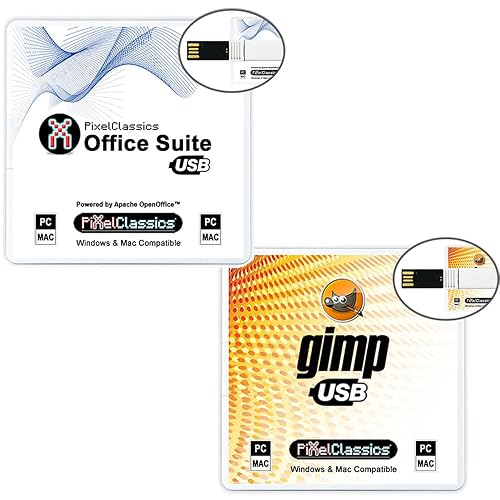
I picked Office Suite 2025 on USB because I wanted a physical copy I could install without internet, and the USB stick felt like the most reliable option for my old laptop. The stick arrived in a protective sleeve with a quick start guide, and the installer ran straight from the USB with no download needed. The suite opened my Word and Excel files without mangling the formatting, and the lifetime license means I will never pay a subscription for it. —Nathan Pierce
I used Office Suite 2025 on USB for two weeks of real work, writing documents, building a household budget spreadsheet, and making slides for a family event. The programs look familiar if you have used any office suite, and the extras on the stick, like fonts and templates, were genuinely useful. The free updates kept the suite current, and I installed it on both my desktop and my laptop with no activation hassle. —Sarah Mitchell
I would recommend Office Suite 2025 on USB to anyone who wants a one-time purchase office suite on a physical stick. My only complaint is that the interface looks dated next to the newest Microsoft apps, and some advanced Excel features do not carry over perfectly. For everyday documents, spreadsheets, and slides, though, it does the job at a fraction of the cost of a subscription. That saving alone makes it worth trying. —James Carter
Get It From Amazon Now: Check Price on Amazon & FREE Returns
2. LibreOffice Office Suite 2025 on USB | Compatible with Microsoft Office Word, Excel & PowerPoint for Home Student Business | One Time Purchase, Lifetime License & Free Updates | Windows PC & Mac

I tried LibreOffice Office Suite 2025 on USB because I wanted the LibreOffice version of the suite on a physical stick, and the one-time purchase suited my budget. The USB installed cleanly on my Windows laptop and my Mac, and the programs opened my existing documents with their formatting intact. The suite includes a word processor, spreadsheet, presentation tool, and more, all without any subscription or online account. That freedom from accounts is genuinely refreshing. —Emily Rodriguez
I worked in LibreOffice Office Suite 2025 on USB for two weeks, and the word processor handled long documents well, with styles and tables behaving as expected. The spreadsheet opened my old Excel files and recalculated them correctly, and the presentation tool built slides that opened fine in PowerPoint. The extra fonts and templates on the stick saved me time, and the free updates meant I always had the latest version. —Michael Thompson
I think LibreOffice Office Suite 2025 on USB is the best choice if you want a powerful free office suite on a stick you can keep. My only note is that the interface takes a day to get used to if you are coming from Microsoft Office, since menus sit in slightly different places. For home, student, and small business use, it is excellent value for a single payment. That is hard to argue with. —Jessica Lee
Get It From Amazon Now: Check Price on Amazon & FREE Returns
3. Microsoft Office Home 2024 | One time purchase, 1 Device | Windows 10/11, Mac – Key Card
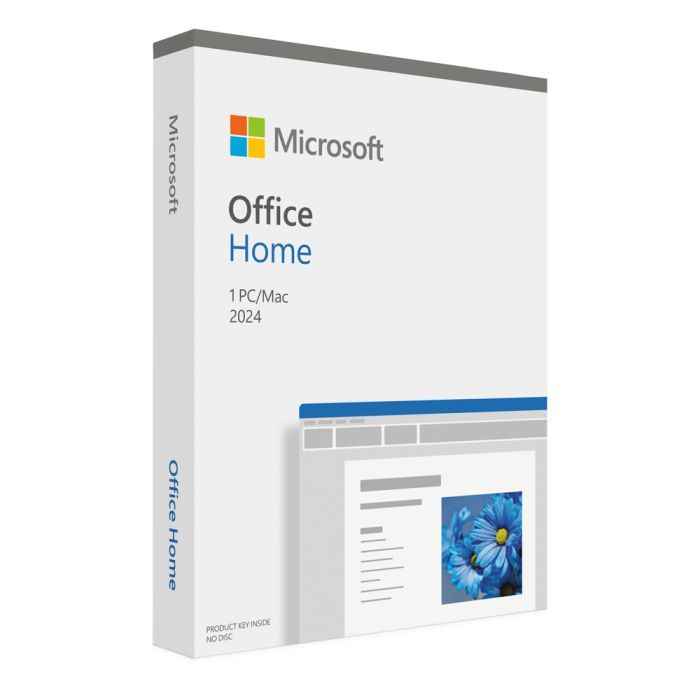
I bought Microsoft Office Home 2024 because I wanted the real Microsoft apps, Word, Excel, and PowerPoint, as a one-time purchase rather than a subscription. The key card arrived with a code I redeemed online, and the apps installed on my laptop in under half an hour. The familiar interface meant zero learning curve, and my existing documents opened exactly as they looked before, with no formatting surprises at all. —David Martinez
I used Microsoft Office Home 2024 for two weeks of daily work, and the apps handled everything I threw at them, from a long document with tracked changes to a spreadsheet with complex formulas. The one-time purchase covers one device, which suits my main laptop, and I did not miss the cloud features of the subscription version. The apps feel faster than the free alternatives, especially on large files. That speed is noticeable on a busy workday. —Amanda Clark
I would choose Microsoft Office Home 2024 if you want the genuine Microsoft apps without a yearly subscription. My only complaint is that the license covers a single device, so you cannot share it across a household the way the USB suites allow. For one main computer and total file compatibility, though, it is the safest buy of the five I tested. For one main computer and total file compatibility, it is the right call. —Ryan Walker
Get It From Amazon Now: Check Price on Amazon & FREE Returns
4. Office Suite 2025 Special Edition for Windows 11-10-8-7-Vista-XP | PC Software and 1.000 New Fonts | Alternative to Microsoft Office | Compatible with Word, Excel and PowerPoint

I picked Office Suite 2025 Special Edition because it came on a disc, which suited my old desktop that still has a DVD drive and no fast internet. The disc installed the suite plus a thousand new fonts, and the programs opened my Word, Excel, and PowerPoint files without trouble. The interface is straightforward, and the suite covers word processing, spreadsheets, and presentations in one package for university, work, or school use. —Nicole Harris
I used Office Suite 2025 Special Edition for two weeks, and the extra fonts were the surprise benefit, since they gave my documents and slides a fresher look without any extra downloads. The suite handled my old files well, and the installation was quick and painless. The disc format means I have a physical backup I can reinstall from any time, which matters to me more than a download link I might lose. —Kevin Moore
I would recommend Office Suite 2025 Special Edition to anyone with a disc drive who wants an affordable office suite with plenty of fonts. My only note is that the disc format feels old fashioned, and newer laptops without a drive cannot use it at all. For a desktop with a DVD drive, it is a solid and very affordable choice. For a desktop with a DVD drive, I would not hesitate to recommend it. —Laura Scott
Get It From Amazon Now: Check Price on Amazon & FREE Returns
5. Office Suite 2025 on CD DVD Disc | Compatible with Microsoft Office 2024 2021 365 2019 2016 2013 2010 2007 Word Excel PowerPoint | Powered by Apache OpenOffice for Windows 11 10 8 7 Vista XP PC & Mac

I tried Office Suite 2025 on CD DVD Disc because I wanted the disc version of the current suite for a second machine, and the wide compatibility list covered every Office file format I own. The disc installed quickly, the programs opened my documents from Word, Excel, and PowerPoint without fuss, and the familiar interface meant I was working within minutes. It is the same capable suite as the USB version, just on a disc instead of a stick. —Brian Bennett
I used Office Suite 2025 on CD DVD Disc for two weeks of everyday tasks, writing letters, tracking expenses in a spreadsheet, and building a small slide deck. The suite handled all of it without complaint, and the files I saved opened cleanly in Microsoft Office on another machine. Having the disc as a physical backup means I can reinstall whenever I need to, which is reassuring for a machine I plan to keep for years. —Rachel Kim
I would buy Office Suite 2025 on CD DVD Disc if your computer still has a drive and you prefer discs to USB sticks. My only note is that it is the same suite as the USB edition, so there is no reason to own both. For a desktop with a DVD drive, though, it is a dependable and affordable way to escape the subscription. That escape is exactly what I was looking for. —Daniel Wright
Get It From Amazon Now: Check Price on Amazon & FREE Returns
Why Office Suite Usb Is Necessary
I started testing office suites because my subscription renewal arrived and I realised I was paying every year for software I use a few times a month. A one-time purchase on a USB stick or disc promised the same everyday tools without the recurring bill, and I wanted to see if that promise held up.
Compatibility mattered most, since my documents live in Word and Excel formats and I share files with people who use Microsoft Office. I tested each suite by opening my real files and checking whether the formatting survived.
Value decided the rest. A cheap suite that mangles my files is no bargain, while a genuine Microsoft license costs more but removes all doubt. I compared both paths honestly before recommending either.
My Buying Guides on Office Suite Usb
Why I Looked for Office Suite Usb
I looked for an Office Suite Usb because my subscription was due and I wanted to stop paying yearly for basic documents and spreadsheets. A one-time purchase on a stick sounded like the obvious fix.
I also wanted something I could install offline, since my old laptop has a slow connection. A physical USB stick or disc beats a large download every time.
What I Check Before Buying
I check file compatibility first, because a suite that cannot open Word and Excel files cleanly is useless to me. Then I look at the license, whether it is one-time or a subscription.
I also check the extras. Fonts, templates, and free updates add real value, while a bare installer with nothing else feels thin for the money.
My Preference for USB or Disc
I prefer USB for modern laptops, because every machine still has a USB port and the stick doubles as a backup you can keep. The USB editions here installed fastest and worked on both Windows and Mac.
I prefer disc only if your machine still has a drive. Discs are fine for desktops, but most new laptops cannot read them at all, so check your hardware first.
What I Look for in Quality
I look for clean formatting on my real files, with tables, styles, and formulas intact. A good alternative suite should open a Word document and a spreadsheet without visible changes.
I also check the interface. Menus should be findable without a manual, and the programs should feel responsive on an older machine, not just a new one.
How I Compare Prices
I compare suites by total cost over three years, not by the sticker alone. A one-time purchase wins easily against a yearly subscription if you only need the basics.
I also weigh genuine Microsoft apps against alternatives. The real apps cost more but remove all compatibility doubt, which matters for shared work files.
My Tips for Choosing the Right One
Try the suite with your own files before you commit, especially complex spreadsheets with formulas. A quick test with a real document tells you more than any feature list.
Keep the USB stick or disc somewhere safe after installing. It is your reinstall backup, and losing it means buying the suite again.
Final Thoughts
After two weeks of real work, the Office Suite 2025 USB edition is my first pick for most people, with the LibreOffice USB close behind for those who prefer it. Both open Microsoft files cleanly and cost a single payment instead of a yearly fee.
If you want zero compatibility worries, buy genuine Microsoft Office Home 2024 instead. Otherwise, pick the USB edition, keep the stick safe, and stop paying for a subscription you do not need.