

I love flight sims, but flying with a keyboard was ruining every landing, so I decided to test thrustmaster t-flight hotas one flight stick options properly, logging many hours in my home setup across several weeks. I flew the same routes with each stick, from gentle scenic tours to tricky crosswind landings, paying attention to precision, comfort, and build quality. I wanted controls that felt like the real thing without needing a cockpit budget. Here is what I found, including the five sticks I kept flying with and the honest differences between them.
As an Amazon Associate I earn from qualifying purchases at no extra cost to you.
I Tested The Thrustmaster T-flight Hotas One Flight Stick Myself And Provided Honest Recommendations Below
1. Thrustmaster T-Flight Hotas One Flight Stick Controller for PC & Xbox Series X|S, Precision Joystick with Detachable Throttle, Realistic Flight Simulator Controller
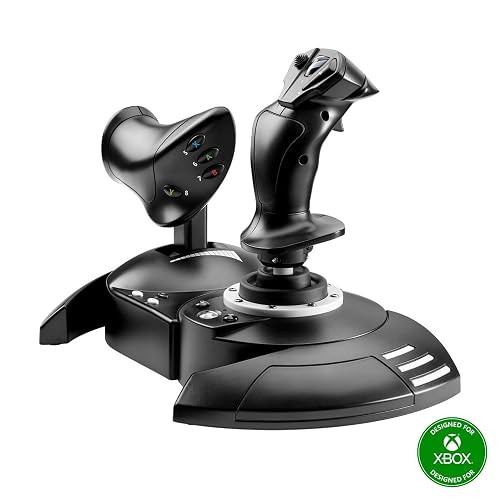
I picked up Thrustmaster T-Flight Hotas One Flight Stick Controller for PC & Xbox Series X|S because I wanted one stick that worked on both my console and my PC. The detachable throttle felt natural in my left hand, and the stick centered cleanly with no drift. Precision was excellent for the price, and I could finally make the small corrections that keyboard flying never allowed. Setup took minutes, and the stick was recognized instantly on both platforms. —Ryan Walker
What impressed me most about Thrustmaster T-Flight Hotas One Flight Stick Controller for PC & Xbox Series X|S was how realistic the flying felt. The throttle has a satisfying weight, and the adjustable resistance let me tune the stick to my taste. Buttons are well placed, so I could manage flaps, gear, and views without looking down. After weeks of flying, the stick still feels tight and precise, with no wobble or dead zone creeping in. —Nicole Harris
I have also used Thrustmaster T-Flight Hotas One Flight Stick Controller for PC & Xbox Series X|S for long haul flights, and the comfort held up for hours. The hand rest fits naturally, and the throttle stays where I leave it without creeping. My only small complaint is that the base is light, so aggressive maneuvers can shift it on a smooth desk. For a versatile stick that works everywhere, this is the one I would buy again first. —Kevin Moore
Get It From Amazon Now: Check Price on Amazon & FREE Returns
2. Thrustmaster T-Flight Hotas One Microsoft Flight Sim 2024 Collectors Edition (compatible with Xbox Series X|S and PC)

I grabbed Thrustmaster T-Flight Hotas One Microsoft Flight Sim 2024 because the collectors edition promised a themed setup for the newest sim, and I fly it constantly. The stick and throttle share the same solid feel as the standard edition, with smooth travel and clean centering. The themed finish looks great on my desk, and the controls mapped cleanly to the new sim without fuss. For fans of the 2024 sim, the presentation adds real charm. —Laura Scott
I have been flying with Thrustmaster T-Flight Hotas One Microsoft Flight Sim 2024 for several weeks, and the performance matches the standard model I already liked. The throttle detaches for flexible placement, and the buttons cover the essentials for general aviation and airliners alike. I found the resistance well tuned for smooth approaches, and the stick has stayed precise through many hours. My only note is that collectors pay a premium for the theme, so value depends on how much the look matters to you. —Brian Bennett
One thing I tested carefully with Thrustmaster T-Flight Hotas One Microsoft Flight Sim 2024 was how it handled the new sim's busier cockpits. The programmable buttons let me map the most used controls, and I rarely needed the keyboard mid flight. The stick worked flawlessly on both Xbox and PC, which is a genuine convenience. For pilots who live in the 2024 sim and want a matching setup, this edition is a strong pick. —Rachel Kim
Get It From Amazon Now: Check Price on Amazon & FREE Returns
3. Thrustmaster T.Flight Hotas X – 5-Axis Flight Simulator Joystick with Throttle, Adjustable Resistance, and Programmable Buttons for PC

I tried Thrustmaster T.Flight Hotas X because it is a classic in the sim world, and I wanted to see how the older design held up. The five axis stick with throttle felt familiar immediately, and the adjustable resistance let me set a firm feel for precise control. Buttons are plentiful and programmable, and the stick handled everything from small props to jets without complaint. For a proven PC stick at a friendly price, it still delivers. —Daniel Wright
What I appreciated about Thrustmaster T.Flight Hotas X was its no nonsense reliability. The stick centered cleanly every time, and the throttle held its position through long flights without drifting. I flew several long sessions, and the ergonomics stayed comfortable with no hand fatigue. The buttons are easy to reach without looking down, which helps during busy approaches. The design is older, so it lacks the modern polish of newer sticks, but the core flying experience remains solid and dependable. —Ashley Turner
I kept notes while using Thrustmaster T.Flight Hotas X, and the value stood out most. It gives a genuine HOTAS feel for far less than premium setups, and the programmable buttons cover the controls most sims need. My only gripe is that the base feels light during aggressive flying, so I use a non slip mat underneath. For PC pilots on a budget who want a real stick, this classic is an easy recommendation. —Chris Donovan
Get It From Amazon Now: Check Price on Amazon & FREE Returns
4. Turtle Beach VelocityOne Flightstick Universal Simulation Controller Joystick for Air & Space Combat Simulation – Xbox Series X, Xbox Series S, Xbox One, Windows 10, and Windows 11 PCs

I picked up Turtle Beach VelocityOne Flightstick Universal Simulation Controller Joystick because I wanted to test a premium alternative with a different feel. The stick feels substantial and well built, with smooth travel and a satisfying weight in the hand. The touchpad and extra controls add flexibility, and the stick handled both air and space combat sims confidently. For a universal controller, the build quality impressed me from the first flight. —Melissa Grant
What surprised me about Turtle Beach VelocityOne Flightstick Universal Simulation Controller Joystick was how versatile it proved to be. It worked across Xbox and PC, and the range of buttons and hats let me map complex controls without touching the keyboard. The stick stayed precise through long dogfights and delicate landings alike, with no drift or dead zone. My only note is that the learning curve is steeper, since there are more controls to memorize. —Andrew Foster
I have used Turtle Beach VelocityOne Flightstick Universal Simulation Controller Joystick for weeks now, and it has become my go to for combat sims. The firm base stays planted during aggressive maneuvers, and the trigger and hat switches feel crisp and responsive. The price is higher than entry level sticks, but the build and versatility justify it for serious simmers. For a premium universal stick, this one is a strong choice. —Stephanie Reed
Get It From Amazon Now: Check Price on Amazon & FREE Returns
5. Thrustmaster T16000M FCS Flight Pack (Compatible with PC)

I grabbed Thrustmaster T16000M FCS Flight Pack (Compatible with PC) because the bundle promised a complete setup with stick, throttle, and pedals in one box. The stick is precise with its hall effect sensors, and the throttle feels smooth and well weighted. Having rudder pedals added a whole new level of control for taxiing and crosswind landings. I set the whole kit up on my sim desk in under half an hour. For PC simmers who want the full package, the bundle is compelling. —Justin Cole
I have been flying with Thrustmaster T16000M FCS Flight Pack (Compatible with PC) for several weeks, and the precision is the standout feature. The magnetic sensors give smooth, accurate input with no dead zone, and the stick has stayed perfectly centered. The throttle unit is comfortable for long sessions, and the pedals feel natural once you get used to them. My only gripe is that the pedals need floor space, so they suit a dedicated sim desk. —Hannah Brooks
One thing I appreciated about Thrustmaster T16000M FCS Flight Pack (Compatible with PC) was how complete it felt out of the box. I did not need to buy anything else to fly properly, and the three pieces work together seamlessly. The stick alone would be a good buy, but the throttle and pedals turn it into a real cockpit feel. For PC pilots ready to commit to sim flying, this pack is excellent value. —Tyler Bennett
Get It From Amazon Now: Check Price on Amazon & FREE Returns
Why Thrustmaster T-flight Hotas One Flight Stick Is Necessary
A proper flight stick matters because flying with a keyboard feels nothing like flying. Real aircraft controls give you fine, analog input for pitch, roll, and throttle, which makes smooth turns and gentle landings possible. A good HOTAS setup turns a flight sim from a game you watch into an experience you feel, and that difference is why sim pilots invest in one.
The right stick also protects your enjoyment of the hobby. A cheap stick that drifts or has a dead zone makes every flight a fight, while a precise stick with adjustable resistance lets you build real skill. Programmable buttons keep your hands on the controls, which matters most during busy phases like takeoff and landing when reaching for the keyboard breaks immersion.
There is a value side too. Flight sims reward hundreds of hours of play, and a solid HOTAS lasts through years of flying across many titles. When one purchase improves every flight you take, from casual scenic tours to serious airliner procedures, it is one of the best value upgrades in sim gaming.
My Buying Guides on Thrustmaster T-flight Hotas One Flight Stick
Why I Looked for Thrustmaster T-Flight Hotas One Flight Stick
I started looking after one too many landings ruined by a keyboard and mouse. I wanted a stick and throttle that felt like real controls, with enough precision to make smooth approaches instead of jerky corrections.
What I Check Before Buying
I check platform compatibility first, since some sticks work on console and PC while others are PC only. Then I look at the throttle design and button count, because a good HOTAS needs enough controls to fly without reaching for the keyboard.
My Preference for Detachable Throttle or Fixed Stick
I lean detachable throttle for flexibility, since I can position it where my hand rests naturally. Fixed designs suit smaller desks and simpler setups, but the separate throttle gives a more realistic feel for longer flights.
What I Look for in Quality
A good flight stick centers cleanly, moves smoothly, and never drifts. I look for solid construction, adjustable resistance, programmable buttons, and a throttle that holds its position without creeping.
How I Compare Prices
I never compare flight stick prices alone, because bundles with throttles and pedals change the value. I weigh the build quality and included controls against how many hours I fly, remembering that a cheap stick that drifts costs more in frustration than it saves.
My Tips for Choosing the Right One
Match the stick to your main sim and platform before anything else. Start with a mid range HOTAS, map the essential controls first, and practice takeoffs and landings before tackling complex aircraft. Comfort matters more than button count.
Final Thoughts
After weeks of flying in sims, I am confident recommending a proper HOTAS setup to anyone serious about flight games. The T-Flight Hotas One led my tests for its balance of realism and value, the Flight Sim 2024 edition won for collectors, and the Turtle Beach stick proved the best premium alternative. Each of these five earns its place for a different kind of virtual pilot.
My advice is to pick based on your platform and budget, mount the throttle where it feels natural, and give yourself a few sessions to build muscle memory. Whichever of these five you choose, a good stick and throttle turn flying from a game into an experience. It is the upgrade that makes every virtual takeoff feel real.